
Today, whether you’re a content creator on TikTok, YouTube, or even a professional videographer, choosing the right video editing software is crucial. Two names often come up: CapCut , the free and incredibly accessible tool, and Adobe Premiere Pro , the industry standard for professionals for years. But which one is really right for you? Simplicity or power? Free or monthly subscription?
This article compares CapCut and Premiere Pro point by point to help you choose the tool that best suits your needs.
A quick overview of the two software programs
What is CapCut?
CapCut is a video editing software developed by ByteDance (the parent company of TikTok). Initially conceived as a mobile app, it quickly won over content creators thanks to its intuitive interface, numerous effects, and above all… its free availability. Today, CapCut also exists as a desktop version, allowing you to edit your videos directly from your computer.
👉 You can download CapCut here .
What is Adobe Premiere Pro?
Premiere Pro is practically a must-have for professional video editing. Used in film, television, and by thousands of independent creators, it’s part of the Adobe Creative Cloud suite. It’s an incredibly comprehensive piece of software, but it requires a significant learning curve and a paid subscription to fully utilize its capabilities.


Interface and ease of use
One of the first criteria that differentiates CapCut from Premiere Pro is ease of use .
- CapCut : from the first time you open it, everything is clear and fast. You can add videos, cut them, add music, automatic subtitles, or transitions in just a few clicks. Ideal for getting started without any hassle.
- Premiere Pro : much more complex, with a tool-rich interface and menus. It’s powerful, but it can be daunting for a beginner. On the other hand, for an experienced editor, it’s a true Swiss Army knife.
Main features
Basic assembly and speed
CapCut lets you quickly cut, paste, and assemble video clips. Perfect for short formats (Reels, Shorts, TikTok). Premiere Pro offers more precise control, ideal for longer or complex projects.
Effects, transitions and templates
CapCut relies on pre-made templates and stylish, ready-to-use effects. It’s great for quickly boosting a video. Premiere Pro, on the other hand, offers a library of professional effects and, above all, the ability to extensively customize your transitions and animations.
Audio editing and automatic subtitles
CapCut has integrated automatic subtitles (very handy for TikTok and YouTube). The audio is easy to adjust but remains basic. Premiere Pro, on the other hand, offers true multitrack audio editing, compatible with Adobe Audition.
Collaboration and integration with other software
Premiere Pro has the edge here: it integrates seamlessly with After Effects, Photoshop, and Audition. It’s an ecosystem designed for professionals. CapCut remains more limited, but compensates with its simplicity and cloud-based functionality, allowing users to work on mobile and PC.

Performance and compatibility
- CapCut : lightweight, works on smartphones and PCs without requiring a high-powered machine.
- Premiere Pro : very demanding, especially with 4K/8K videos. You need a powerful computer to work comfortably.
In terms of formats, Premiere Pro supports almost everything, while CapCut remains more limited, but largely sufficient for common uses (MP4, MOV, etc.).

Price and accessibility
- CapCut : totally free, with a CapCut Pro option to unlock more effects and tools (very affordable prices).
- Premiere Pro : subscription at around €23/month (or via the Adobe Creative Cloud package which costs more). In the long run, it’s a real expense.
For what type of user?
- CapCut is perfect if you are a beginner, if you create videos for TikTok, Instagram or YouTube, or if you are looking for a free and effective tool.
- Premiere Pro is aimed at those who want a professional solution : videographers, freelance editors, or anyone who needs to work on complex projects.
CapCut vs Adobe Premiere Pro: Comparison Chart
| Criterion | CapCut | Adobe Premiere Pro |
|---|---|---|
| Price | Free (+ affordable Pro version) | Monthly subscription (~€23/month) |
| Ease of use | Very simple, ideal for beginners | More complex, for advanced users |
| Platforms | Mobile + Desktop | Desktop only |
| Effects/Transitions | Stylish and quick templates | Complete professional effects |
| Audio | Basic + automatic subtitles | Multitrack, Audition compatible |
| Compatibility | Common formats (MP4, MOV) | Wide range of professional formats |
| Target audience | Beginners, social creators | Professionals, experienced videographers |
Possible alternatives
If you are still hesitating, be aware that other options exist:
- DaVinci Resolve : a mix between free and pro, with a full version that is already very powerful.
- Final Cut Pro : for Mac users, fast and efficient.
- Filmora : simple, fun, accessible like CapCut, but on a computer.

Final verdict: which software to choose?
In a nutshell:
- Looking for a free, simple, efficient and fast tool for your social videos? → CapCut is perfect.
- You need a complete software, with pro features and maximum compatibility → Premiere Pro is the logical choice.
👉 Personally, if you are a beginner or if you are looking for a quick and fun tool, I advise you to try CapCut now: Try CapCut for free here .
FAQ
Is CapCut really free?
Yes, and that’s one of its major strengths. You can use all the basic functions without paying anything.
Is Adobe Premiere Pro worth its price?
If you use it professionally or intensively, yes. Otherwise, for occasional use, it’s expensive.
Can you create professional-quality edits with CapCut?
Yes, especially for social media. But for film or complex projects, Premiere Pro remains more suitable.
CapCut or Premiere Pro for YouTube?
If you’re a beginner, CapCut is more than enough. If you want highly personalized and professional content, Premiere Pro will be more flexible.
Publications similaires :
 CapCut PC – The Complete Guide to Editing Your Videos on Your Computer
 CapCut Pro APK: Is it legal, what are the risks and what are the alternatives?
 Best CapCut templates in 2025: which ones are actually useful?
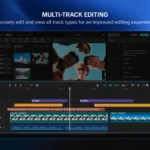 CapCut Pad Pro on iPad: professional video editing, finally designed for mobile creators
-1-150x150.avif)




Leave a Reply