
Finding the serial number of your Antigravity A1 may seem simple… until the moment you really need it.
Activation, warranty, after-sales service, Antigravity Care, drone identification, device pairing: the serial number, also called SN or Serial Number , is essential information. However, it’s not always easy to know where to find it, especially if you’ve just received your drone or if you no longer have the box handy.
In this article, I simply explain where to find the serial number of the Antigravity A1 , but also that of the Vision Goggles, the Motion Controller and related accessories.
What is the purpose of the Antigravity A1 ‘s serial number?
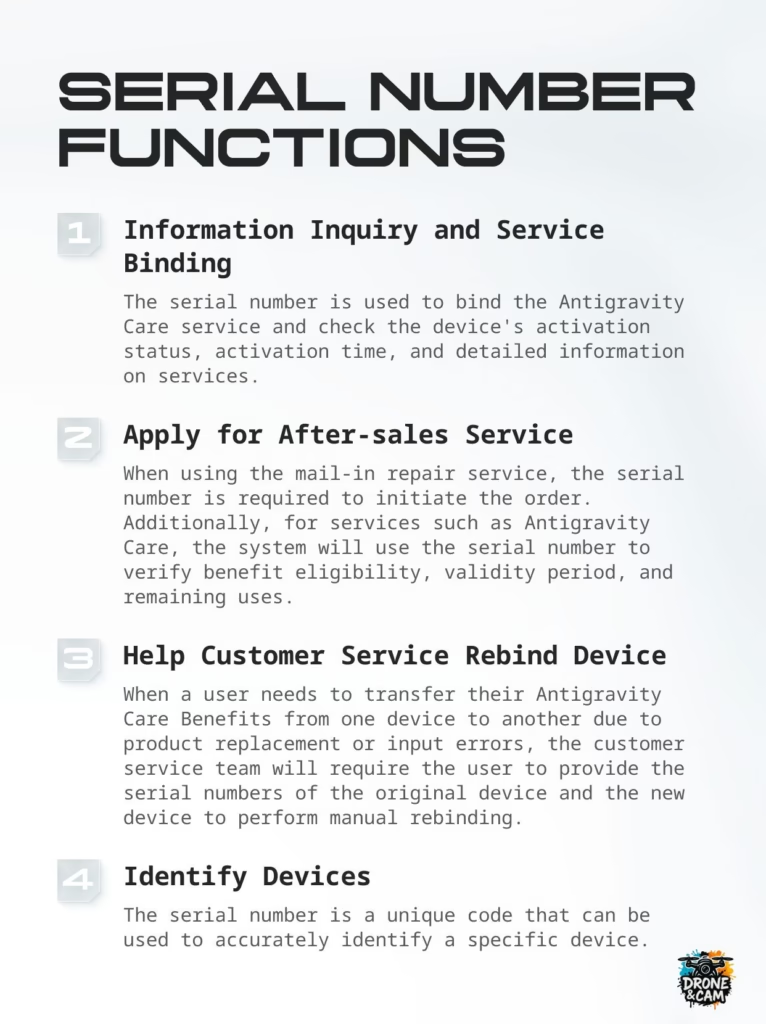
The Antigravity A1 ‘s serial number is a unique identifier. It allows you to precisely link your drone to your account, after-sales service, and any Antigravity Care warranties or services.
In practical terms, it can be used to:
- check the drone’s activation status;
- link your device to your Antigravity account;
- request after-sales service support;
- check eligibility for Antigravity Care;
- Identify your drone precisely in case of replacement;
- help customer support locate your device.
This is therefore information to keep carefully from the moment of unpacking.
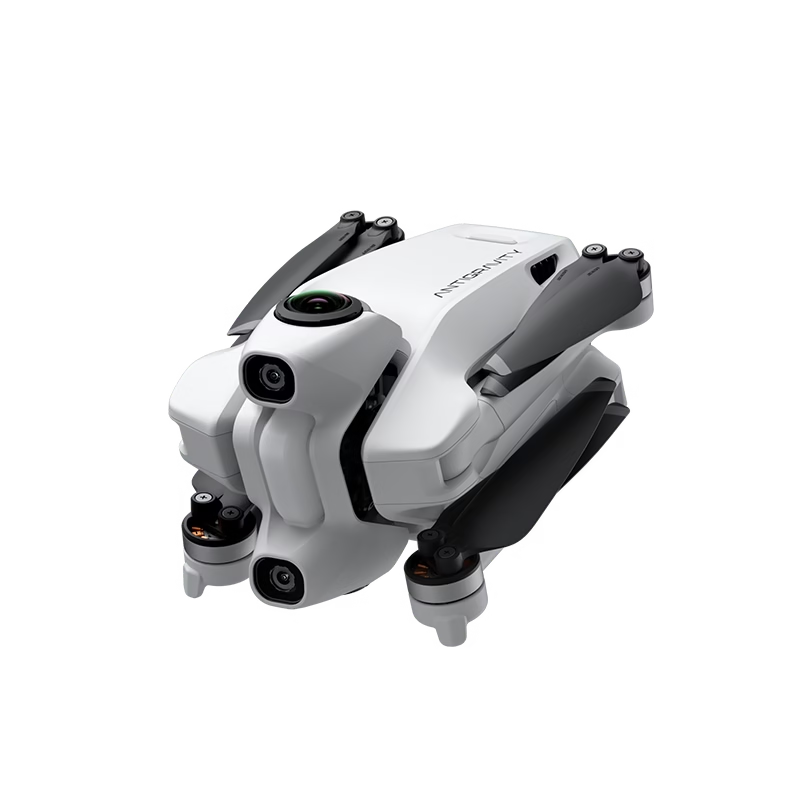
Where can I find the serial number of the Antigravity A1 drone?
There are several methods to find your drone’s serial number. The good news is that you don’t necessarily need to have all your devices turned on to find it.
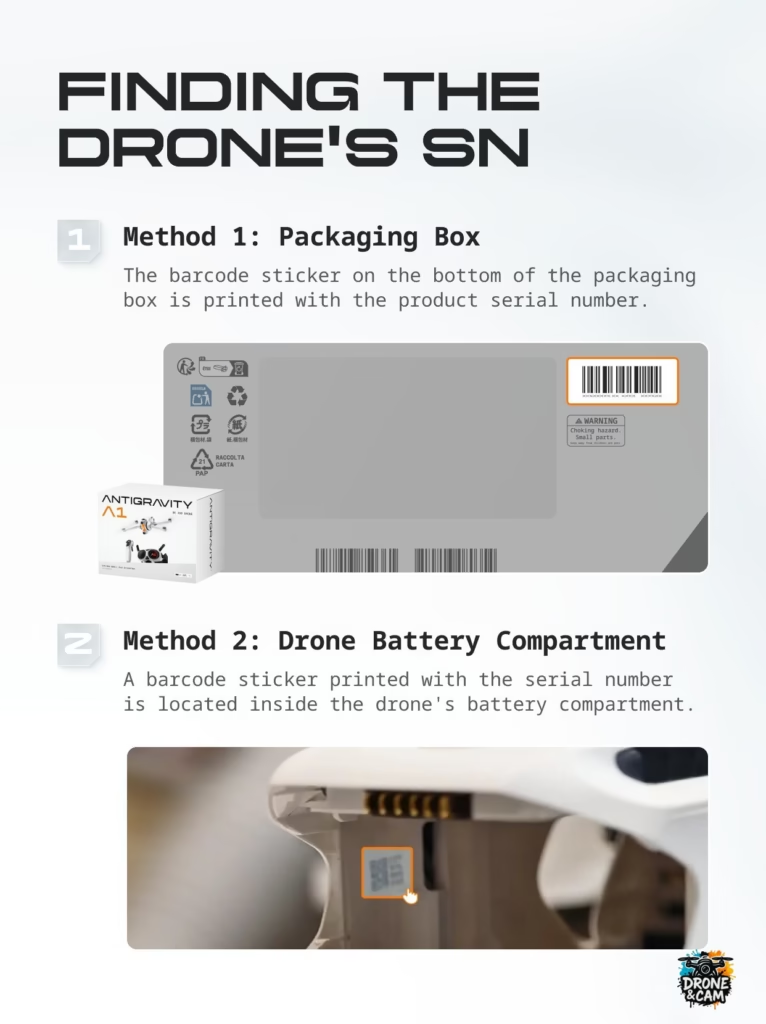
Method 1: Find the serial number on the drone’s box
The simplest method is to look directly at the original box of the Antigravity A1 .
The serial number is usually printed on a barcode label located on the bottom or side of the packaging. This is often the quickest method if you’ve just received your drone and still have the box.
My advice: before even throwing away or storing the packaging, take a clear photo of the label. This can save you from having to dig it out again later if you need to make a customer service request or activate the product.
Method 2: Find the serial number in the battery compartment
If you no longer have the box, don’t panic.
You can also find the serial number directly in the drone’s battery compartment. To do this, simply remove the battery from the Antigravity A1 . A barcode label with the serial number is located inside the compartment.
This is a very practical method, especially if you are already in the field or if you need to quickly communicate your serial number to support.
Warning: Always turn off the drone before removing the battery. This is a simple but important rule to avoid any hardware problems.
Where can I find the serial number for the Vision Goggles and the Motion Controller?
The Antigravity A1 does not work alone. It is used in conjunction with the Vision Goggles and the Motion Controller. These devices also have their own serial number.
This is important because, depending on the request, Antigravity support may ask you for the serial number of the drone, goggles, controller, or even the battery.
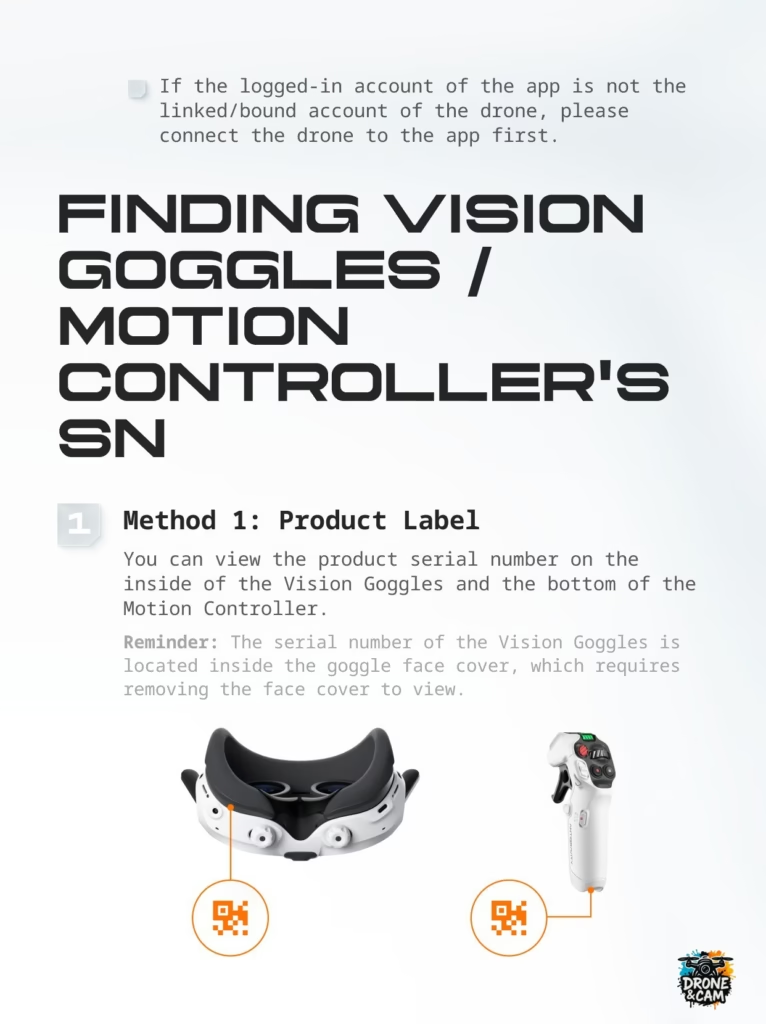
Method 1: Check the product label
For Vision Goggles, the serial number can be found inside the mask area, under or behind the facepiece. You may need to gently remove the foam or face cover to access the label.
For the Motion Controller, the serial number is usually located underneath the device, on a barcode label.
This method is useful if the devices are not turned on or if you do not have access to the application.
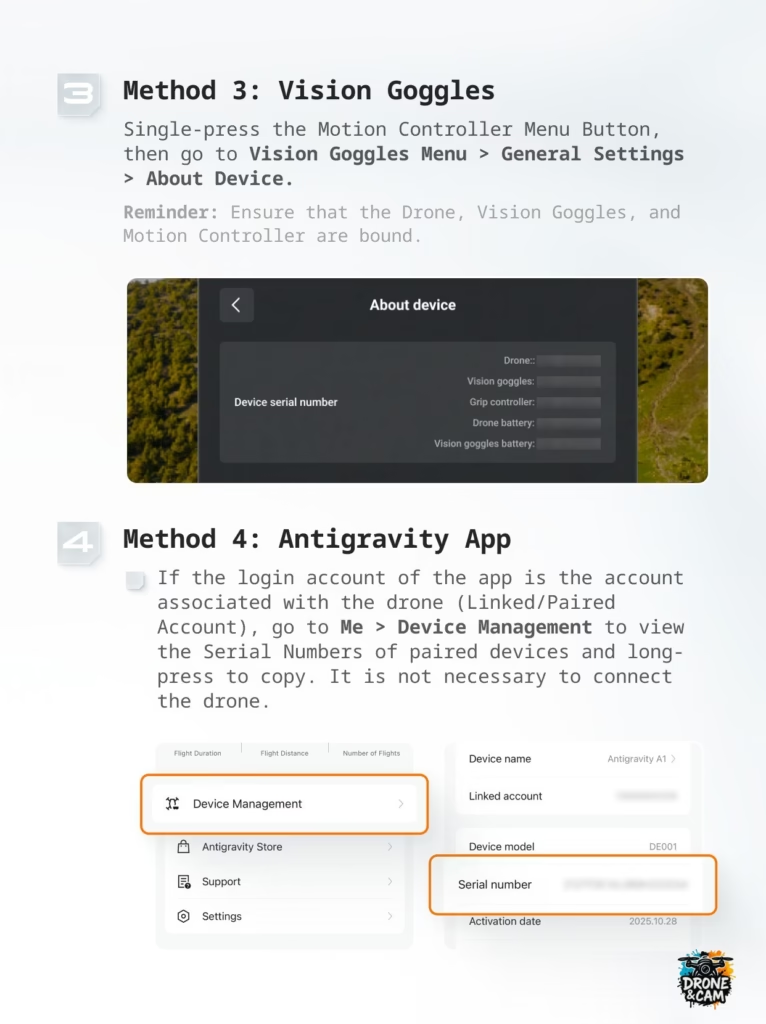
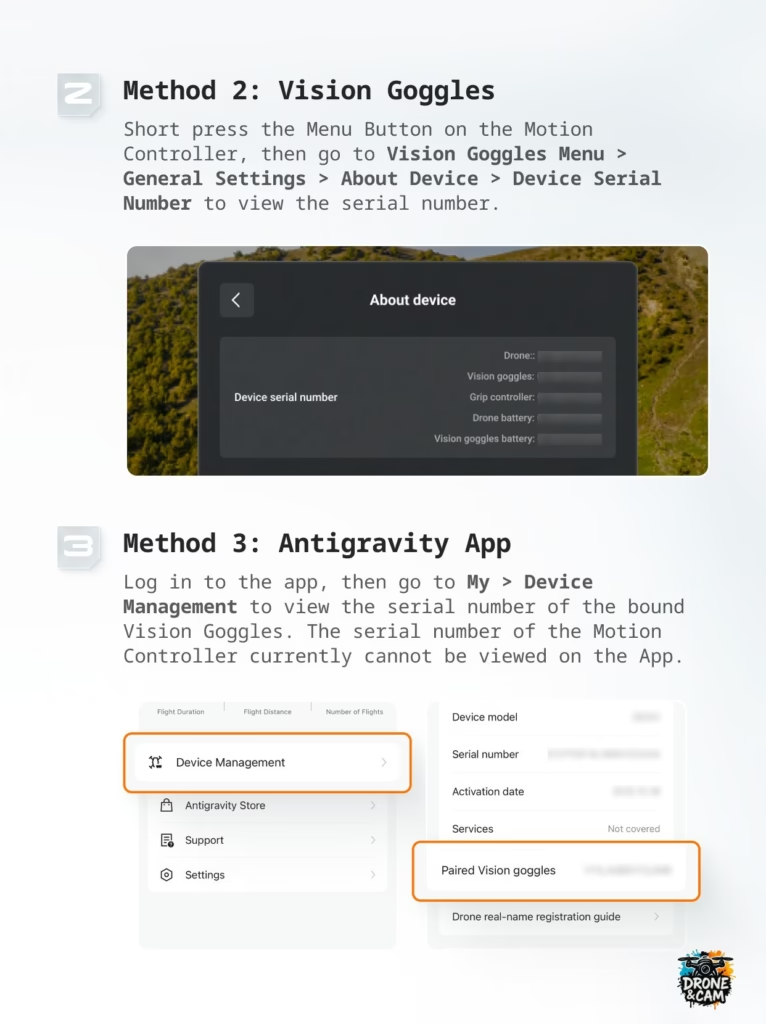
Method 2: Find the serial number from the Vision Goggles
You can also find the serial numbers directly from the Vision Goggles interface.
Here is the path to follow:
Vision Goggles Menu> General Settings> About Device> Device Serial Number
From this section, you can view the serial numbers associated with the various linked devices, such as:
- the drone;
- Vision Goggles;
- the Grip / Motion Controller;
- the drone’s battery;
- the battery of the Vision Goggles.
This is one of the most practical methods, as it centralizes several pieces of information in one place.
Quick reminder: make sure your drone, Vision Goggles and Motion Controller are switched on and properly connected to each other.
Method 3: Find the serial number using the Antigravity app
The Antigravity app also allows you to view certain serial numbers.
Here is the path to follow:
Me> Device Management
In this section, you can see information about your device, including:
- the model;
- the serial number;
- the activation date;
- related services;
- paired devices.
If your account is properly linked to the drone, you can access the serial numbers of the linked devices, and sometimes copy them directly from the application.
Important: If the account connected to the app is not the one used to pair the drone, the information may not appear. In this case, you will need to reconnect the correct account or link the drone to the app.
Why doesn’t the serial number appear in the application?
If you don’t see the serial number in the Antigravity app, there are several possible reasons.
The first possibility is that the drone is not yet properly linked to your account. It may also be connected to another account, or it may not have been activated correctly.
Another possibility: the Vision Goggles or the Motion Controller are not yet paired with the drone. In this case, some information may be missing or incomplete.
Here are the checks to perform:
- Log in with the correct Antigravity account;
- Turn on the drone, the Vision Goggles and the Motion Controller;
- checks that the devices are properly connected;
- open the Antigravity application;
- go in Me> Device Management ;
- check the displayed information.
If nothing appears, use the physical method: box, battery compartment or product label.
Serial number of the drone, the goggles, the controller: what’s the difference?
This is a common misconception.
The drone’s serial number is not necessarily the same as that of the Vision Goggles or the Motion Controller. Each device has its own unique identifier.
So you can have:
- a serial number for the drone;
- a serial number for the Vision Goggles;
- a serial number for the Motion Controller;
- a serial number for certain batteries or accessories.
For a customer service request, you must always provide the correct number. If your problem concerns the glasses, provide the Vision Goggles’ serial number. If your problem concerns the drone itself, provide the drone’s serial number.
Why keep your serial number?
The serial number isn’t only useful on the day of activation. It can also be useful to you several months later.
For example, if you want to claim under warranty, request a repair, check your Antigravity Care status, or transfer a service to a new device, support may need the original serial number and the new device.
It’s also a good habit if you’re traveling with your drone. In case of loss, theft, or technical problem, having the serial numbers handy can save a lot of time.
My tips for never losing your serial number
As soon as you receive your Antigravity A1 , I advise you to do three simple things:
- Photograph the label on the box.
- Photograph the serial number in the battery compartment.
- Save the serial numbers in a note on your phone.
You can create a note called “Antigravity A1 – Serial Numbers” with:
- drone serial number;
- Vision Goggles serial number;
- Motion Controller serial number;
- purchase date;
- activation date;
- screenshot of the application.
It’s simple, but very practical.
My opinion: simple but essential information
The serial number isn’t the most exciting part when you discover a drone. You’re more interested in flying it, testing the 360 camera, the Vision Goggles, the immersive control, and the intelligent features.
But in real life, this is essential information.
With a drone like the Antigravity A1 , which relies on a complete ecosystem including drone, goggles, controller, batteries and associated services, it’s best to have all the information neatly organized from the start.
This saves you stress in case of a problem and greatly facilitates communication with support.
Discover the Antigravity A1
If you’re discovering the Antigravity A1 , it’s a truly unique drone. It doesn’t just film from the sky: it offers an immersive 360° experience, with a much more intuitive way of flying.
This is precisely what makes this drone interesting for content creators, travelers, and anyone who wants a different experience from classic drones.
👉 Discover the Antigravity A1
👉 See the offer with the code AGRRLOV
With the promo code AGRRLOV , you can currently get an interesting bonus depending on the current offer: lens replacement kit + free takeoff mat .
FAQ: Antigravity A1 serial number
Where can I find the serial number of the Antigravity A1 ?
You can find it on the drone’s box, in the battery compartment, or in the Antigravity app via Me.> Device Management .
Where can I find the serial number of Vision Goggles?
The serial number of the Vision Goggles can be found on the label inside the mask, in the Vision Goggles menu, or in the Antigravity app if the device is linked.
Where can I find the serial number of the Motion Controller?
The Motion Controller’s serial number is visible on the label located underneath the controller. It may also appear in the Vision Goggles menu if the devices are properly paired.
Why is my serial number not appearing in the application?
This can happen if your account is not linked to the drone, if the devices are not paired, or if you are not logged in with the correct Antigravity account.
Is the serial number useful for customer service?
Yes. The serial number is often required for a repair request, warranty check, Antigravity Care, or precise device identification.
Do the drone, goggles, and controller have the same serial number?
No. Each device has its own serial number.
Conclusion
The serial number of the Antigravity A1 is information to keep from day one.
You can find it in several ways:
- on the box;
- in the battery compartment;
- in the Vision Goggles;
- in the Antigravity app.
My advice: take a few minutes to record all your serial numbers right now. It’s not the most fun part, but when you need them, you’ll be glad you did.




Leave a Reply