
Do you feel limited by 4K when you want to crop your best shots? The latest update finally unlocks 8K video for the DJI Osmo Action 6, giving you stunning image definition. Discover the secrets of this new firmware and how wireless transfer will dramatically speed up your workflow.
- 8K is coming to the Osmo Action 6: what really changes
- A redesigned workflow for nomadic creators
- Much more than 8K: a summary of the firmware’s new features
- Verdict: The real impact of this update on you
8K is coming to the Osmo Action 6: what really changes
An update that unlocks ultra-high definition
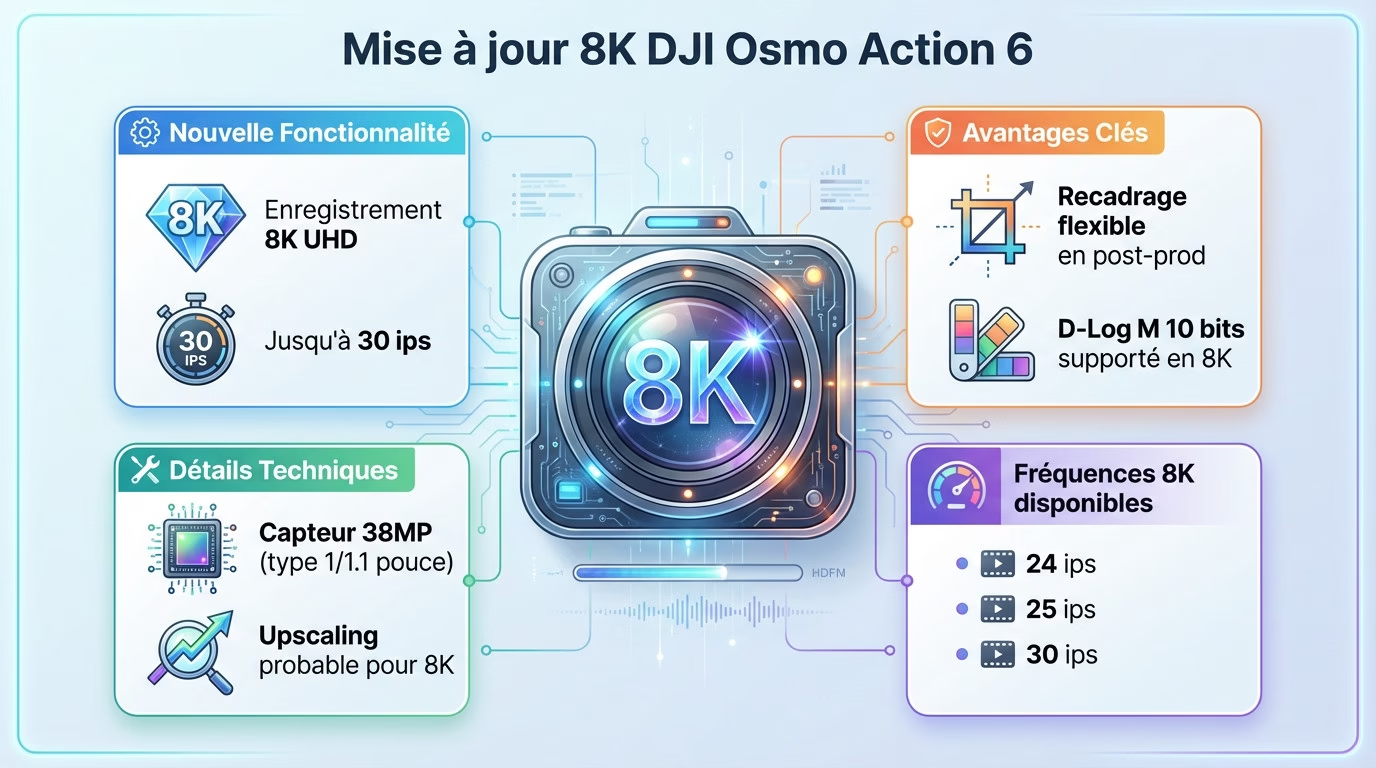
Good news for Action 6 owners. Firmware v01.02.0521 is available and it packs a punch: 8k recording is now enabled on the DJI Osmo Action 6.
You can now film at up to 30 frames per second with this resolution. That’s a huge amount of leeway for cropping your shots in post-production without sacrificing the sharpness of the final image.
The 10-bit D-Log M mode is also still available in 8K for precise calibration.
8k on a 38mp sensor: how does it work?
The 1/1.1-inch type sensor offers a resolution of 38MP. On paper, this is technically a bit low to reach the 8K UHD standard of 7680×4320.
The most plausible hypothesis is that DJI uses slight oversampling to achieve this resolution. The main objective remains to offer complete freedom during video editing.
Here are the frame rates you can choose for your sequences:
- 24 fps
- 25 fps
- 30 fps
A redesigned workflow for nomadic creators
Say goodbye to the hassle of cables in the field. With the DJI Osmo Action 6 8K, you save a ton of time. You can finally send your footage wirelessly, right after filming.
Transfer your videos wirelessly, even to your NAS.
The option allows you to send the sequences to a cloud service or, even better, directly to your personal NAS at home.
You have a choice of backup destinations. The system supports several major platforms for your files. Here are the compatible cloud services for securing your images:
- Baidu Netdisk
- Quark Netdisk
- OneDrive
- Google Drive
How to install this update on your camera
You don’t need to be an engineer to do it. The process is incredibly simple, so don’t miss out on these new features.
Everything is managed via the DJI Mimo app on your smartphone. Simply connect your camera to your phone, open the app, and follow the instructions provided by the interface, which will detect the device.
A notification for firmware v01.02.0521 will appear automatically. Follow the on-screen instructions to install it. A quick tip before you begin: make sure the camera’s battery is charged to at least 15%.
Much more than 8K: a summary of the firmware’s new features
Beyond 8K and wireless transfer, DJI has slipped other major advantages into this update.
Additional creative and practical tools
Want stylish photos? The update adds cinematic presets directly to Photo mode. It’s ideal for instantly enhancing your shots without post-production.
On the practical side, customize the QS button with new functions such as zoom or screen off. An essential shortcut to configure to save time.
Focus peaking assistance now works with the macro lens. Finally, gesture control also functions in webcam or streaming mode.
All the improvements at a glance
Here is a clear summary of the new technical features of firmware v01.02.0521.
| Functionality | Description |
|---|---|
| 8K Video | DJI Osmo Action 6 8k UHD 30fps recording (D-Log M). |
| Wireless download | Transfer to Cloud (Google Drive, OneDrive…) and NAS. |
| Photo presets | Adding cinematic style tones. |
| QS button customization | New assignable functions (zoom, screen off). |
| Focus Peaking (Macro) | Focusing aid with the macro lens. |
| Gesture control | Support for gestures in webcam and streaming mode. |
| Image quality | Improved rendering in “Quality Priority” mode. |
Verdict: The real impact of this update on you
Now that we’ve covered the new features, the real question is: is it worth it for your needs?
The 8k vs 4k duel: quality, storage and editing
Filming with the DJI Osmo Action 6 in 8K offers incredible image sharpness, but requires careful consideration. This increase in quality places significant demands on your editing software. Is it really necessary for you?
Be mindful of your disk space usage. With only 50GB of usable internal storage, 8K files will fill up the memory incredibly quickly. This is a crucial point to consider.
Here’s a quick summary; this is a point to consider when compared to its competitors :
- Advantages: more detail, enormous flexibility for cropping.
- Disadvantages: very large files, requires a robust editing setup, technical upscaling.
In short: what this update brings to Action 6
This update makes the DJI Osmo Action 6 even more versatile. It’s not just a marketing gimmick; it genuinely improves the daily lives of creators with wireless file transfer. It’s a real time-saver.
The camera, already high-performing with its sensor and variable aperture, becomes an even stronger option in the action-cam market. It’s completely convincing. You can find all its capabilities in our full review .
Don’t wait any longer to equip yourself: Buy DJI Osmo Action 6 .
With this update, your Osmo Action 6 truly gains power. 8K offers incredible framing freedom, while wireless transfer simplifies your daily file management. It’s a tangible evolution that enhances your experience. Head over to the DJI Mimo app to install it now.



-1-150x150.avif)




Leave a Reply