
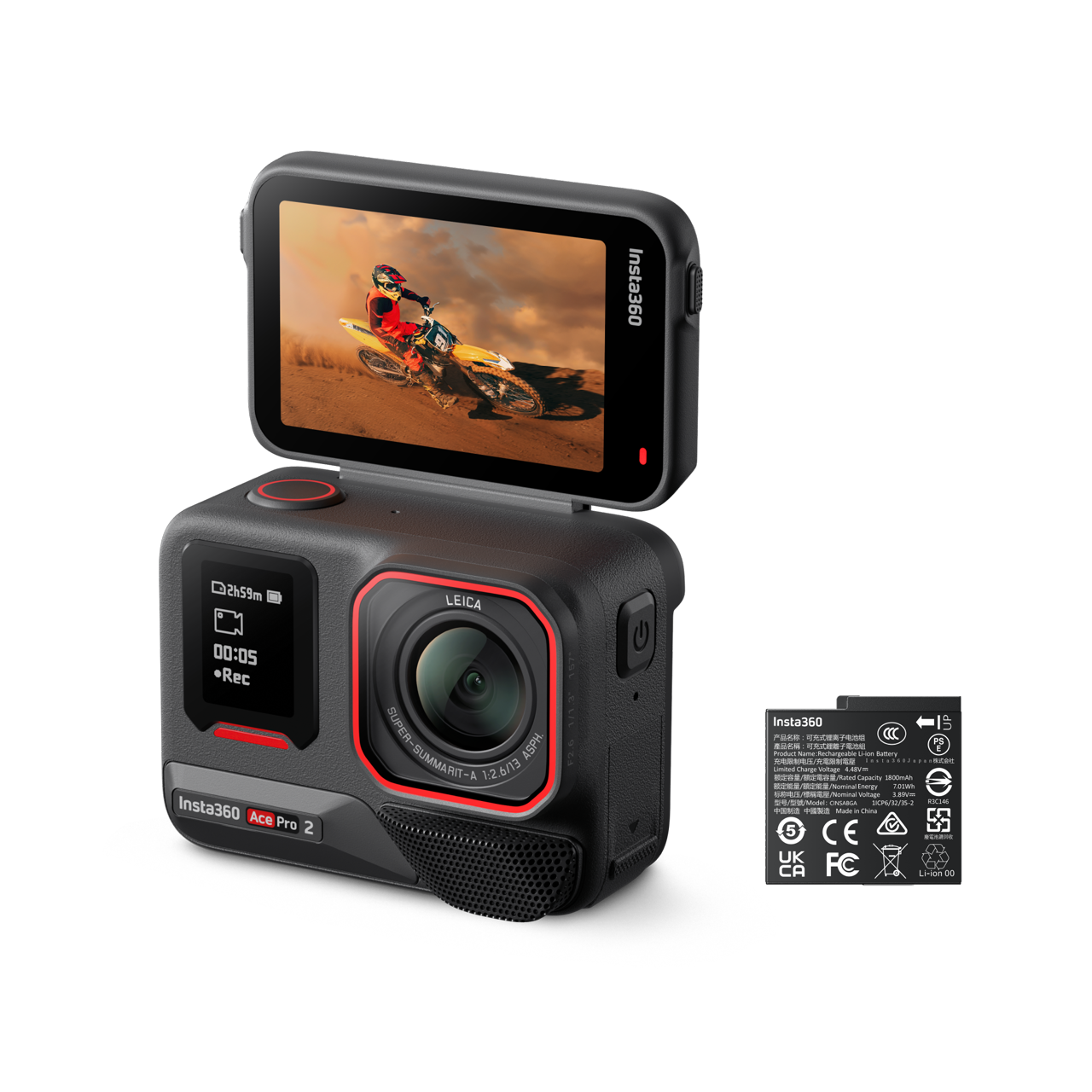
In the world of videography, visuals are only half the equation when it comes to creating immersive and captivating content. Audio, often considered the soul of a video production, plays a crucial role in bringing images to life, enriching the viewer experience, and transporting the audience into the heart of the action. This is especially true when recording with high-end equipment like the Insta360 Ace Pro , where every detail counts in producing videos of exceptional quality.
The Insta360 Ace Pro, with its cutting-edge 1/1.3″ sensor co-engineered with Leica, delivers unparalleled image quality, even in low light. Powered by a 5nm AI chip, this camera achieves exceptional performance thanks to its PureVideo technology, ensuring superior daytime shots with stunning clarity, Active HDR video, and 4K slow motion at 120fps. Its 2.4-inch flip-out screen provides precise control and efficient preview of shots, while its ruggedness and waterproofing up to 10 meters make it ready for any adventure. Its gimbal-like FlowState stabilization ensures ultra-smooth footage, making high-quality audio not just desirable but essential to complement such images.
Therefore, for those looking to fully exploit the potential of the Insta360 Ace Pro , investing in a high-quality microphone is not a luxury but a necessity. A good microphone does more than simply capture sound; it enriches your content, ensures clear communication, and enhances immersion, guaranteeing that your videos stand out not only for their visual quality but also for their audio excellence.

Why Audio Is Essential for Your Insta360 Ace Pro
The importance of audio in video productions is often underestimated, yet it plays a fundamental role in creating an immersive and captivating viewer experience. A visual recording, however impressive, cannot reach its full potential without high-quality sound. This is where the need for exceptional audio for your Insta360 Ace Pro comes in.
The Insta360 Ace Pro is equipped to deliver stunning image quality, thanks to its partnership with Leica and the use of cutting-edge technologies. However, for the captured content to be truly immersive, the sound must match the visuals. Good audio enhances presence and immersion, allowing viewers to feel like they’re right in the middle of the action. Whether it’s the gentle whisper of a breeze, the hustle and bustle of a busy street, or the subtlety of a distant melody, a high-quality microphone can capture these nuances, significantly enriching the viewing experience.
The Insta360 Ace Pro, while a technological marvel in terms of imaging, also benefits from advanced audio technologies. These technologies allow for faithfully capturing the sound environment, adding an extra dimension to your videos. Clear, noise-free, and well-balanced audio can transform a simple video into a captivating story, engaging the audience on a much deeper emotional level.
In short, audio isn’t just an add-on to the image; it’s an integral part of a video’s narrative and immersive experience. Investing in a good microphone for your Insta360 Ace Pro therefore means investing in the ability to capture not only exceptional visuals but also rich, enveloping soundscapes that will make every video a memorable work.
Features to Look for in a Microphone for the Insta360 Ace Pro
When choosing a microphone to accompany your Insta360 Ace Pro , it’s crucial to consider features and specifications that maximize the quality of the captured audio, in keeping with the camera’s exceptional visual quality. Here are the key features to look for in a microphone to ensure optimal compatibility and performance with your Insta360 Ace Pro.
Sensitivity
A microphone’s sensitivity indicates its ability to pick up faint or distant sounds. A highly sensitive microphone is preferable for a variety of environments, capturing subtle sound details without requiring excessive amplification, which can introduce noise.
Directivity
Directivity, or the pickup pattern, determines how the microphone picks up sound from different directions. For outdoor recordings or in noisy environments, a directional microphone (such as a cardioid) is ideal because it primarily picks up sound coming from in front of the microphone, thus reducing background noise. For situations requiring more immersive sound capture, an omnidirectional microphone might be preferable.
Weather Resistance
Since the Insta360 Ace Pro is designed for adventure, including outdoor shooting and potentially harsh weather conditions, choosing a weatherproof microphone is essential. A microphone with protection against moisture, dust, and splashes will ensure your equipment remains functional and secure, no matter where your adventures take you.
Frequency Response
A microphone’s frequency response affects how different sounds are captured. A wide range ensures the microphone can faithfully capture everything from low to high tones, which is crucial for recording a full range of soundscapes and voices.
Connectivity and Compatibility
Make sure the microphone you choose can easily connect to your Insta360 Ace Pro, either wirelessly or with compatible cables. Seamless compatibility with your device ensures a smooth and hassle-free recording experience.
Durability and Portability
A robust yet lightweight microphone is ideal for use with the Insta360 Ace Pro , especially for those who are constantly on the go. Durability is essential to withstand the rigors of outdoor shooting, while portability ensures it doesn’t become a burden when you’re traveling.
By taking these features into account when choosing a microphone for your Insta360 Ace Pro , you can significantly improve the audio quality of your videos, creating a truly immersive experience for your audience.
The Best Microphones for the Insta360 Ace Pro
Selecting the perfect microphone for your Insta360 Ace Pro can significantly improve the quality of your audio recordings. Here’s a comparison of three popular microphones, each offering unique advantages and specific considerations to help you make an informed choice based on your video production needs.
1. Rode VideoMic Pro Compact VMP
Advantages :
- Exceptional Audio Quality: Offers clear, high-quality sound capture, ideal for a wide range of uses.
- Ambient Noise Control: With the 3-position switch, you can easily adapt the microphone to different sound environments.
- Long Battery Life: Up to 70 hours of use with a single 9V battery, which is perfect for long shooting sessions.
Disadvantages :
- Price: At $289, it’s an investment for serious videographers who require superior audio quality.
- Requires a Battery: Unlike some microphones that draw their power directly from the camera, this one requires a 9V battery.

2. Sennheiser MKE 400
Advantages :
- Durability: Designed to be water-resistant and non-slip, it adapts well to harsh shooting conditions.
- Portability: Lightweight and compact, it is easy to carry and attach to your device.
- Versatility: Well suited for interviews and sporting events.
Disadvantages :
- Powered by AAA batteries: May require frequent replacements or recharging, especially during prolonged use.

3. Rode Video Mic GoShotgun
Advantages :
- Ease of Use: No need to worry about the battery as it draws its power directly from the camera.
- Lightweight Design: Easy to maneuver and ideal for shooting on the move.
- Affordable Price: At $99.00, it’s an accessible option for those who are just starting out or on a limited budget.
Disadvantages :
- Less Control Over Ambient Noise: Does not have the same advanced noise reduction options as more expensive models.

Each of these microphones offers distinct advantages that can suit different shooting styles and conditions with your Insta360 Ace Pro . By assessing your specific needs in terms of audio quality, durability, and budget, you can choose the microphone that best complements your shooting equipment and enhances the overall quality of your video productions.
How to Install and Configure Your Microphone with the Insta360 Ace Pro
To integrate and configure an external microphone with your Insta360 Ace Pro , it’s essential to follow specific steps to ensure a successful connection and optimize audio quality for your video recordings. Here’s a step-by-step guide, including purchasing the necessary adapter for the connection.
Step 1: Acquire the Necessary Adapters
- Purchasing the Adapter: First and foremost, get the Microphone Adapter for Insta360 Ace Pro/Ace. This adapter is crucial as it supports external Type-C microphones and 3.5mm audio ports, allowing for a seamless connection between your microphone and your camera.

Buy the microphone adapter for Ace and Ace Pro cameras
- Purchase the Insta360 Ace Pro & Ace Accessory Mount: Designed for stability and security, this lightweight aluminum alloy mount weighs only 12.9g. Easy to disassemble and use with the quick-release bracket (sold separately), this convenient solution allows you to easily attach a microphone or other accessories to optimize your shooting experience.

Buy Insta360 Ace Pro & Ace Accessory Holder
Step 2: Connecting the Microphone to the Adapter
- Preparation: Make sure your microphone is compatible and that you have all the necessary cables.
- Connection: Connect your microphone to the adapter via the corresponding port (Type-C or 3.5mm).
Step 3: Connecting the Adapter to the Insta360 Ace Pro
- Adapter Connection: Plug the adapter into the Type-C port of your Insta360 Ace Pro.
- Verification: Ensure that the connection is secure and that the microphone is correctly recognized by the camera.
Step 4: Configuring Audio Settings
- Accessing Settings: Turn on your Insta360 Ace Pro and access the settings menu.
- Audio Settings: Select audio options and adjust settings according to the connected microphone and shooting environment.
Tips for Optimizing Audio Settings
- Quiet Environment: For quiet environments, adjust the microphone sensitivity to capture subtle nuances without picking up background noise.
- Noisy Environment: In noisy environments, use settings that minimize ambient noise, such as noise reduction or adjusting microphone directionality if available.
- Interviews: For interviews, use a directional microphone to isolate the subject’s voice from background noise.
- Action Scenes: When capturing action scenes, ensure the microphone is securely attached to avoid unwanted noise from movement.
By following these steps and adjusting the audio settings according to the shooting context, you will be able to fully exploit the audio potential of your Insta360 Ace Pro , ensuring that your videos captivate not only with their visual quality but also with their sound clarity.
In summary, choosing the right microphone for the Insta360 Ace Pro is crucial to ensuring optimal audio quality in your creations. High-quality audio can significantly enhance the viewing experience and the impact of your content. Therefore, it’s important to experiment with different audio equipment to find the one that best suits your specific needs.






Leave a Reply