
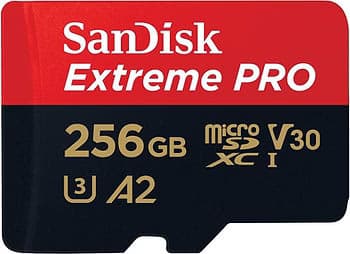
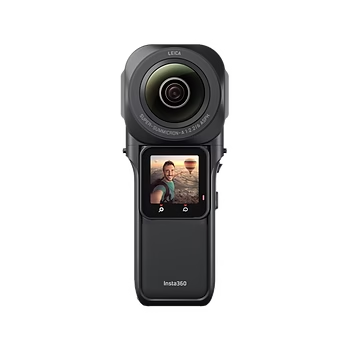
You’ve finally got your hands on theInsta360 ONE RS 1-Inch Edition 360, one of the most powerful and versatile cameras on the market. With its exceptional video capture capabilities and advanced features, this camera is ideal for demanding content creators. But to make the most of its capabilities, you need the perfect SD card.
A suitable SD card is essential to ensure optimum performance from your Insta360 ONE RS 1-Inch Edition 360. An inappropriate card can lead to interruptions in recording, file corruption and poor overall performance. That’s why it’s crucial to choose an SD card that matches your camera’s specifications and can handle the high demands of high-resolution recording.
In this article, we’ll explore why SD card choice is crucial for your Insta360 ONE RS 1-Inch Edition 360 and help you choose the best option for optimum performance. We’ll cover the key features to look for in an SD card, recommend the best cards available on the market, and provide tips for formatting and maintaining your SD card to ensure long life and reliable performance.
Why choosing the right SD card is important
Performance and storage
A quality SD card plays a crucial role in the performance of your Insta360 ONE RS 1-Inch Edition 360. It guarantees smooth, high-resolution video capture, enabling you to fully exploit the camera’s capabilities. A high-performance SD card also ensures reliable storage of your precious footage, avoiding interruptions and data loss. This is particularly important when you’re shooting 5.3K or 360-degree videos, where the demand for storage capacity and write speed is high.
Compatibility
It is crucial to choose an SD card compatible with the specifications of your Insta360 ONE RS 1-Inch Edition 360. Using a non-compatible SD card can lead to recording interruptions, file corruption and poor overall performance. Each camera has specific requirements in terms of writing speed and speed class, and choosing an SD card that doesn’t meet these criteria can limit your device’s capabilities and affect the quality of your videos. To guarantee optimum performance, it’s essential to select an SD card that complies with your camera manufacturer’s recommendations.

Features to look for on an SD card
Storage capacity
Storage capacity is a crucial element to consider when choosing an SD card for your Insta360 ONE RS 1-Inch Edition 360. Capacity options generally range from 32 GB to 1 TB. For 5.3K or 360 shooting, a capacity of 128 GB or more is recommended to avoid running out of space during your capture sessions. High-resolution video and 360 files require a lot of space, so opting for a large-capacity card will enable you to shoot longer without having to change cards frequently.
Reading and writing speed
Read and write speeds are essential to guarantee the performance of your camera. Fast write speeds are necessary to record high-resolution video without data loss. For example, for 5.3K recordings, high write speeds ensure that every frame is captured without interruption. On the other hand, fast playback speeds facilitate file transfer and editing, making the post-production process smoother and more efficient. An SD card with high speeds minimizes waiting times and improves your overall workflow.
Speed class
Speed classes indicate minimum performance in terms of continuous writing speed. For optimum use with theInsta360 ONE RS 1-Inch Edition 360, we recommend choosing a class U3 or V30 SD card. These classes guarantee sustained writing speeds sufficient for high-resolution videos and 360-degree shots. A U3 class card guarantees a minimum write speed of 30 MB/s, while a V30 card guarantees the same performance, which is essential for maintaining recording quality without interruption or data loss.
In summary, when choosing an SD card for your Insta360 ONE RS 1-Inch Edition 360, it’s crucial to consider storage capacity, read and write speeds, and speed class to ensure optimum performance and reliable capture of your videos.
Best recommended SD cards for Insta360 ONE RS 1-Inch Edition 360
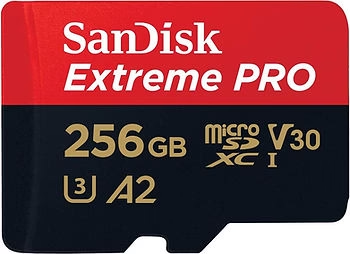
SanDisk Extreme Pro 256GB
The SanDisk Extreme Pro 256GB is a high-performance SD card ideal for theInsta360 ONE RS 1-Inch Edition 360. With write speeds of up to 90 MB/s and a capacity of 256 GB, this card is perfect for 5.3K videos and 360-degree shots. It also offers read speeds of up to 170 MB/s, facilitating rapid file transfer and editing. The SanDisk Extreme Pro is renowned for its robustness and reliability, capable of withstanding the most extreme conditions, making it an ideal choice for content creators on the move.
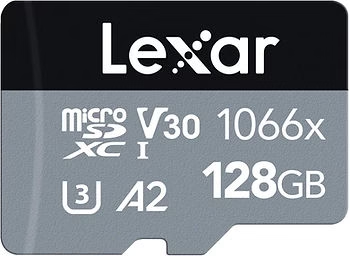
Lexar Professional 1066x
The Lexar Professional 1066x is designed for high performance, making it ideal for high-resolution recording with theInsta360 ONE RS 1-Inch Edition 360. This SD card offers read speeds of up to 160 Mb/s and write speeds of up to 120 Mb/s, guaranteeing fast data transfers and smooth capture of high-resolution video. The Lexar Professional 1066x is also durable and reliable, making it an excellent choice for demanding vloggers and content creators.
Samsung EVO Plus
The Samsung EVO Plus is renowned for its reliability and exceptional performance. With a read speed of up to 100 MB/s and a write speed of 90 MB/s, this card is perfect for vloggers and content creators using theInsta360 ONE RS 1-Inch Edition 360. Its 256 GB capacity offers enough space to store many hours of high-resolution video, while its rugged construction ensures protection against water, temperature, X-rays and magnetic fields. The Samsung EVO Plus combines performance and durability, making it an excellent choice for action camera users.

How to format and maintain your SD card
Formatting
Formatting your SD card before use is a crucial step in ensuring optimum performance and maximum compatibility with your Insta360 ONE RS 1-Inch Edition 360. Formatting prepares the card for a specific use, erasing all existing data and configuring the file system optimally. This prevents read and write errors that could occur if the card is not properly formatted. We recommend formatting the SD card directly via the camera, or using a computer with the file system recommended by the camera manufacturer.
Maintenance
Proper care of your SD card can extend its life and ensure reliable performance over the long term. Here are some practical tips for keeping your SD card in good condition:
- Avoid extreme temperatures: Do not leave your SD card in very hot or very cold environments, as this can damage the internal electronic components.
- Protect against moisture and liquids: Although some SD cards are water-resistant, it’s best to keep them dry to avoid any risk of damage.
- Handle with care: Insert and remove the SD card gently to avoid damaging the contacts. Always use the protective case supplied when not in use.
- Back up your data regularly: To avoid losing important files, regularly back up the contents of your SD card to a hard disk or online storage service. This frees up space and preserves your files in the event of card failure.
- Format periodically: Formatting your SD card regularly, after backing up your data, can help maintain its performance by reorganizing files and correcting any errors.
- Use high-quality adapters: If you need to use an adapter to read your SD card on a computer, make sure it’s of good quality to avoid connectivity problems.
By following these maintenance tips, you can maximize the life and performance of your SD card, ensuring that your Insta360 ONE RS 1-Inch Edition 360 performs optimally with every use.
See SD cards available on Amazon
Conclusion
Summary of key points
Choosing the right SD card for your Insta360 ONE RS 1-Inch Edition 360 is essential to guarantee optimum performance and protect your videos. Key considerations include storage capacity, read and write speeds, and speed class. A high-performance SD card lets you capture high-resolution video without interruptions, and easily transfer files for editing.
Final opinion
The cards SanDisk Extreme Pro, Lexar Professional 1066xand Samsung EVO Plus are excellent options for ensuring smooth, reliable recording with your Insta360 ONE RS 1-Inch Edition 360. Each of these cards offers high performance, large storage capacity and durability, perfectly meeting the needs of demanding content creators.
Call to action
Have you already used one of these SD cards with your Insta360 ONE RS 1-Inch Edition 360? Share your thoughts and tips in the comments below! If you have any questions or experiences to share, we’d love to hear from you. Your feedback can help other designers make the right choice for their storage needs.