
The GoPro Hero 13 Black is set to revolutionize the world of action cameras, with significant improvements over its predecessors. Among its most striking features is the ability to film in 5.3K at 60 FPS, offering exceptional image quality, ideal for capturing action moments with unrivalled precision and clarity. This new version also incorporates advanced features such as HyperSmooth 6.0, enhanced HDR, and a more powerful 1,900 mAh battery, which guarantees extended autonomy, even when recording at high resolution.
However, to fully exploit the potential of the GoPro Hero 13 Blackthe choice of a high-quality SD card is essential. Indeed, this camera requires a storage medium capable of keeping pace with its performance, especially when it comes to handling the high data rates required to record 5.3K videos. An unsuitable SD card could not only cause annoying interruptions, but also compromise the quality of your recordings. So selecting a high-performance SD card compatible with the Hero 13 Black’s requirements is crucial to ensuring smooth, seamless captures, enabling you to relive your adventures in all their glory.

Understanding the needs of the GoPro Hero 13 Black
Speed and capacity requirements
The GoPro Hero 13 Black is a powerful action camera designed to capture high-resolution video, including 5.3K at 60 FPS. To record these videos smoothly and without any loss of data, it’s imperative to use an SD card with high read and write speeds. In particular, UHS-I and V30 or higher specifications are essential. An SD card with UHS-I classification guarantees fast interface speed, while V30 classification ensures a minimum write speed of 30 MB/s, essential for capturing video in 4K and beyond. Without these specifications, you risk experiencing interruptions in recording, data errors or even loss of video sequences at the most crucial moments.

Compatibility and longevity
In addition to speed, SD card compatibility and durability are equally crucial to maximizing the performance of the GoPro Hero 13 Black. This camera is designed to withstand extreme conditions: from freezing temperatures to hot and humid environments, to situations where it’s exposed to water, dust or physical shock. So it’s essential to choose an SD card that can not only keep up with these performances, but also withstand them. Recommended SD cards for the GoPro should be waterproof, shockproof, X-ray resistant and capable of operating in a wide range of temperatures. By choosing a card that meets these criteria, you can ensure that your SD card will be as tough as your camera, protecting your precious data wherever your adventures take you.

SD card selection criteria for the GoPro Hero 13 Black
Reading and writing speed
One of the most critical criteria for choosing a suitable SD card for the GoPro Hero 13 Black is read and write speed. To capture high-resolution video, especially in 4K and 5.3K, it’s essential to have an SD card that offers high, stable write speeds. The V30 classification (Video Speed Class 30) is the recommended minimum, as it guarantees a continuous write speed of 30 MB/s, thus avoiding recording errors, interruptions or loss of sequences when recording high-speed video. What’s more, a fast playback speed means you can transfer your files more quickly to other devices, which is essential for an efficient workflow.
Storage capacity
Storage capacity is another determining factor when selecting an SD card for the GoPro Hero 13 Black. Your needs in terms of capacity depend on how you use it. For amateurs capturing occasional footage, a 128GB card may suffice, offering enough space for several hours of 4K video. On the other hand, for professionals or intensive users who record long sessions in 5.3K or regularly use high frame rate modes, a 256GB card or more is recommended. This ensures that you’ll never run out of space on your most important adventures.
Reliability and durability
Finally, reliability and durability are essential criteria to consider when choosing the perfect SD card for your GoPro Hero 13 Black. Given that this camera is often used in extreme environments, it’s crucial that the SD card is capable of withstanding the same harsh conditions. Look for cards that are waterproof, dustproof, shockproof and X-ray resistant. These features ensure that your SD card and your data remain intact, even in the most demanding situations. Investing in a durable SD card gives you peace of mind, knowing that your precious contents are protected from the vagaries of your adventures.

Top 3 recommended SD cards for the GoPro Hero 13 Black
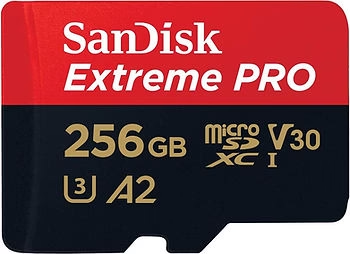
1. SanDisk Extreme Pro 256 GB
- Advantages: The SanDisk Extreme Pro 256 GB is renowned for its high speed and reliability, making it an ideal choice for capturing 5.3K and 4K video. It delivers flawless performance, even under the most demanding conditions.
- Disadvantages: The only notable drawback is its higher price, justified by its premium performance.
- Link: Buy on Amazon
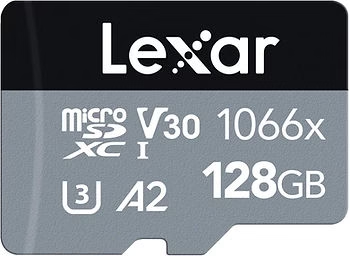
2. Lexar Professional 1066x
- Advantages: The Lexar Professional 1066x offers excellent value for money. It delivers solid performance for high-resolution recording, making it a reliable option for amateurs and professionals alike.
- Disadvantages: It may be less available in some regions, which may limit its accessibility.
- Link: Buy on Amazon
3. Samsung EVO Plus
- Benefits: The Samsung EVO Plus is a durable and affordable option, particularly suited to occasional users. It offers good overall performance at a lower cost.
- Disadvantages: Its speed is slightly slower than that of premium cards, which could be a limiting factor for very intensive 5.3K recordings.
- Link: Buy on Amazon
These three SD cards are all excellent choices for maximizing the performance of your GoPro Hero 13 Black, each catering for different needs and budgets.
Practical tips for using SD cards with the GoPro Hero 13 Black
Regular formatting
Regular formatting of your SD card is crucial to maintaining optimal performance with your GoPro Hero 13 Black. By formatting the card before each new shooting session, you erase old data and reduce the risk of file fragmentation, which can cause recording errors. What’s more, formatting ensures that the card is correctly configured to work with your GoPro, minimizing the risk of failure while recording high-resolution videos.
Storage and handling
Proper handling and storage of your SD cards is essential to prolong their life. Always handle cards by the edges to avoid touching the contacts, which could cause damage or deposits of dirt. When not in use, store your SD cards in protective cases to protect them against shock, humidity and extreme temperatures. By taking these precautions, you’ll avoid hardware failures that could compromise your recordings.
Backup strategies
To avoid data loss, it’s important to implement regular backup strategies. After each shooting session, transfer your videos to a computer or online storage service. This frees up space on your SD card and ensures that your files are safe in the event of loss or card failure. Adopting a systematic backup routine protects you from the unexpected and ensures that your captured memories remain intact.
Conclusion
Summary of key points
Choosing the right SD card is essential for maximizing the capabilities of your GoPro Hero 13 Black. A high-performance SD card guarantees smooth 5.3K/4K recordings, prevents errors and data loss, and withstands extreme conditions on your adventures. Read and write speed, storage capacity, reliability and durability are key criteria to consider to ensure your action camera performs at its best.
Final recommendations
For those looking for ultimate performance, the SanDisk Extreme Pro 256 GB is ideal, thanks to its high speed and proven reliability. If you’re looking for excellent value for money, the Lexar Professional 1066x is a solid option, offering good performance for most users. Finally, for occasional users or those who value durability at an affordable cost, the Samsung EVO Plus is an excellent choice.
Call to action
We’d love to hear about your experiences with the different SD cards for the GoPro Hero 13 Black. Do you have any additional tips or questions? Feel free to share them in the comments below. For more information and recommendations, check out our other articles and discover the products we offer to optimize your recordings.
Links & Resources
- Links to recommended products:




Leave a Reply