
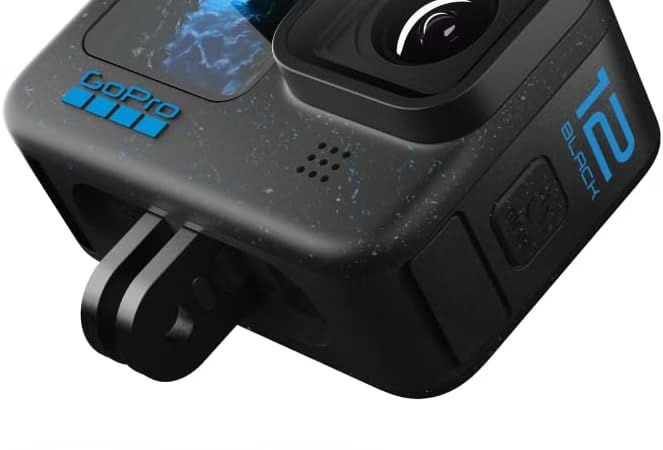
When it comes to capturing mind-blowing moments and breathtaking action with your GoPro Hero 12, the last thing you want is to be limited by the performance of your SD card. A reliable and fast SD card is essential for recording high-resolution, high-bitrate video without a hitch, especially with the impressive capabilities of the GoPro Hero 12. Whether you’re riding a perfect wave, biking down a mountain track, or capturing your child’s first steps, the quality of your recording depends greatly on this small component.
The goal of this article is to guide you through the maze of SD card specs, helping you understand what makes a good SD card for your GoPro Hero 12. We’ll explore the specific speed and capacity requirements together to ensure you make the best choice, maximizing the quality and reliability of your recordings. Ultimately, we want you to be able to focus on adventure and creation, without worrying about the technology that supports you.
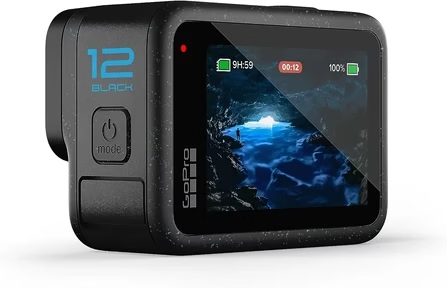
Understanding SD Card Specifications for GoPro 12
When choosing an SD card for your GoPro Hero 12, understanding the technical specifications is crucial to ensure optimal compatibility and performance. Here’s a guide to demystify these specs and help you make the right choice.
Speed Classes
- Class 10: This is the minimum recommended for HD and Full HD video recording. It guarantees a minimum write speed of 10 MB/s, which is sufficient for low-resolution videos.
- UHS Speed Class: Divided into U1 and U3, indicating minimum write speeds of 10 MB/s and 30 MB/s, respectively. U3 is recommended for video recording in 4K or higher.
- Video Speed Class: Ranging from V6 to V90, this classification is the newest and most relevant for modern action cameras like the GoPro Hero 12. V30 (30 MB/s) is often sufficient for 4K, but for 5.3K or higher recordings, V60 (60 MB/s) or V90 (90 MB/s) are preferable to ensure smooth video capture without data loss.
Storage Capacity
Storage capacity, measured in gigabytes (GB), determines how much video your card can hold. For 4K or 5.3K recordings, choosing a card with a large capacity is essential. A 64 GB card can be a good place to start, but for users who record frequently or for long periods of time, cards with 128 GB, 256 GB, or more, are recommended. This allows you to shoot all day without worrying about storage space.
Reliability and Durability
Reliability and durability are critical, especially for GoPro users venturing into extreme conditions. The best SD cards for the GoPro Hero 12 are those that are not only resistant to water, shock, extreme temperatures, and X-rays but also offer data recovery in case of corruption. Look for cards with a good warranty and positive user reviews regarding their longevity.
In conclusion, choosing the right SD card for your GoPro Hero 12 is a balance between speed, capacity, reliability, and durability. Understanding these specifications will help you select a card that will maximize your camera’s performance, allowing you to capture every epic moment flawlessly.

Specific Requirements of GoPro Hero 12
The GoPro Hero 12 is a state-of-the-art action camera designed to capture high-quality video in a variety of formats and resolutions, including 4K and 5.3K. To fully exploit its capabilities, it is crucial to understand and comply with GoPro’s specific SD card requirements.
GoPro Recommendations
GoPro recommends the use of SD cards with high write speeds to ensure flawless video capture, especially when recording in high resolution or high bitrates. For the Hero 12, SD cards must meet the following criteria:
- Write Speed: Fast write speed is essential for recording 4K or 5.3K video. GoPro suggests using cards with a Video Speed Class V30 or higher, UHS Speed Class U3, or even better, V60 or V90 classification for very high-resolution, high-bitrate recordings.
- Capacity: Given the size of high-resolution video files, a large storage capacity is recommended. 64 GB cards are the suggested minimum, with 128 GB or more being ideal for users who record frequently or during long sessions.
Importance of Fast Writing Speed
Choosing an SD card with a fast write speed is crucial for several reasons:
- Interruption Prevention: Insufficient write speed can lead to interruptions in video recording, where the camera stops recording or loses frames. This scenario is particularly problematic in action situations where every moment counts.
- Maximum image quality: To maintain the highest possible image quality, especially with the demanding video codecs used by the GoPro Hero 12, a fast card ensures that data is written efficiently without compromising quality.
- Workflow Efficiencies: A quick map also makes it easier to transfer files from the camera to other devices for editing, making the post-production process smoother and less time-consuming.
In summary, to get the most out of your GoPro Hero 12, it is imperative to choose an SD card that not only meets the storage capacity requirements but also offers the write speeds needed for high-quality video recording without interruptions. Following GoPro’s recommendations ensures that you can focus on capturing your adventures without worrying about technical limitations.
Maximum SD Card Size for GoPro Hero 12
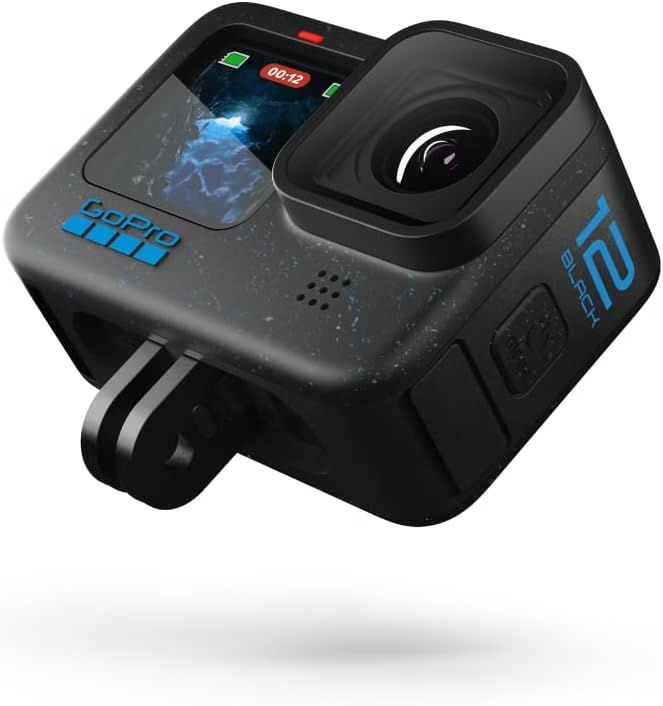
The GoPro Hero 12 is compatible with SD cards up to 1TB of storage capacity. This wide compatibility gives users the flexibility to capture hours of high-resolution video, such as 4K and 5.3K, without worrying about running out of space. Opting for a high-capacity SD card is especially useful for those who plan extended shooting sessions or don’t want to be forced to transfer their files regularly to free up space. By choosing an SD card up to 1TB, you maximize the use of your GoPro Hero 12, ensuring that every epic adventure is captured in all its glory.

Top Recommended SD Cards for GoPro Hero 12
To ensure an optimal user experience with your GoPro Hero 12, choosing a suitable SD card is essential. Here is a selection of the best SD cards on the market, meeting the performance requirements of the GoPro Hero 12, for different budgets.
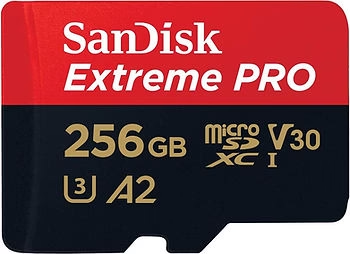
1. SanDisk Extreme Pro 256GB
The SanDisk Extreme Pro 256GB is the perfect choice for those looking to capture 4K or 5.3K video without compromise. With read speeds of up to 170 MB/s and write speeds of up to 90 MB/s, this V30/U3 class card ensures reliable and fast performance. Its large storage capacity is ideal for extended recording sessions, making card changes less frequent and file transfers fast and efficient.
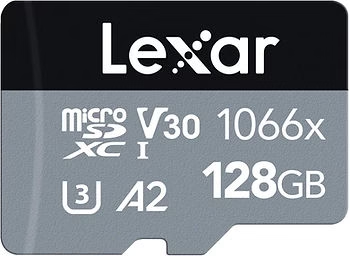
2. Lexar Professional 1066x
The Lexar Professional 1066x is a great option for professional videographers and serious hobbyists alike. Offering transfer speeds of up to 160MB/s, this V30 card ensures smooth video capture and consistent performance, even in the GoPro Hero 12’s most demanding recording modes. Its reliability and durability make it a solid investment for capturing adventures in any environment.

3. Samsung EVO Plus
For those looking for great value for money without sacrificing performance, the Samsung EVO Plus is a smart choice. With a read speed of up to 100 MB/s and a write speed of 90 MB/s, it meets the needs of high-resolution video recording well. The card offers a solid combination of speed, capacity, and durability, making it ideal for everyday use with the GoPro Hero 12.

Where to Buy and What to Look Out For
Buying an SD card for your GoPro Hero 12 is an important step in ensuring the quality and reliability of your video recordings. Here are some tips to make sure you make the right choice and avoid common pitfalls.
Tips for Buying SD Cards
- Avoiding Counterfeits: The market is flooded with fake SD cards that claim to offer high performance at a low price. These cards can be unreliable or even damage your equipment. To avoid fakes, always check the seller’s reviews and ratings.
- Favor Trusted Sellers: Buy your SD cards from authorized dealers or trusted websites to ensure you receive a genuine and quality product. Be wary of offers that seem too good to be true.
- Check Compatibility: Make sure that the SD card you choose is compatible with the GoPro Hero 12, following the specifications recommended by GoPro.
Trusted Sites for Buying
Here are links to trusted sites where you can buy the recommended SD cards for the GoPro Hero 12:
These links lead to reputable sites that offer a guarantee of authenticity and quality for your purchase.
Choosing the Perfect MicroSD Card for Your GoPro
To maximize the performance of your GoPro and ensure seamless compatibility, it is essential to choose microSD cards from reputable brands and purchased from authorized dealers. Here is a complete update of the recommended microSD cards for different GoPro camera lines, ensuring an optimal experience when recording and backing up your media.
Tips for using SD cards: For optimal performance, it is advisable to regularly format your SD card via the options available in your camera’s settings, allowing you to erase all files. For detailed instructions on how to format your SD card specific to your GoPro model, please refer to the appropriate article.
Here is the summary table of the recommended microSD cards for each GoPro model:
| Camera Model | Minimum System Requirements | Micro SD cards recommended |
| HERO12 Black, HERO11 Black, HERO11 Black Mini, HERO10 Black, HERO10 Black Bones | Class v30 or UHS-3 microSD card | – SanDisk: Extreme Series, Extreme PLUS, Extreme PRO (32/64/128/256/512GB/1TB) – Lexar: FLY Series, Professional 1066x Silver, Professional Gold (64/128/256/512GB) – PNY: PRO Elite, Elite-X, Premier-X (64/128/256/512GB) – Samsung: EVO Plus, EVO Select, PRO Plus, PRO Ultimate (128/256/512GB) – Gigastone: 4K Pro A2V30 Series, 4K Pro A2V60 Series, 4K Extreme A2V90 Series (64/128/256GB/1TB) – Amazon Basics (64/128/256/512GB) – Kingston: Canvas Go! Plus (64/128/256 GB) |
| Other Cameras (HERO9/8/7/6/5 Black, MAX, Fusion, HERO5 Session, HERO (2018)) | Class 10 or UHS-1 microSD card | Please refer to the user manual for the maximum supported capacity. |
| HERO4, HERO Session | Supports up to 128GB | – |
| HERO3 Black, HERO3+, HERO+, HERO+ LCD | Supports up to 64GB | – |
| HERO (2014) | Supports up to 32GB | – |
| HD HERO2 | Class 10 SD card, up to 32GB | – |
| HD HERO Original / HD HERO 960 | Class 4 SD card, up to 32 GB | – |
| Standard Definition HERO | Standard SD memory card of up to 2GB | – |
By selecting a microSD card from the recommendations above, you ensure that your GoPro will perform at its best potential, capturing high-quality images and videos without compatibility or performance concerns.
Memory Card Formats for GoPro
Table of Formats
| Format | Description | Capacity | File System |
| SD (SDSC) | Standard Capacity, the most classic | Up to 2 GB | – |
| SDHC | High Capacity, the first evolution of the SD format | 2 GB to 32 GB | FAT32 |
| SDXC | Extended Capacity, the latest evolution | 32 GB to 2 TB | exFAT |
Memory Card Speed
Table of Speed Classes
| Class | Minimum write throughput | Recommended Use |
| Class 2 | 2 MB/s | 480p videos |
| Class 4 | 4 MB/s | 720p recording |
| Class 6 | 6 MB/s | 1080p video, capable of recording in 4K |
| Class 10 / U1 | 10 MB/s | RAW, AVCHD, up to 4K |
| U3 Class | 30 MB/s | 4K Data Streams |
| V6 Class | 6 MB/s | 4K (higher speed recommended) |
| V10 Class | 10 MB/s | Up to 4K |
| V30 Class | 30 MB/s | Comfortable 4K |
| V60 Class | 60 MB/s | 8K video recording |
| V90-Class | 90 MB/s | 8K video and high refresh rates |
Memory Card Bus
Bus Table
| Abbreviation | Description | Speed |
| I | UHS-I, up to 50 MB/s write and 104 MB/s read | Suitable for standard recordings |
| II | UHS-II, three times faster than UHS-I | Ideal for advanced recordings |
| – | Predate UHS-I and lower performance | – |
Choice of SD Card for GoPro
Recommendations
| Resolution | MicroSD Card Type Recommended | Minimum write throughput | Note |
| 4K at 60fps | U3 or V30 | 30 MB/s | Suitable for smooth 4K recording |
| More than 4K (5.3K for example) | V60 or higher | 60 MB/s or more | Necessary for higher resolution |
SD Card for GoPro Hero 12 Black: The Verdict
Choosing the right SD card for your GoPro Hero 12 may seem complex, but by selecting one of the options recommended above, you ensure that your camera is working to its full potential. Whether you value storage capacity, write speed, or the best value for money, there’s a card for every need and budget. Investing in a quality SD card is essential for flawlessly capturing all the amazing moments that life has to offer.



Leave a Reply