

Bullet Time is one of the most impressive features of the Insta360 X4 , allowing you to capture spectacular 360° footage, creating a slow-motion effect worthy of the greatest action movies. This mode offers a unique, immersive perspective, where the world seems to spin around you while you remain frozen in the center of the scene. Whether you’re an extreme sports enthusiast, a content creator, or simply want to add a cinematic touch to your videos, the Insta360 X4 ‘s Bullet Time feature is an essential tool. Here’s a complete guide to getting the most out of this feature, with techniques and tips for achieving the best shots.

What is the Bullet Time feature of the Insta360 X4 ?
The Insta360 X4 ‘s Bullet Time feature lets you capture videos where the camera appears to rotate around you, while you remain perfectly still in the center of the frame. This is achieved through an invisible boom mic and precise camera rotation, creating a spectacular illusion of circular movement around the subject. This feature is reminiscent of the famous special effects popularized by films like The Matrix , where time seems to stand still.
With the Insta360 X4 , you can easily capture stunning footage. Not only does FlowState stabilization make your videos perfectly smooth, but the invisible selfie stick eliminates any equipment from view, giving the impression that the camera is floating around you. This feature is ideal for capturing sporting moments, epic landscapes, or adding a creative element to more ordinary footage.
How to Use Bullet Time Mode with the Insta360 X4
To achieve the Bullet Time effect, follow these simple steps:
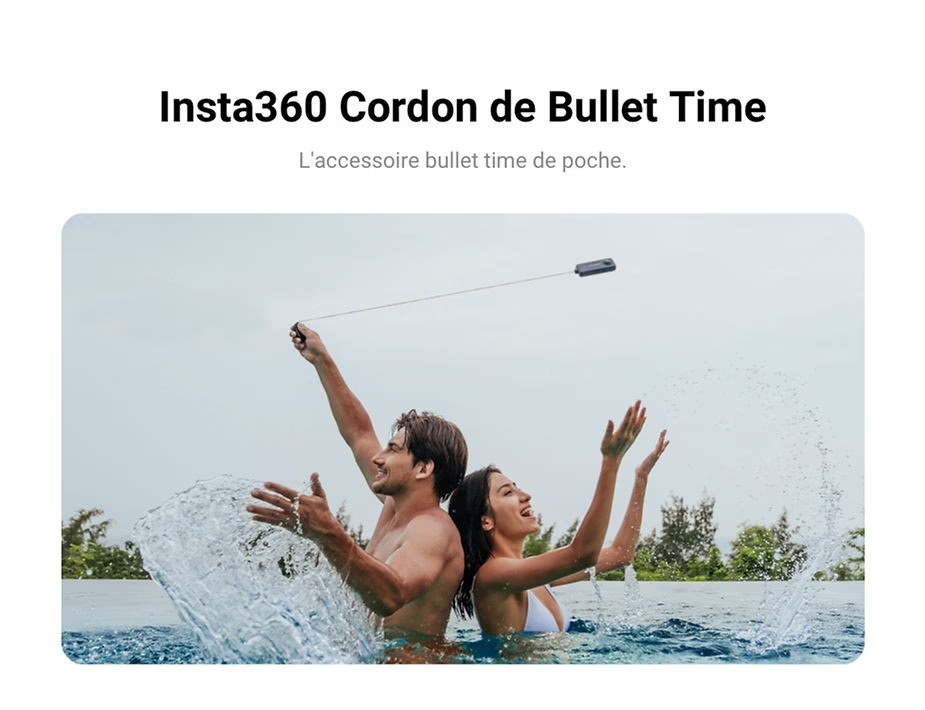
- Attaching the Camera to the Bullet Time Cord : To achieve the Bullet Time effect, you can attach your Insta360 X4 to a Bullet Time cord or an invisible selfie stick. The Bullet Time cord is a portable, retractable accessory that allows you to rotate your camera in any direction, providing a convenient alternative for creating the spinning effect without anything being visible in the video. Note that the Bullet Time cord cannot be used with the selfie stick.
- To select Bullet Time mode : Access the shooting modes menu on the Insta360 X4 and select Bullet Time mode. You can access this mode directly via the camera’s control screen or through the Insta360 app.
- Slowly Rotate the Camera Around You : To achieve the desired effect, rotate the invisible boom mic with the camera above your head. Make sure to rotate at a constant speed and avoid sudden movements to ensure a smooth shot.
- Maintaining a Stable Position : To create the Bullet Time effect, remain as still as possible while rotating the camera. The goal is to give the impression that you are frozen while the world spins around you.
- Using Editing Options : After capturing your video, use the Insta360 app to add effects and adjust the playback speed. You can also add soundtracks to enhance the cinematic feel of your video.
Techniques for Successful Bullet Time Shots
To create standout Bullet Time videos, here are some techniques and tips to keep in mind:
- Choose an Interesting Background : Bullet Time mode works best with a dynamic background. Landscapes, architectural features, or animated locations will add depth and movement to your shots.
- Take advantage of natural light : To maximize the cinematic effect, try filming during the golden hours (just after sunrise or before sunset). The soft, warm light will add a magical touch to your videos.
- Vary the Angles : Don’t be afraid to experiment with different angles. You can rotate the camera lower or higher relative to your body to create different perspectives and make your videos even more captivating.
- Synchronize Your Movements : To enhance the dramatic effect, try synchronizing your movements with the camera’s rotation. For example, jump or gesture when the camera is moving to add an extra dimension to your video.
Tips for Using Bullet Time Mode Safely
Safety is important, especially when using a selfie stick to rotate the camera around you. Here are some tips to stay safe:
- Check your environment : Make sure there are no obstacles, objects or people around you that could be hit by the rotating pole.
- Use a Sturdy Pole : Make sure the pole is securely attached and the camera is safe. An unstable pole could cause the camera to fall and get damaged.
- Maintain a Moderate Speed : Rotating the boom mic too quickly can not only result in jerky footage, but also increase the risk of losing control of the camera. Rotate at a moderate speed for optimal results.
Why use Bullet Time mode with the Insta360 X4 ?
The Insta360 X4 offers advanced stabilization and exceptional 8K image quality, making it the perfect tool for shooting Bullet Time. FlowState stabilization ensures smooth, crisp videos, while 8K resolution lets you capture incredible detail. Bullet Time mode is a great way to add creativity and emotion to your videos, offering angles that few other cameras can replicate.
Using the Insta360 X4 , you have the freedom to create unique sequences that capture movement in breathtaking ways. Whether you want to impress your social media audience or simply preserve unforgettable memories of your adventures, the Bullet Time feature is an excellent choice. With the right techniques and a little practice, you can transform any scene into an unforgettable cinematic moment.
So, take out your Insta360 X4 , attach it to your invisible selfie stick, and let your creativity flow. Bullet Time is more than just a feature – it’s a way to transform every moment into an unforgettable experience.





Leave a Reply