
This comparison highlights the real differences, strengths, and trade-offs first, so you can make the right choice faster.
Are you unsure whether to prioritize the convenience of plug-and-play or the complete freedom of customization in this DJI Avata 2 vs. Cinewhoop Custom comparison? This hesitation is understandable, as choosing the wrong equipment from the start could lead to costly repairs and significantly hinder your FPV piloting progress in the long run. Here, we analyze the technical and budgetary differences to help you finally choose the drone that truly suits your needs and video goals this year.
- DJI Avata 2 vs. Cinewhoop Custom: The Quick Verdict for Those in a Hurry
- Getting started and learning: ready to fly or ready to weld?
- Flight performance and agility: raw power versus controlled flight
- The battle of the image: O4 integrated camera vs. modular setup
- Durability, repairs and long-term cost: the wallet has a say.
- Ecosystem and compatibility: DJI’s closed garden versus open source
- Verdict 2025: Which profile for which machine?
DJI Avata 2 vs. Cinewhoop Custom: The Quick Verdict for Those in a Hurry
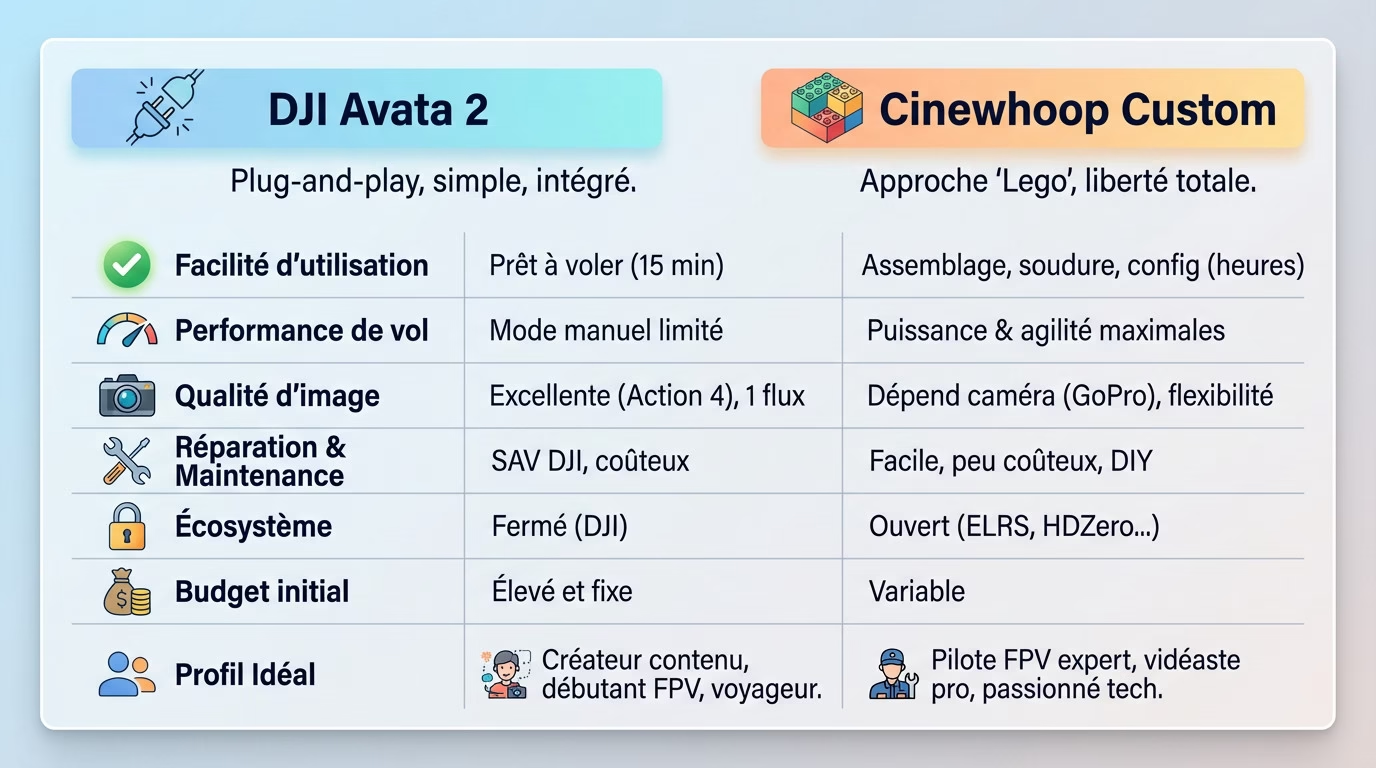
The two philosophies face to face
Need to fly right away? The Avata 2 is the ultimate “ready-to-fly” solution. You take it out of the box, charge the battery, and you’re off. In this DJI Avata 2 vs. Cinewhoop Custom comparison, it’s the integrated and reliable option within the DJI ecosystem.
Custom cinewhoops are like building with Lego. You choose every part, from the chassis to the motors. It requires time and technical skills, but the freedom of configuration is total for the demanding pilot.
Ultimately, the choice isn’t about the “best” drone, but about the user profile. The right device for you depends solely on your available time, your flying preferences, and your comfort level with DIY projects.
Comparative table: key points at a glance
This table summarizes the key differences to help you avoid making the wrong choice. It’s an essential shortcut for quickly visualizing where each machine stands and understanding what you gain or lose with each option.
| Characteristic | DJI Avata 2 | Cinewhoop Custom 2025 |
|---|---|---|
| Ease of use | Ready to fly in 15 minutes | Requires assembly, welding and configuration (several hours/days) |
| Flight performance (Acro) | Manual mode is present but limited in acceleration | Maximum power and agility, fully configurable |
| Image quality | Excellent (Action 4 type sensor), single video stream | Depends on the onboard camera (e.g., GoPro), total flexibility (dual recording) |
| Repair & Maintenance | Return to DJI customer service required, expensive | Easy and inexpensive, each part is user-replaceable. |
| Ecosystem | Closed (DJI goggles and radio) | Open (compatible with ELRS, HDZero, Walksnail…) |
| Initial budget | High and fixed (complete package) | Variable, may be cheaper or more expensive depending on the components |
Who is each drone intended for?
The Avata 2 is ideal for content creators who want immersive shots without the hassle. It’s also the choice of FPV beginners looking for safety, or travelers who need absolute reliability in the field.
Go for a custom cinewhoop if you’re an FPV pilot looking to push the boundaries of acrobatics. It’s for the videographer who demands total control over their image and the enthusiast who loves building and repairing their equipment.
Be aware that there are some interesting alternatives that fall somewhere in between. Take a look at this comparison between the Antigravity A1 and the DJI Avata 2 ; it’s a relevant option for those looking for a technical compromise.
Getting started and learning: ready to fly or ready to weld?
Now that the match has been set, let’s look at what this actually means right out of the box.
The “zero hassle” experience of the DJI Avata 2
You open the box and, good news, everything is there. The device arrives pre-configured, ready to use without any hassle. Updates are easily launched via the DJI Fly app, which guides you step by step.
For your first flights, rely on the stabilized Normal and Sport modes to gently build confidence. The emergency brake button and automatic return-to-home (RTH) provide a reassuring safety net should you panic.
You can, of course, switch to Manual mode for more freedom, but the drone’s core principle remains simplicity. It’s a machine designed to fly immediately, not for spending hours tweaking complex settings.
The initiatory journey of the custom cinewhoop
Here, forget about ease: “custom” begins with extensive research. Each component must be meticulously selected: the frame, the appropriate motors, the flight controller, the ESCs, and even the VTX video system.
Next comes the construction, where the soldering iron becomes your best friend. Assembly requires the patience of a saint and absolute precision to connect everything cleanly without frying anything during the initial power-up.
Once the drone is assembled, here are the software configuration steps that await you:
- Flash and configure the flight controller firmware (Betaflight or Emuflight).
- Fine-tune the PIDs to achieve stable and responsive flight.
- Configure flight modes, OSD display, and failsafe security.
- Pair the remote control and the glasses, which are often from different brands.
The simulator: an essential step in both cases
Whether you choose the DJI Avata 2 or the Cinewhoop Custom, manual mode isn’t something you can just wing. Simulator training (like on Velocidrone or Liftoff) is essential to learn the basics of piloting without risking damage to your equipment.
It’s in front of the screen that you’ll develop the muscle memory essential for FPV flying. Spending dozens of hours on the simulator will save you hundreds of euros in costly repairs and spare parts.
Even with the Avata 2, skipping this step is the best way to end up in a tree on your first flight in Manual mode.
Flight performance and agility: raw power versus controlled flight
Once airborne, the sensations are radically different. This is where the gap between the two approaches really widens.
The Avata 2: an agile marathon runner but not a sprinter
In flight, the Avata 2 prioritizes reassuring stability above all else. It’s a predictable drone, capable of staying airborne for approximately 23 minutes, a rare endurance that allows for seamless, stress-free filming.
But be warned, even in manual mode at 27 m/s, it lacks bite. The acceleration remains gentle, almost sluggish compared to a custom bike. For tricks requiring a sharp burst of throttle, like a Split-S or a Power Loop, it can lack “punch” at the critical moment.
This isn’t a flaw; it’s a design choice by DJI for safety and accessibility. It’s perfect for smooth, cinematic flights where fluidity is key.
The custom cinewhoop: the uncompromising racing beast
In the DJI Avata 2 vs. Cinewhoop Custom comparison, the custom build is a game changer. Here, performance is limited only by your budget and the laws of physics. The power-to-weight ratio is significantly better.
Looking for thrills? Expect lightning-fast acceleration and the ability to effortlessly string together acrobatic maneuvers. Surgical responsiveness awaits you, and you decide the level of aggression.
However, this power comes at a cost: flight time is often shorter, around 3 to 6 minutes compared to the Avata’s 20 minutes. Furthermore, piloting is much more demanding for the pilot.
The specific case of theft indoors and in close proximity
These two machines are designed for this purpose, thanks to their integrated propeller guards. This is the very essence of the “cinewhoop”: being able to operate close to the subjects.
But the Avata 2 weighs approximately 377g at takeoff, and this inertia is noticeable in very confined spaces. A lighter, 3-inch custom drone will be more agile for squeezing through tight spaces.
For complex real estate thefts or highly technical indoor shots, a lightweight custom aircraft often has the advantage in terms of maneuverability.
The battle of the image: O4 integrated camera vs. modular setup
The quality and simplicity of the DJI O4 system
The Avata 2 is no toy. Its sensor rivals that of an excellent action camera, offering the D-Log M profile for serious color grading. It’s clean, sharp, and ready to use.
In terms of stability, RockSteady and HorizonSteady do a fantastic job. Everything is integrated, so forget the hassle of third-party software, although Gyroflow remains an option. Note that you need SD cards specifically designed for the DJI Avata 2 to handle 4K without glitches.
But here’s the catch: you only have one video stream. What you see in the goggles dictates the recording. It’s impossible to separate the exposure or frame rate settings for the pilot and the final image.
The complete flexibility of the FPV camera + action camera combination
On a custom cinewhoop, the tasks are separated. A small FPV camera manages your instant video feed, while a high-performance GoPro-type camera sits on top to capture the final sequence.
This separation is a game-changer. You can shoot in 5K at 24fps for a pure cinematic look, while maintaining a smooth 120fps feed in the headset. It’s this complete freedom that the DJI Avata 2 vs. Cinewhoop Custom comparison highlights.
The downside? It means twice the work. You have to manage two batteries, two SD cards, and often spend hours on Gyroflow to stabilize the shots in post-production.
Which setup should I choose for which video project in 2025?
For feeding a YouTube channel or social media, the Avata 2 is a formidable tool. The quality is more than sufficient and the workflow is ultra-fast. You film, you export, you publish.
However, for demanding music videos or commercials, customization remains king. Being able to assemble the best action camera for 2025 and fine-tune every image parameter is non-negotiable for professionals.
Ultimately, it’s a binary choice: do you want the immediate efficiency of an all-in-one system or the raw power of a custom-built tool?
Durability, repairs and long-term cost: the wallet has a say.
The crash with an Avata 2: a costly experience
You hit it a little too hard, an arm is broken, or a motor has stopped working. Unfortunately, there’s nothing you can do yourself on the Avata 2. Your drone remains grounded.
The process is cumbersome: contact DJI customer service, send the drone in, wait for a quote, pay for the repair, and wait for it to be returned. It can take weeks and be expensive. You lose precious flying time.
DJI Care Refresh insurance is almost indispensable, but it comes at a cost and has a limited number of uses.
The philosophy of repairing the custom cinewhoop
Let’s change our perspective. On a custom drone, a crash is part of the game. The drone is designed to be repaired in the field. You get out your tools and get to work.
Here’s how simple common repairs are:
- A broken propeller: 30 seconds and a screwdriver. And there you go!
- A bent chassis arm: 10 minutes and a few screws.
- A burnt-out motor: 15 minutes and 3 welds.
- An antenna torn off: 5 minutes to replace it.
The cost is also much lower. A replacement motor costs around twenty euros, a chassis arm even less. You’re self-sufficient.
Calculating the total cost of ownership: beyond the purchase price
Let’s analyze the initial cost for this DJI Avata 2 vs. Cinewhoop Custom comparison. The Avata 2 package seems expensive, but it’s complete. The Custom might appear cheaper, but you have to add a radio, goggles, batteries, and a charger.
The real calculation is done over one or two years. The “crash” budget for an active custom motorcycle rider can be a few hundred euros in parts. A single major repair on the Avata 2 can reach the same amount.
If you plan to fly aggressively and progress in aerobatics, custom will almost always be more economical in the long run.
Ecosystem and compatibility: DJI’s closed garden versus open source
Your drone doesn’t live alone. It’s part of an ecosystem of glasses, radios, and protocols that define your experience.
DJI’s integrated but locked universe
Understand the principle of this ecosystem. In the DJI Avata 2 vs. Cinewhoop Custom duel, the Avata sets the rules. It only works with the DJI FPV 3 remote controller and the Goggles 3.
The advantage is seamless, hassle-free integration. It works immediately, pairing is simple, and the user experience is smooth. The new DJI Goggles 3, with their O4 transmission, offer exceptional image quality and range.
The major drawback is this total lock-in. You can’t use your favorite radio or glasses from another brand: you’re trapped in the ecosystem.
Total freedom in the custom FPV world
Let’s now look at the opposite approach from the assembly side. In the world of customization, almost everything is interoperable between manufacturers. It’s the true realm of open source and tinkering.
Here are the current market standards. For radio, the ExpressLRS (ELRS) protocol dominates due to its range and low latency. For video, you have the choice between DJI O3/O4, HDZero for speed, or Walksnail as a good compromise.
The advantage is that your peripherals, like the radio and goggles, are a long-term investment. You’ll be able to use them on all your future drones, regardless of the brand.
What impact will this have on your future purchases?
If you start with the Avata 2, you’re investing in a complete package. If tomorrow you want a 5-inch racing drone, you’ll have to buy a new radio and maybe goggles.
If you start with a complete custom setup, you can evolve your fleet. You’ll build a cinewhoop, then a freestyle drone, then a long-range drone, all while keeping the same piloting equipment.
It’s a strategic choice for your budget. You’re either investing in a single product or in a scalable platform.
Verdict 2025: Which profile for which machine?
So, after weighing everything up, how do you make the right choice for yourself today in 2025? Let’s summarize.
The DJI Avata 2 is for you if…
You want crazy cinematic shots without the hassle. Your time is precious: you’d rather spend it flying and capturing images than soldering wires in a workshop.
Safety is your top priority. Are you a beginner or flying over water? DJI’s emergency button and reliable Return to Home (RTH) are there to save the day.
You already own DJI equipment and are looking for an all-in-one solution. You want a seamless experience where everything connects instantly. In short, a product that works “right” when you turn it on.
The custom cinewhoop is your ally if…
You’re aiming for pure performance and limitless acrobatic piloting. You want a responsive machine that reacts instantly, capable of diving and turning much faster than the Avata.
You enjoy understanding mechanics. Getting your hands dirty, changing a motor, soldering a circuit board, or configuring Betaflight is part of the fun. You want to repair things yourself for less money.
You have a very specific need that the general public is unaware of. Whether it’s an ultra-light drone under 250g or the desire to use an alternative video system like Walksnail, customization is mandatory.
The final questions to ask yourself before deciding
To help you decide once and for all, here’s the ultimate test. Take a sheet of paper, or just two seconds to think, and answer these points honestly to avoid a costly mistake.
- What is my total budget, including inevitable future repairs?
- How many hours per week am I really willing to dedicate to maintenance and technical configuration?
- Is my goal to create beautiful, fluid images or to master freestyle tricks?
Your answers determine the winner of the DJI Avata 2 vs. Cinewhoop Custom match for your needs. There are no wrong choices, only the ones that aren’t right for you. And that’s it!
The final choice is yours. Opt for the DJI Avata 2 if you’re looking for immediate simplicity and stable footage. Choose the custom Cinewhoop for total freedom and raw thrills. In any case, start with the simulator to avoid any mishaps. Now it’s your turn to fly.





Leave a Reply