
Are your stats plummeting from the start because your viewers are immediately skipping your content? Here, we’ll explain how Submagic improves video retention by transforming your first three seconds with AI-powered tools designed to grab attention. You’ll learn how to use dynamic subtitles and automatic zooms to stop scrolling and finally boost your views.
- The verdict is in 3 seconds: the initial retention challenge
- Dynamic subtitles: Submagic’s weapon for captivating from the start
- Rhythm and dynamism: other assets for the first few seconds
- Putting it into practice: your 3-second strategy with Submagic
The verdict is in 3 seconds: the initial retention challenge
Let’s keep it simple: you have three seconds. Not a second more. That’s the exact time it takes for a brain to decide if your video is worth watching or if it will end up in oblivion.
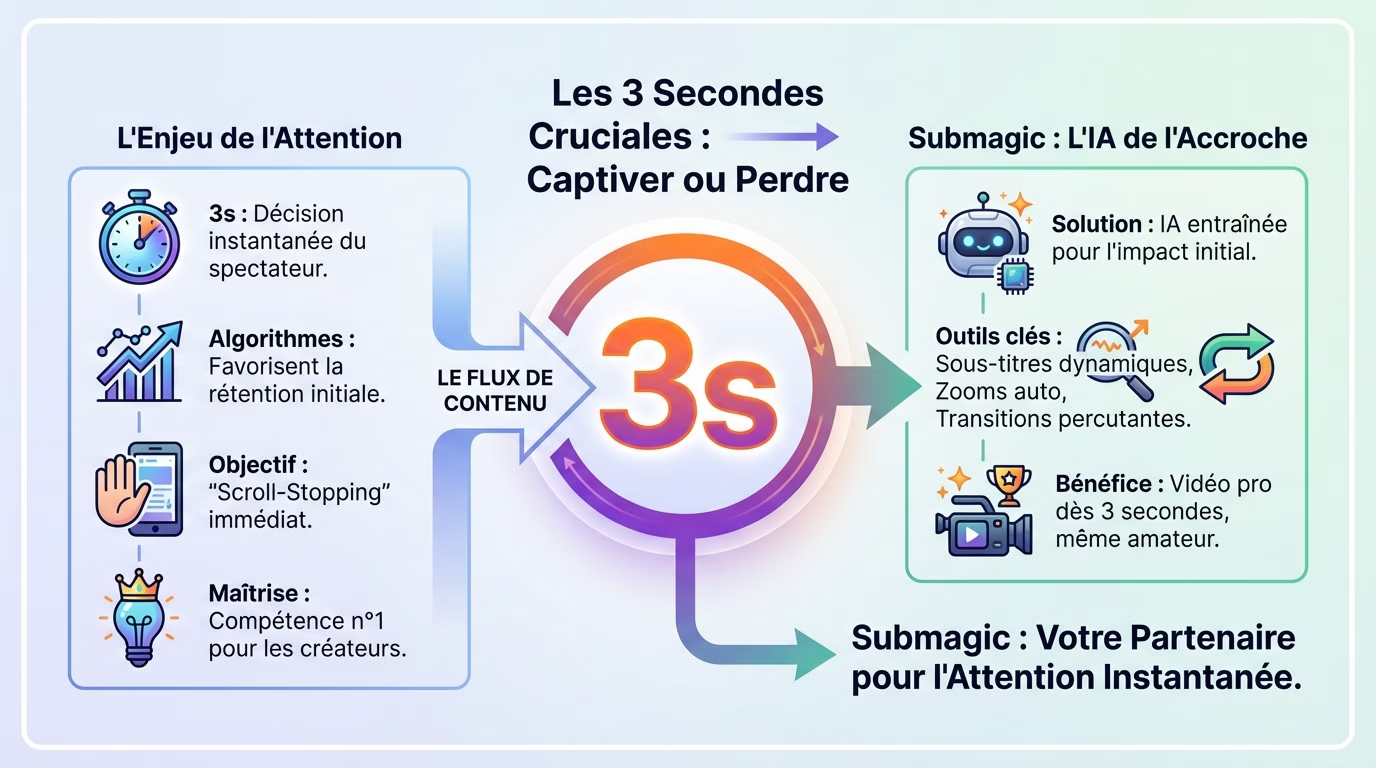
Why these 3 seconds change everything for your videos
A viewer’s attention has become a rare commodity. In the blink of an eye, they judge your content. It’s brutal but real: either you grab their attention immediately, or they scroll mercilessly.
It’s not just a matter of taste, it’s simple math. The algorithms of YouTube Shorts and TikTok heavily favor content with high initial engagement. A strong start guarantees your video will reach a wider audience.
Your enemy is automatic scrolling. To break this hypnotic spell of endless scrolling, you need a real visual or auditory shock. The goal is simple: force your thumb to stop abruptly on your image.
Mastering this precise moment has become, without exaggeration, the number one skill for any creator who wants to break through today.
Submagic’s promise: AI designed for hooks
That’s where Submagic comes in to solve this problem. It’s not just a simple editing tool, but an AI specifically trained to maximize the impact of your first few seconds.
The tool focuses entirely on what instantly captures the eye and ear. With dynamic subtitles, automatic zooms (“Magic Zooms”), and abrupt transitions, submagic improves video retention by using these formidable weapons to win the battle for attention.
The idea is to transform an amateur video into a professional-looking production right from the start. Submagic automates these hook techniques that professionals spend hours setting up manually.
But how exactly do these features work to captivate your audience?
Dynamic subtitles: Submagic’s weapon for captivating from the start
We’ve seen that the hook is key. Now let’s look at Submagic’s most visible tool for achieving this: subtitles.
More than words: mesmerizing visuals
Forget about dull, traditional subtitles. With Submagic, words come alive and change color in sync with the spoken word. It’s no longer just text, but a graphic element that enhances the image.
This visual effect is mesmerizing. The constant movement of the text guides the eye and forces the viewer to focus on the message from the very first second.
Also consider watching videos without sound. On mobile, many videos start silently; these animated subtitles immediately fill that void.
It’s a powerful technique for holding attention. The viewer doesn’t even wonder whether to turn on the sound; they’re already captivated.
How personalized subtitles boost engagement
Effectiveness comes not only from animation, but also from personalization. Submagic allows you to create a strong, unmistakable visual identity.
You have several levers at your disposal to make a lasting impression:
- Adding animated emojis: To emphasize an emotion or keyword right from the start.
- Choosing fonts and colours: To match your brand guidelines and be recognizable.
- Highlighting effects: To emphasize the most impactful word in the tagline.
These options transform a tagline into a visual event. This is what creates the “pattern interrupt” and abruptly stops the user’s scrolling.
Fortunately, this AI video editing tool makes these adjustments quick and easy. This is how Submagic improves video retention without any technical effort.
Rhythm and dynamism: other assets for the first few seconds
AI that zooms and cuts for a punchy rhythm
The tool analyzes your video to identify key moments and automatically applies zooms in or out. As soon as a sentence ends or an important word appears, the image moves. This breaks the monotony of a static shot without you having to manually adjust any effects.
Next, the “Auto-Cut” function eliminates silences. That half-second pause at the start? It’s enough to drive the audience away. Submagic removes it so the sound starts immediately.
The result? The viewer is captivated by a non-stop video, where constant movement draws the eye. It’s an advanced editing technique, but here, everything is automated.
This provides a raw energy that naturally encourages one to stay.
The concrete impact on the first 3 seconds: before/after
To truly understand, nothing beats a direct comparison. Here’s what typically happens in the first 3 seconds and how Submagic improves video retention.
| Element | Standard video (without Submagic) | Optimized video (with Submagic) |
|---|---|---|
| Text | No or static subtitles | Animated, colorful subtitles with emojis |
| Pace | Fixed shot, silence possible at the beginning | No silence, dynamic zoom from the very first word |
| Visual Impact | Static, risk of boredom | Dynamic, ‘scroll-stopper’, grabs attention |
| Message | The message has just been heard. | The message is seen, read, and felt. |
The contrast is striking. On one hand, a passive video that waits for the viewer’s attention. On the other, an active video that aggressively seeks it from the very first frame.
These micro-adjustments, accumulated over 3 seconds, make all the difference between a 2-second view and a complete view.
Putting it into practice: your 3-second strategy with Submagic
You’re not going in blind here. Submagic offers pre-designed templates from successful creators. It’s the perfect starting point to avoid getting lost.
Take action now. Here are the settings:
- Choose a template that matches the energy of your video.
- Change the color or add an emoji to the important word.
- Enable zoom and visual effects.
The AI does 90% of the technical work. Your role is to guide the AI on the exact intent of the video. The goal is to amplify the impact of your tagline, not create it from scratch.
This makes it easier to create a viral YouTube Short . The tool handles the technical aspects, so you can focus on the message.
Configure your perfect “hook” in just a few clicks
Analyze and adjust: the algorithm will thank you
The work doesn’t stop after exporting. You need to look at retention statistics on YouTube Studio or TikTok. The goal is to see if the initial peak is higher. This is how Submagic improves video retention.
I advise you to test different hooks. Try a different template, another highlighted word, or a B-roll from the very first second.
Submagic makes this testing process incredibly fast. In just a few minutes, you can produce multiple versions of the same headline to see what works best with your audience. Try Submagic here .
You now know that everything hinges on three seconds. Submagic gives you the tools to win this battle for attention with its dynamic subtitles and automatic zooms. Stop your audience from scrolling. Take control of your video openings and watch your retention rates skyrocket.







Leave a Reply