
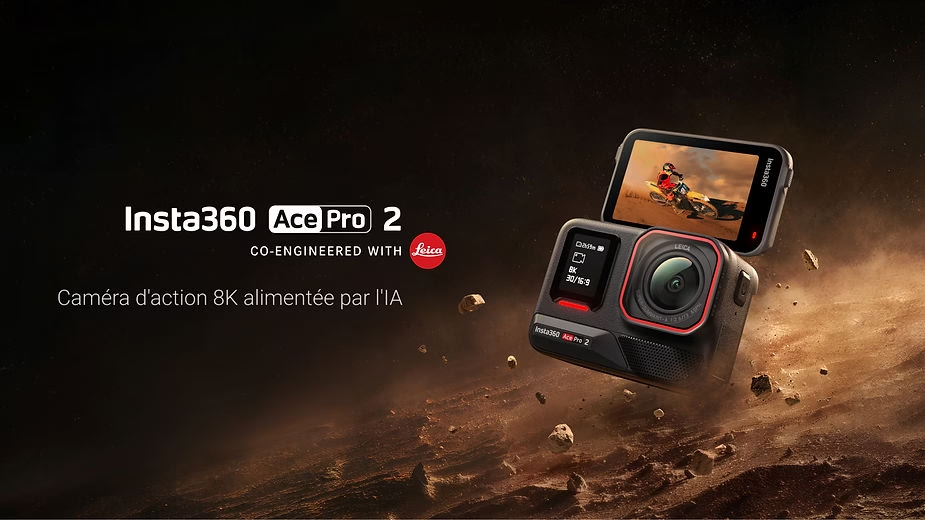
The Insta360 Ace Pro 2 is an innovative action camera that offers a variety of voice and gesture controls for ease of use. These features allow users to control the camera without having to touch it, making the capture process smoother, especially in dynamic situations. Whether you’re filming an outdoor adventure or need to capture a special moment without direct handling, this guide explains how to use these smart controls to get the most out of your camera and make your recordings even more creative and spontaneous.

1. How to Use Gesture Control
The Insta360 Ace Pro 2 ‘s gesture control is a handy feature that lets you start recordings or take photos without touching the camera. Here’s how to activate and use it:
To activate gesture control , swipe down from the top of the camera screen, then find the ✋ icon and select “gesture control”. This feature can recognize gestures made between 0.4 m and 1.6 m from the camera, as long as your face is visible and unobstructed.
- Press ✋ (open hand) to start a video.
- Make a V-sign ✌️ (two fingers in a V) to take a picture.
These simple gestures make capturing moments easy and natural, especially when filming alone or in environments where it’s difficult to interact directly with the camera. This can be extremely useful during hikes, sports sessions, or even when capturing family moments where you want the camera to be autonomous.
Using gesture control also offers a new way to interact with the camera, allowing you to capture spontaneous moments without having to interrupt the action to press a button. Whether you’re a content creator or an amateur, this feature lets you maintain a natural connection with your subject while having complete control over the recording.
2. Languages Supported by the Insta360 Ace Pro 2
The Insta360 Ace Pro 2 is designed for global use and currently supports 18 languages , making it easy for users worldwide to use. Supported languages include:
- English, Simplified Chinese, Traditional Chinese, Japanese, German, Korean, French, Spanish, Portuguese, Russian, Malay, Indonesian, Dutch, Vietnamese, Polish, Turkish, Italian, Arabic.
To change the language , swipe down on the camera’s touchscreen to open the menu, then tap the “Settings” icon.> “Language.” The addition of new languages is planned for future firmware updates, providing better accessibility for users worldwide. This means that regardless of your native language, you will be able to use the Insta360 Ace Pro 2 intuitively and efficiently.
This language flexibility is especially useful for content creators who travel and interact with diverse audiences. By simply changing the interface language, you can adapt the camera to the people around you, making it easier to collaborate and share important moments.
3. Voice Control of the Insta360 Ace Pro 2
The Insta360 Ace Pro 2 also features voice control , allowing you to operate the camera hands-free. This is especially useful for action scenes or when the camera is mounted on a helmet or a hard-to-reach support. Voice control makes recording much more intuitive and lets you stay focused on the action without interruption.
Languages Supported by Voice Control
Voice control currently supports three languages :
- English
- Chinese
- Japanese
To enable or disable voice control, swipe down on the camera screen and select “Settings” > “Voice Control”. This ease of use allows you to easily switch between different control options, depending on what’s most convenient for you at any given time.
Voice Commands Available
Here are the available voice commands:
- Take a Photo : To take a photo.
- Start Recording : To begin video recording.
- Stop Recording : To stop recording.
- Mark That : To mark a specific moment during the recording.
- Shutdown Camera : To turn off the camera.
These commands simplify the capture process and make the filming experience more intuitive and convenient, especially when your hands are full. Imagine being in the middle of a surfing or mountain biking session, and being able to simply say “Start Recording” to begin capturing the action without having to handle the camera—that’s the power of voice control.

4. The Microphones of the Insta360 Ace Pro 2
To deliver optimal audio quality, the Insta360 Ace Pro 2 is equipped with three microphones located on the front, top, and side of the camera. These microphones capture clear and precise sound regardless of the camera’s angle or direction, ensuring a more immersive video experience.
This multi-microphone setup is ideal for capturing audio in a variety of environments, whether you’re filming noisy landscapes or quieter scenes. Sound quality is just as important as video quality, and the Insta360 Ace Pro 2 doesn’t compromise on either. The multiple microphones help reduce background noise and capture sound more accurately, thus improving the overall quality of your recordings.
5. Audio Modes Available on the Insta360 Ace Pro 2
The Insta360 Ace Pro 2 offers several audio modes to suit different recording situations:
- Wind reduction : Ideal for outdoor shooting, especially in windy conditions, to minimize unwanted noise. This is particularly useful when recording while cycling, motorcycling, or on a boat.
- Voice Enhancement : Designed to amplify the user’s voice, this mode is perfect for vlogs or commentary. It allows you to stay the center of attention, even in noisy environments.
- Stereo : Captures balanced and immersive sound, ideal for recordings where you want the audio to reflect the ambient atmosphere. This mode is particularly effective for footage where atmosphere plays an important role, such as festivals or gatherings.
By choosing the right audio mode, you can ensure that the sound quality of your videos is always optimal, regardless of the context. Whether you’re in the middle of the desert or in a dense forest, these audio modes allow you to adapt the sound to your environment for an exceptional viewing experience.
Conclusion
The Insta360 Ace Pro 2 is a state-of-the-art camera that offers advanced gesture and voice control features, as well as multiple audio options to make your recordings more convenient and professional. Whether you want to capture spontaneous moments without touching the camera, change the language for better accessibility, or adapt the audio to your environment, this guide will help you get the most out of your Insta360 Ace Pro 2. Use these features to film intuitively and creatively, and take full advantage of this versatile and powerful camera.
Using the Insta360 Ace Pro 2 , you can transform your recordings into immersive and engaging experiences. Thanks to the combination of voice and gesture controls, and exceptional audio quality, you have a powerful tool at your disposal for creating high-quality videos. Whether you’re a professional or an amateur, this camera empowers you to capture every moment with precision and creativity, making each moment even more memorable.







Leave a Reply