
Filming with your smartphone has become the norm, but some models clearly push the boundaries of what’s possible. The iPhone 17 Pro is no longer just a phone: it’s a true pocket-sized cinema camera, capable of capturing 4K Dolby Vision video at up to 120 fps, with impressive professional results.
Meanwhile, the Insta360 Flow 2 Pro is a smart stabilizer designed for content creators. With its AI tracking, 3-axis stabilization, and creative tools like teleprompter mode, it transforms the smartphone shooting experience.
Together, these two tools form a formidable combo for filming like a pro, without a heavy camera or complex setup. Let’s see how to get the most out of them.

Why the iPhone 17 Pro is already a movie camera
Apple has always focused on mobile photography and video, but the iPhone 17 Pro takes it a step further.
High-level specifications
- 4K Dolby Vision video up to 120 fps.
- ProRes and ProRes RAW recording for filmmakers.
- Action mode in 2.8K at 60fps for sports scenes.
- Cinematic mode to achieve a reflex-like depth of field.
- Optical stabilization by sensor shift.
The strengths of the iPhone 17 Pro
What makes the difference is the combination of a large sensor , Apple’s software processing , and Dolby Vision compatibility . The result: natural colors, wide dynamic range, and videos ready to be edited or broadcast without heavy post-processing.
The natural limitations of a smartphone
Despite its qualities, an iPhone 17 Pro remains susceptible to camera shake, sudden changes in framing, or very dynamic scenes. This is where the Insta360 Flow 2 Pro comes in.
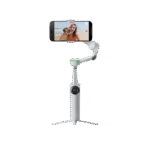
Insta360 Flow 2 Pro

The ultimate stabilizer for iPhone and Android: AI tracking, 3-axis stabilization, teleprompter and built-in creative tools for pro videos!
The Insta360 Flow 2 Pro: a stabilizer designed for creators
The Insta360 Flow 2 Pro is much more than just a gimbal.
3-axis mechanical stabilization
Where the iPhone 17 Pro relies on its electronic and optical stabilization, the Flow 2 Pro adds 3-axis mechanical stabilization that smooths out all movements, even when walking or running.
AI in the service of filming
Thanks to its intelligent tracking, the stabilizer recognizes faces and always keeps the subject centered in the frame. Ideal for vlogs, interviews, or action shots where smooth movement is required.
Built-in creative features
- Integrated teleprompter mode for reading a script while filming.
- Optional LED lighting to improve low-light shooting.
- Gesture control to start recording a hand sign.

The perfect combination: iPhone 17 Pro + Insta360 Flow 2 Pro
When you combine an iPhone 17 Pro and an Insta360 Flow 2 Pro , you get a lightweight, stable and extremely versatile setup.
Example 1: Filming a vlog while walking
- The iPhone 17 Pro captures a smooth 4K HDR image.
- The Flow 2 Pro eliminates shaking and keeps the face framed.
- The result: a YouTube or TikTok video worthy of a professional camera.
Example 2: Filming a sporting event
- The iPhone 17 Pro records in 4K/120fps for spectacular slow motion.
- The Flow 2 Pro automatically follows the subject thanks to its AI tracking.
- The result: dynamic shots, perfect for action editing.
Insta360 Flow 2 Pro
The ultimate stabilizer for iPhone and Android: AI tracking, 3-axis stabilization, teleprompter and built-in creative tools for pro videos!
Tutorial: Filming like a pro
Step 1: Prepare your setup
- Attach the iPhone 17 Pro to the Insta360 Flow 2 Pro .
- Check battery and firmware.
- Open the camera app or the Insta360 Flow app for settings.
Step 2: Choose the right video settings
- Cinematic mode for interviews.
- ProRes or Dolby Vision for a cinematic experience.
- Adjust ISO, HDR and white balance for visual consistency.
Step 3: Film smoothly
- Use the Flow 2 Pro joystick for panning.
- Leverage AI tracking to never lose track of your subject.
- Think about transitions in motion to create rhythm.
Step 4: Optimize the audio
- The iPhone 17 Pro ‘s microphones are excellent, but an external microphone can be plugged in for an even more professional sound.
- Wind reduction and Spatial Audio activated depending on the scene.
Step 5: Assembly and export
- Use the Insta360 app for quick editing.
- Export in ProRes RAW if you want to do in-depth editing.
- For TikTok or Instagram, use the optimized exports directly.
In what situations should you use the iPhone + Flow 2 Pro combo?
- Vlogging and YouTube : stable image, auto-tracking, professional rendering.
- Travel : filming light without lugging around a camera.
- Sport and action : 4K/120 slow motion + AI stabilization.
- Interviews / TikTok : integrated teleprompter + smooth vertical video.

Accessories and optimization
- External lighting for night scenes.
- Lavalier microphone connected to the iPhone 17 Pro .
- Integrated tripod of the Flow 2 Pro for fixed shots.
- Power bank to last a full day of filming.
Strengths and limitations of the combo
Strengths
- Cinematic video in 4K/120 without a heavy camera.
- Smooth stabilization thanks to the Flow 2 Pro.
- Effective AI tracking to keep the subject centered.
- Compact setup and portable everywhere.
Bounds
- Combined weight greater than a smartphone alone.
- Battery life to monitor (iPhone + stabilizer).
- It requires some practice to master all the settings.

Verdict: Filming like a pro without a dedicated camera
With the iPhone 17 Pro and the Insta360 Flow 2 Pro , you get a duo capable of replacing a professional camera in many cases.
- The iPhone 17 Pro delivers raw quality and advanced video modes.
- The Insta360 Flow 2 Pro adds stabilization, AI, and creative tools.
The result: stable, smooth videos, ready to be published, whether for YouTube, TikTok, Instagram or a more ambitious documentary.
👉 If you want to film light without compromising on quality, this combo is probably the best solution in 2025.




Leave a Reply