
Choosing the right SD card for your Insta360 X4 is crucial to maximizing your camera’s performance. A proper SD card doesn’t just store your videos and photos; It has a direct impact on the quality of recording and the fluidity of the use of your device. Indeed, a card that is too slow or of insufficient capacity can lead to slowdowns during recording, or even data loss, especially when you film in high resolution as the Insta360 X4 allows.
The write and read speed of the chosen SD card must therefore be compatible with the technical requirements of the Insta360 X4 to ensure an optimal user experience and the best possible quality shots. This article will walk you through the required specifications, recommended capabilities, as well as the best brands and models of SD cards to consider for your Insta360 X4 camera.

Maximize Your Efficiency with the PGYTECH CREATEMATE SD Card Reader
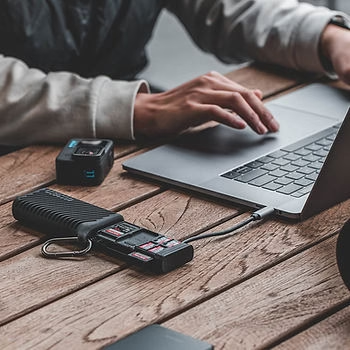
For those looking to improve the management of their devices, the CREATEMATE High Speed Card Reader Case is an ideal solution that combines speed and functionality. This innovative product not only secures your precious memory cards, it also speeds up your workflow with its ultra-fast data transfer capacity of up to 312 MB/s. Featuring dual SD and TF card slots, the CREATEMATE card reader case allows for simultaneous data transfer, making it a must-have tool for photographers, videographers, and drone enthusiasts who require efficient data management. Additionally, its ability to store multiple cards and a Nano SIM card enhances its utility, making it an excellent investment for managing digital storage on the go.
Insta360 X4 Specifications:
To fully exploit the capabilities of the Insta360 X4, it is essential to choose an SD card that not only meets the basic needs of the device but also exceeds these requirements to ensure optimal performance. Here are the minimum and recommended specifications by Insta360 for SD cards used with the X4, along with an explanation of the relevant technical terms.
Minimum and Recommended Specifications:
- Minimum: For recording videos in lower resolutions, such as 1080p, an SD card with a minimum write speed of 30 MB/s may be sufficient. However, these cards aren’t ideal for maximizing the capabilities of the X4.
- Recommended: For recording in 5.7K or even 8K, it is recommended to use SD cards with a write speed of 60 MB/s or higher. These maps ensure that the data captured by the camera is written quickly and efficiently, avoiding lag or data loss issues.
Explanation of Technical Terms:
- Write speed: This is the speed at which data can be saved to the SD card. A high write speed is crucial for high-resolution video recording because it allows the large volumes of data generated to be written without interruption.
- Speed class: SD cards are classified into different speed categories to help consumers choose the right card for their equipment. For the Insta360 X4, recommended classes include:
- Class 10: Suitable for HD and Full HD recording.
- UHS Class 3 (U3): Required for video recording in 4K or higher.
- Video Speed Class 30 (V30) or higher: Ideal for 8K recording, ensuring a continuous write speed of 30 MB/s or more.
Using an SD card that meets or exceeds these recommended specifications ensures that the Insta360 X4 performs at its maximum potential, providing exceptional image quality and a seamless user experience.
Choice of storage capacity for the Insta360 X4:
The storage capacity of the SD card is a key factor to consider when buying a card for the Insta360 X4, as it determines how much video and photo content you can store before you need to transfer the data or switch cards. Here is an overview of the different capacities available and their suitability for various types of use.
Different capacities available:
- 64 GB: Suitable for hobbyists or those who use their camera for short or sporadic sessions. A 64 GB card can store about 80 minutes of video in 5.7K, which is enough for everyday non-professional use.
- 128 GB: Ideal for semi-professional videographers or advanced amateurs who record more frequently or need more space for extended sessions. A 128 GB card can store about 160 minutes of video in 5.7K.
- 256 GB: Recommended for professionals or users who are involved in long-term projects, such as events or travel. It offers enough space so that you don’t have to constantly worry about transferring files.
- 1 TB: The best option for professionals who demand ample storage space to capture hours of high-resolution video without compromise, including 8K.
Storage Management Tips:
- Resolution and Capacity: The higher the resolution of the video, the more data is generated per minute of video. For example, shooting in 8K will consume much more storage space than shooting in 1080p. It’s crucial to choose an SD card with enough capacity to handle the resolution you plan to shoot at most often.
- Data Management: For those who regularly shoot in high resolution, it is recommended to develop a data management routine, including regular transfers of files to external or online storage to avoid filling up the SD card completely and risking losing important shots.
By choosing your SD card capacity wisely for the Insta360 X4 based on your usage and the resolution you’re shooting at, you can optimize your workflow and ensure that you never run out of space when recording.
Recommended Makes and Models for the Insta360 X4:
Choosing a reliable branded SD card is essential to ensure the reliability and performance of your Insta360 X4. Here is a selection of brands and models that have been tested and are recommended for compatibility with the X4, as well as details on their performance and durability.
Reliable Brands:
- SanDisk: Known for its reliability and consistent performance, SanDisk offers SD cards that are ideal for high-resolution recording.
- Lexar: Another reputable brand that produces high-end SD cards, which are known for their high speed and durability.
- Samsung: Offers cards with excellent write and read speed performance, suitable for 360-degree high-definition videos.
Specific models recommended:
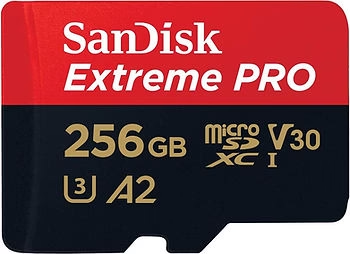
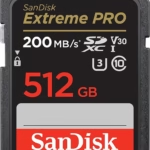
- SanDisk Extreme Pro 256GB V30, U3, Class 10 – This card is highly recommended for X4 users because of its fast write speed that allows for uninterrupted recording of 8K videos.
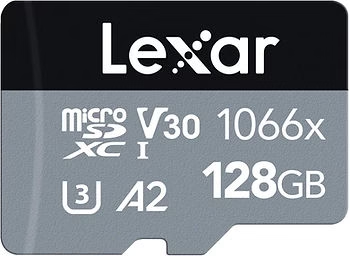
- Lexar Professional 1066x 128GB V30, U3 – Perfect for those who need a fast and reliable card for extended shoots, this card offers excellent performance under high workloads.
- Samsung EVO Plus 128GB U3, Class 10 – With its good resistance to the elements and reliability, this card is ideal for adventurers who use their X4 in harsh outdoor conditions.

Performance Comparison:
- Write/Read Speed: SanDisk Extreme Pro and Lexar Professional cards offer write speeds that exceed 90 MB/s, which is essential for 8K recording. The Samsung EVO Plus, while slightly slower, still offers a robust performance suitable for most situations.
- Durability and Resistance: All three models are designed to withstand extreme environments, including water, shock, and X-ray resistance, making them perfect for outdoor use in a variety of weather conditions.
By choosing one of these recommended SD cards for your Insta360 X4, you will not only ensure that you capture high-quality videos without worry, but also protect your precious data in almost any condition.
Where to buy your SD card:
Buying an SD card for your Insta360 X4 is a crucial step in ensuring the quality and security of your recordings. Here’s where and how you can buy SD cards safely:
Where to buy:
- Specialty stores: Buying from stores specializing in electronics or photography is often recommended. These stores usually offer a wide range of SD cards from well-known brands, and the staff can help you choose the right card for your specific needs.
- Online platforms: Sites like Amazon, B&H Photo, and Best Buy offer a wide variety of SD cards. These platforms make it easy to compare prices and user reviews for various models.
Tips for Avoiding Counterfeits:
- Buying from Authorized Dealers: Make sure the seller is an authorized reseller by SD card brands.
- Check Reviews and Ratings: On online platforms, take the time to read customer reviews and check the seller’s rating to ensure their reliability.
- Be careful with Too Tempting Offers: Be wary of extremely low prices that seem too good to be true, as they may indicate counterfeit products.
SD Card Installation and Formatting:
To maximize the performance and reliability of your SD card in the Insta360 X4, follow these steps for installation and formatting:
Step-by-Step Guide to Installation and Formatting:
- Insert SD Card: Turn off your Insta360 X4 camera before inserting the SD card. Open the SD card compartment, insert the card firmly until it clicks into place.
- Turn on the Camera: Open your cam.
- Formatting: Go to the settings menu on your camera, find the format SD card option, and select it. Confirm that you want to format the card, which will erase all the data on the card.
- Verification: Once the formatting is complete, record a short video to verify that the card is working properly.
Importance of Regular Formatting:
- Formatting your SD card regularly can help maintain its performance and reliability. This helps clean the card of corrupted or unnecessary files and optimizes storage space. It is recommended that you format your SD card in your Insta360 X4 camera rather than on a computer to ensure maximum compatibility.
By following these tips, you will not only ensure the purchase of a genuine and high-quality SD card for your Insta360 X4, but you will also optimize its operation through proper installation and formatting.
Conclusion: Choosing the Right SD Card for Your Insta360 X4
To get the most out of your Insta360 X4, choosing the right SD card is essential. As we’ve seen, it’s important to select a card that not only meets the speed and capacity requirements of the device, but is also reliable and durable to withstand the varied conditions of use.
Summary of Key Points:
- Make sure that the SD card has enough write speed to handle high resolutions, including 5.7K and 8K that the Insta360 X4 can record.
- Choose capacities adapted to your use, ranging from 64 GB for light uses, up to 1 TB for professionals who require more storage space.
- Look for reputable brands like SanDisk, Lexar, and Samsung, and make sure you buy your cards from reputable sellers to avoid counterfeits.
Encouragement to Invest in a Quality Card: Investing in a high-quality SD card is a wise choice that will allow you to take full advantage of the impressive capabilities of the Insta360 X4. A good card not only ensures that you can capture images and videos without interruption, but it also protects your data from potential loss due to card errors.
Call to Action: We invite you to share your personal experiences with different SD cards in the comments below. Your feedback can help other users make informed choices. Also, if you want to dig deeper, check out our detailed buying guide or the specific product reviews available on our site. These resources will provide you with additional information and detailed assessments to help you in your selection.
By choosing your SD card wisely, you’ll maximize the performance and reliability of your Insta360 X4, ensuring a 360-degree video capture experience that’s both enjoyable and productive.



Leave a Reply