
Which SD card for the Insta360 X3?
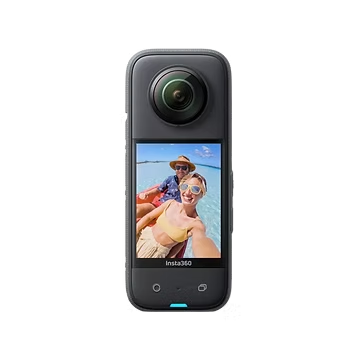
Hey to all you you technology and photography enthusiasts out there! Today, we’re going to dive into a crucial topic for all Insta360 X3 owners: selecting the perfect SD card for this extraordinary device. Launched in September 2022, the Insta360 X3 is Insta360’s latest 360-degree camera, known for its impressive features such as pre-recording, loop recording, and incredible water resistance up to 33 feet (10 meters).
These features, combined with a 72MP photography capability and up to 5.7K video resolution, make the Insta360 X3 not only versatile but also storage-intensive. That’s why choosing the right SD card is essential to fully exploit the potential of this revolutionary camera. Whether you’re capturing unforgettable moments on your travels, filming thrilling action scenes, or simply creating creative content, the right SD card will ensure that your X3 performs at its best.

In the next few paragraphs, we’ll explore the ideal SD card options for the Insta360 X3, guiding you through the necessary specs and recommended models. Don’t forget to check out our selection of Insta360 accessories to complete your photography and videography equipment. Stay tuned!
For more details on the features of the Insta360 X3, visit the official website of Insta360.

Criteria for Selecting an SD Card for the Insta360 X3
Hello Insta360 X3 enthusiasts! Today, we’re going to talk about something essential: choosing the perfect SD card for your camera. To ensure that your X3 reaches its full potential, there are a few small details that should not be overlooked.
For starters, it’s crucial to use UHS-I Micro SD cards with a speed class V30 or higher and an exFAT form factor. Why is that? Well, it’s simple: if you don’t use the recommended type of card, you might experience problems while recording or even damage your precious videos.
Let’s take a look at the capacity. A 128GB card can store about 21,800 photos or 2.5 hours of video in 5.7K. But be careful, these numbers can vary depending on the resolution and refresh rate of your videos. To give you an idea, with a 128GB card, you can record up to 130 minutes of video in 5.7K at 30 fps, 300 minutes in 4K at 30 fps, or 190 minutes in 4K at 50 fps. For a 3K video at 100 fps, you can go up to 150 minutes.
A quick tip: while 128GB cards are fine for most users, if you’re shooting a lot of high-resolution videos or photos, consider investing in a higher-capacity card, such as a 256GB. And remember, Micro SD cards UHS-II, UHS-III, or larger than 1TB are not compatible with the X3. So stay within the framework of UHS-I or UHS-II cards to avoid any problems.
Don’t forget to take a look at our range of Insta360 accessories to maximize your experience with the X3. That’s all for today, stay tuned for more tips and tricks for your Insta360 X3!

Improve Your Productivity with PGYTECH
PGYTECH’s high-speed card reader case transforms your digital media management by perfectly combining security and performance. Offering transfer speeds of up to 312 MB/s, this case is a must-have for professionals who require speed and reliability. Equipped with SD and TF card slots, the PGYTECH facilitates simultaneous data transfers, which is crucial for photographers, videographers, and drone users. Its ability to store various types of cards, including Nano SIM cards, makes it an essential tool for securing and easily transporting your valuable content in the field.

Best Recommended SD Cards for the Insta360 X3
For Insta360 X3 aficionados! Are you ready to discover the stars of SD cards for your Insta360 X3 camera? Here we go!
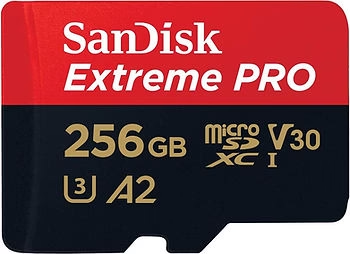
- SanDisk Extreme Pro 256GB : It’s the cream of the crop! With read speeds of up to 200MB/s and write speeds of up to 140MB/s, this SD card is a real workhorse for your X3. It is as robust as it is reliable, resistant to shocks, temperature, water and even X-rays. What more could you ask for? It is also available in different capacities, up to 1TB.
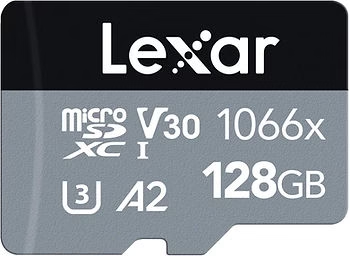
- Lexar Professional 1066x Series : These cards offer read speeds of up to 160MB/s, which is ideal for capturing high-quality images and 4K UHD video. The models range from 64GB to 256GB, perfect for all your storage needs.
Buy Lexar Professional 1066x Series
- Samsung EVO Plus : With read/write speeds of 100/90MB/s, this card is a great choice for those looking for value for money. It is available in different capacities, from 32GB to 512GB, and offers great reliability
- Kingston Canvas React Plus : For those looking for a budget-friendly option, this card offers read speeds of up to 300MB/s and write speeds of up to 260MB/s, and is available in capacities ranging from 32GB to 256GB.
Buy Kingston Canvas React Plus
To get the most out of your Insta360 X3, make sure you choose an SD card that meets its specific requirements in terms of speed and capacity. And for an even more complete experience, don’t forget to visit our selection of Insta360 accessories. Stay tuned for more tips and tricks for your Insta360 X3 camera! 🌟📸
Purchase and Maintenance Tips for Insta360 X3 SD Cards
Today, we’re going to talk about the art of buying and maintaining your SD card. It’s a small accessory, but oh so important!
Where to buy?
- Choose reliable sellers like Amazon to avoid counterfeits. You want the best of the best for your X3, so make sure you buy authentic, quality SD cards.
- Lexar Professional 1066x, Delkin Devices, Gigastone, and SanDisk Ultra cards are a few popular options for their high performance and compatibility with the X3.
How to choose?
- Keep in mind that your X3 requires UHS-I Micro SD cards with a speed class V30 or higher and an exFAT format. Do not venture out with UHS-II, UHS-III, or more than 1TB cards that are not compatible.
- Storage capacity is also crucial. For example, a 128GB card can hold about 21,800 photos or 2.5 hours of video in 5.7K.
Maintenance and Formatting
- First of all, back up your data! Formatting erases everything on the card.
- On Mac: Use an SD card reader or adapter to connect the card to your Mac. Format it using the “Erase” option in the Finder.
- On Windows: Insert the card into a card reader, open File Explorer, right-click on the SD card, and choose “Format”. Select the exFAT file system and start formatting.
- On iPhone or Android: Follow the OS-specific instructions to format the SD card.
- In the camera: Insert the card into your X3, turn on the camera, and use the format option in the camera menu.
Good to know
- Be sure to check our range of Insta360 accessories regularly for updates and special offers.
- Stay up to date on the latest tips and advice for your X3 on our Insta360 blog.
There you go! With these tips, you are ready to maximize the use of your Insta360 X3 with the perfect SD card. Keep an eye out for more tips and tricks for your Insta360 gear! 🌟🎥

Explore the Depths of 360° Photography with the Insta360 X3
So, dear readers of our blog dedicated to Insta360, here we are at the end of our captivating journey through the world of SD cards for your Insta360 X3. I hope these tips help you get the most out of your 360° camera. Remember, choosing the right SD card is crucial for capturing stunning images and smooth videos.
Speaking of stunning captures, have you ever taken a look at our article “Insta360 Titan: The 360° Video Revolution in 11K“? This is a must-read for anyone who is fascinated by the endless possibilities of 360° photography.
And for those who are looking forward to the next innovations, keep an eye on our blog. We’ll keep you updated on all the new features, including the highly anticipated Insta360 X4. Stay tuned for more information!
In the meantime, be sure to check out our selection of Insta360 accessories to enhance your photography and videography experience. Thank you for following us and see you soon for new adventures with Insta360! 🌟📸
Don’t forget to read our insta360 coupon code article.



Leave a Reply