
We’ve all felt the frustration of seeing a great video flop, so we dug into vidIQ’s YouTube optimization to finally turn things around. Here, we’ll share how this tool adjusts your titles and descriptions to appeal to the algorithm without any hassle. Expect practical tips that will transform your channel and boost your stats ! 🚀
- Discover the right keywords with vidIQ’s flair
- Craft a hit song with vidIQ’s suggestions
- Write a description that the YouTube algorithm will love
- Tags, limitations of the tool, and the final assessment
Discover the right keywords with vidIQ’s flair
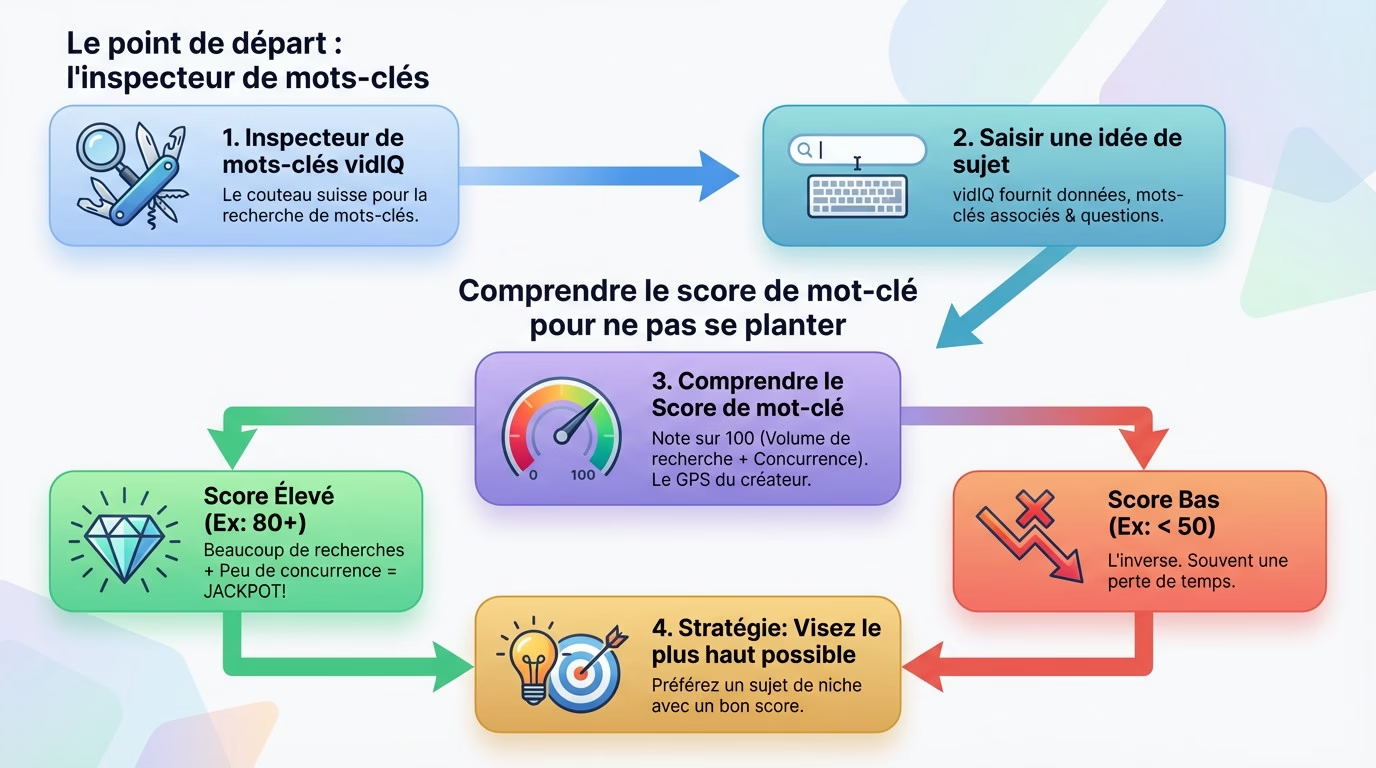
The starting point: the keyword inspector
We quickly realized that everything starts with solid research if we want to truly take off with vidIQ’s YouTube optimization . The Keyword Inspector tool is our indispensable Swiss Army knife for this mission. Before even scribbling a title, we go through it; it’s non-negotiable.
How does it work in practice? You simply type a topic idea into the extension’s search bar. The tool immediately provides you with raw data on the volume . It’s straightforward, no-nonsense, and it saves you from navigating blindly.
As a bonus, vidIQ suggests related keywords and the questions people are actually asking. A real goldmine for discovering angles you would never have thought of.
Understanding keyword scoring to avoid making mistakes
Next, we take a critical look at the Keyword Score. This score out of 100 combines search volume and fierce competition. For us, it’s literally the content creator’s GPS .
Here’s what we’re looking for: a high score indicates a lot of searches and little competition . That’s the absolute jackpot. Conversely, a low score is a bad sign. We always aim for the highest possible score, especially when we’re starting out on the platform.
A word of advice: don’t obsess over low scores. It’s often a waste of time. It’s better to target a niche topic with a good score ; we found that much more profitable.
Craft a hit song with vidIQ’s suggestions
Once you have your keyword in hand, the real battle begins: the title . It’s the first thing people see, there’s no room for error.
Use real-time SEO score
For vidIQ to optimize YouTube, we appreciate that the tool integrates directly into the upload page. The ” vidIQ SEO Score ” panel appears just to the right of the screen. It’s like having a live personal coach.
When you type in a title, the score changes instantly before your eyes. The goal is to increase it by incorporating the main keyword , preferably at the beginning. It’s almost like a game for us.
In our opinion, this tool is fantastic for visualizing the impact of each word . We can finally stop working blindly.
vidIQ’s AI to the rescue of bland titles
We’ve all experienced writer’s block when it comes to titles. vidIQ’s AI Title Generator has arrived as the miracle solution. With a simple click, the tool offers several options .
It’s crucial not to simply copy and paste the raw result. These suggestions are an excellent starting point . You can mix and match them, adapt them to your own style for a more personal result.
- A title in the form of a question to pique curiosity.
- A very direct and actionable “how-to” title.
- A title with a number to attract attention (e.g., “3 mistakes to avoid”).
Write a description that the YouTube algorithm will love
Okay, the title is good. But many creators neglect the next step: the description . It’s a huge mistake, and vidIQ is here to remind us. 👇
Structure your description like a pro
We quickly realized something: the description isn’t a rushed summary. It’s the vital space for feeding YouTube’s algorithm . The golden rule we apply? Place the main keyword, to properly optimize for YouTube, within the first 25 words.
Next, we take the time to write two or three paragraphs detailing the adventure. We take this opportunity to sprinkle in synonyms and secondary keywords that vidIQ kindly suggested to us at the start.
Finally, we wrap things up with our relevant links, social media profiles, and hashtags. This shows YouTube that we’ve paid attention to every detail . ✨
vidIQ’s checklist for a rock-solid description
Our first instinct is to look at the panel on the right. vidIQ’s ” Optimization Checklist ” is our compass. It’s a checklist of tasks to ensure we don’t forget anything along the way.
For the description, the tool scans everything: the keyword, the length. Sometimes, the writing process doesn’t go as planned, and this safeguard alerts us to any omissions. It’s really reassuring .
- Include the target keyword in the first 25 words of the text.
- Write a detailed description of at least 200 words .
- Add at least one external link to a website or social network.
Tags, limitations of the tool, and the final assessment
Title, check. Description, check. That leaves the last pillar, often misunderstood: tags . And then, we’ll be honest with you about what vidIQ doesn’t do perfectly.
Choosing your tags without spending the night
Let’s be honest, the impact of tags has decreased, but they’re still useful for context. Fortunately, vidIQ has done the legwork for us with its recommended tags . No more endless brainstorming.
The tool analyzes our title and description to suggest relevant tags instantly . We also loved seeing the tags of competing videos; it’s a great source of inspiration.
| vidIQ functionality | What it offers (free vs. paid) |
|---|---|
| Keyword score | Basic score (free), Detailed score and history (paid) |
| Recommended tags | 3 recommendations (free), 50+ recommendations (paid) |
| AI Title Generator | A few trials (free), Unlimited use (paid) |
The pros and cons of vidIQ: we tell you everything
Let’s be honest, using vidIQ to optimize YouTube is powerful, but it’s not magic. Its biggest advantage: it structures the SEO process and saves a ton of time . That’s undeniable.
- Stop navigating blindly thanks to scores.
- Save hours on keyword and tag research.
- Finally understanding what the algorithm expects .
The free version quickly frustrated us with its limited AI features and tagging. And be warned, the tool provides some guidance, but it doesn’t replace creativity and audience knowledge . You still need to be in control. To learn more: Find out more about VidIQ or See VidIQ pricing .
In the end, we really loved using VidIQ to boost our channel. It’s the perfect co-pilot to stop stressing about SEO and focus on creative content. The tool doesn’t work magic, but it does the legwork for us . Now it’s your turn to make your views take off ! 🚀





Leave a Reply