
Are you actively searching for alternatives to InVideo AI 2025 because the sometimes robotic rendering of your videos is frustrating your audience and limiting your growth? We’ve sifted through the best solutions on the market to help you find the tool capable of producing ultra-realistic content without any technical skills. Discover immediately which software will replace your current subscription and boost your visibility thanks to our detailed comparison of the top-performing options.
- Why look for an alternative to Invideo AI in 2025?
- Criteria for choosing the right AI video creation tool
- Comparison chart of the best alternatives to Invideo AI
- Synthesia: the leader in professional AI avatars
- HeyGen: the solution for personalized and creative avatars
- Pictory and Fliki: the champions of fast “blog-to-video”
- Canva and CapCut: the all-in-one alternatives
- How to make the right choice for your video projects in 2025
Why look for an alternative to Invideo AI in 2025?
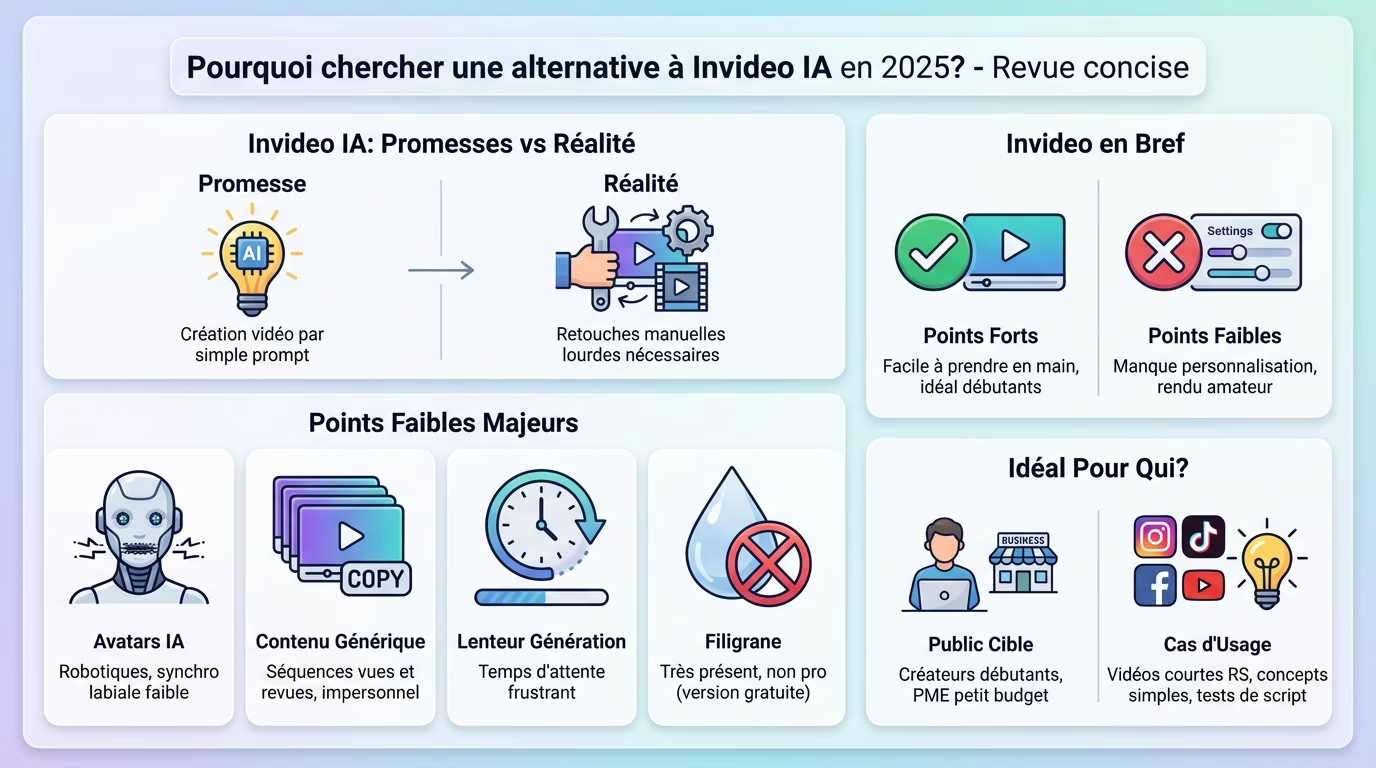
Invideo AI’s promises versus the reality on the ground
Invideo made a lot of noise with its bold promise of creating videos from a simple prompt . On paper, the idea is brilliant and a dream come true for any busy creator.
But in practice, many users, including us, quickly encountered the Limitations of the tool. The raw result does not always meet initial expectations. .
While the tool is excellent for rapid prototyping, it struggles to produce truly “finished” and professional videos without significant manual editing. This is often where the problem lies and where the search for an alternative begins. You’ll find these details in our full review of Invideo AI .
The weaknesses that make you look elsewhere
Why are so many people looking for alternatives to InVideo AI 2025 today? It’s simple: several problems keep recurring in user feedback and end up being annoying.
Here are the most frequently recurring points of friction :
- Quality of AI avatars: They often look robotic, with sometimes imprecise lip-syncing. The rendering is sorely lacking in naturalness .
- Genericity of content: AI tends to choose very conventional video sequences (b-roll), seen and reviewed everywhere, which gives an impersonal result .
- Slow generation : The time required to generate a video, especially if it is a bit long, can become frustrating in the long run.
- The watermark: On the free version, the watermark is very prominent, making the videos difficult to use professionally .
Invideo in brief: a summary before you choose
Let’s quickly summarize Invideo’s strengths. It’s an easy-to-use tool , ideal for beginners who want to create a video without any prior technical skills.
However, its weaknesses are real: a lack of advanced customization and a rendering that can quickly appear amateurish to a slightly discerning eye.
If, despite everything, you want to form your own opinion (which is always recommended), you can test the tool yourself . To form your own opinion, you can learn more about Invideo AI or directly view Invideo AI pricing .
For whom does Invideo AI remain a good option?
Let’s be clear, Invideo isn’t bad. It’s an excellent entry point for beginner content creators, small businesses on a tight budget, or for quickly creating video drafts.
It’s perfect for certain use cases: creating a short video for social media, illustrating a simple concept for an internal presentation, or testing a script idea without spending hours on it. For these specific needs, it gets the job done .
Criteria for choosing the right AI video creation tool
Now that we’ve identified Invideo’s limitations, we need to define a clear framework for analysis . How do we judge whether an alternative is truly better? That’s what we’re going to look at.
Quality and realism of AI avatars: the key to success
Realism is the number one criterion. If the avatar looks like a robot or if its voice is off, the immersion is immediately broken. Your goal is to have a presentation that closely resembles a real human presenter for your videos.
Pay close attention to the technical details before making your choice. Lip-sync must be perfect , as must subtle facial expressions and natural head movements.
The best platforms stand out clearly on this specific point. This is precisely what separates a fun gadget from a true production tool .
Ease of use vs. richness of features
A tool can be very powerful, but if it takes you three days to master it, its usefulness diminishes. The balance between raw power and accessibility remains key.
Some tools, like Pictory, focus entirely on a clean interface and a three-click process. It’s the perfect solution for speed .
Others, like Synthesia, offer more control: avatar positioning, adding elements, transitions. It’s more complex but allows for a much more personalized result . The choice depends on your need for creative control.
Languages, voices, and personalization options
Localization is vital. If you’re targeting an international audience, the number of languages and accents available is a crucial factor . Make sure, for example, that the French is of good quality.
Let’s talk about voices. The ability to choose between several voices, or even clone your own voice (a feature offered by HeyGen), is a huge plus for authenticity .
Avatar customization goes further: being able to change your clothes or even create an avatar from your own image is a game changer.
The budget: from free templates to pro subscriptions
Price is obviously a major obstacle . Models vary enormously, from often limited free plans to expensive business subscriptions.
Before you pull out your credit card, here’s a checklist to avoid wasting money unnecessarily on InVideo AI 2025 alternatives:
- Is the free plan usable? (Watermark present, limited video duration).
- Does the first paid plan unlock the essential features? ( HD export, watermark removal ).
- Is billing based on the length of video generated ? (The “credit” model can quickly become expensive).
- Does it offer good value for money compared to competitors?
Comparison chart of the best alternatives to Invideo AI
Enough theory. To get a clear picture, nothing beats a good table that puts everyone on the same page. Here is our selection of the most serious contenders for 2025 , head-to-head.
Our selection of serious competitors for 2025
We’ve chosen a mix of tools to cover all aspects of creation . You’ll find AI avatar specialists for realism, “text-to-video” experts for speed, and powerful general-purpose editors.
The challengers are Synthesia, HeyGen, Pictory, Fliki, and Canva. Each tool has its own niche; there’s no universally “best” option. This table will help you find the right one for each specific need .
The large summary table
Here’s a visual summary to help you compare the strengths and weaknesses of each solution at a glance. Take a close look to choose from these alternatives for InVideo AI 2025 .
| Tool | Ideal for… | Avatar Quality | Customization | Pricing Model | Our Opinion |
|---|---|---|---|---|---|
| Synthesia | Corporate videos, training, internal communication. | Excellent (very realistic). | Advanced (backgrounds, texts, branding). | Professional subscriptions (no free plan). | The benchmark for a professional finish. |
| HeyGen | Marketing content, social media, personalized avatars. | Very good (with avatar cloning). | Very high (voice/face cloning, dynamic scenes). | Freemium (free plan with credits). | The most creative and flexible. |
| Picture | Quickly turn blog posts and scripts into videos. | N/A (focus on assembly from stock). | Average (focus on speed). | Subscriptions (free trial). | The fastest tool for recycling content. |
| Fliki | Videos with ultra-realistic voiceovers, podcasts. | Basic (secondary functionality). | Good (voice choices, subtitles). | Freemium (monthly credits). | The king of synthesized voices. |
| Canva | Creators already in the Canva ecosystem, visual design. | N/A (other AI functions like Magic Media). | Excellent (in terms of overall design). | Very generous freemium. | The Swiss Army knife for the busy creator. |
Synthesia: the leader in professional AI avatars
The table provides an overview, but now it’s time to dig. We’ll start with the heavyweight. from the category: Synthesia.
Why Synthesia dominates the corporate market
From the outset, Synthesia positioned itself as one of the essential AI-powered InVideo alternatives for the B2B market by 2025. Their message is clear: to replace costly filming for training videos and corporate communications. And it’s working.
In fact, 90% of Fortune 100 companies use it, which is a testament to its seriousness and reliability . The platform is designed for effective team collaboration. It’s solid.
Their obsessive focus on data quality and security makes them a logical choice for professionals. You take no risks .
Key features: avatars, languages, and integrations
Let’s talk about the quality of the avatars, since that’s their main selling point. The rendering is clean, and the movements are fluid thanks to the EXPRESS-1 model. It’s a far cry from the “uncanny valley” effect of some competitors.
With a library of over 140 languages and accents, you break down language barriers . This is a huge advantage for businesses that need to produce multilingual content on a large scale. You reach everyone.
Need to connect your tools? Integrations with other professional tools (LMS, creation platforms, etc.) are numerous. This demonstrates their understanding of their clients’ workflows.
Limitations to know before committing
Let’s be honest about the drawbacks: the first, and most obvious, is The price. Synthesia is not cheap. Compared to other solutions, there’s no unlimited free plan for truly in-depth testing.
The second point is a certain creative rigidity. It’s a very “structured” tool, less fun and experimental than other generators. It remains firmly in the professional realm.
Finally, creating a personalized avatar is a premium, very expensive service reserved for large accounts. It’s not as accessible as on HeyGen with a simple photo. It’s a production tool, not a creative toy.
Synthesia’s pricing: an investment in quality?
Let’s look at the pricing structure: they operate on an annual or monthly subscription model with a set number of video minutes included. The first Starter plan at $29 per month is already a significant financial commitment to get started.
The cost per minute may seem high, but it must be compared to the cost of a traditional video production (actor, studio, editor). The savings are often massive .
It’s a calculation you need to make based on your requirements. For intensive, professional use, the investment can be very worthwhile . It’s up to you.
HeyGen: the solution for personalized and creative avatars
Want an avatar that truly looks like you? HeyGen delivers with its custom avatar creation feature. All you need to do is record yourself for a few minutes in front of your webcam—no professional equipment required. It’s incredibly simple for any creator.
Add to that voice cloning for a complete result. You type your text, and your digital double animates it with your exact timbre , without you ever having to use a microphone.
It’s the ultimate weapon for building a strong and authentic personal brand . You save a ton of time while remaining “present” on screen.
HeyGen’s trump card: avatar and voice cloning
HeyGen isn’t aimed at HR managers, but rather at marketing content creators . The interface and tools practically scream “social media” from the very first use.
You have access to ready-to-use, trending video templates . Whether for TikTok or Reels, vertical formats are available, with dynamic scenes where the avatar actually moves. Say goodbye to the boring, static presenter.
The video translation tool is a gem: it adapts lip movements to the new language.
HeyGen versus Synthesia: which one to choose?
Let’s compare apples to apples: Synthesia offers rigorous standards for large companies. HeyGen, on the other hand, offers total flexibility. For marketing professionals and freelancers looking for alternatives to invideo ia 2025, the feeling is completely different.
If your goal is to create training modules for 500 employees , stay with Synthesia. It’s well-structured, secure, and designed for that purpose.
But for viral ads featuring your own face without filming yourself, head over to HeyGen. The visual impact is significantly greater .
Pricing structure and what you actually get
Let’s talk money. HeyGen offers a generous free plan to test the software with starting credit. It’s ideal for getting started, even if the watermark remains visible in the final output.
The paid versions operate on a fairly standard monthly credit system. Basically, one credit equals one minute of generated video .
Be aware, however, that options like high-fidelity avatar cloning often require a more expensive subscription .
Pictory and Fliki: the champions of fast “blog-to-video”
The principle: to transform any text into a video
Do you have a script or an old blog post gathering dust? Simply copy the text or URL directly into the tool. The idea is to convert your writing into a dynamic video stream without lifting a finger.
The algorithm analyzes the meaning, breaks it down into scenes, and selects relevant stock videos from its image library. It then overlays a synthetic voice and automatically synchronizes the subtitles for immediate rendering .
The goal is not cinematic realism, but rather speed and efficiency to give your texts a second life .
Picturery: simplicity above all
Pictory positions itself as the most straightforward tool on the market with its ultra-minimalist interface. You won’t find any unnecessary buttons or lengthy menus here; everything is designed for quick production .
Its main advantage remains its ability to extract key phrases from dense content to generate a coherent and digestible video summary .
However, the AI voices sometimes lack warmth, and the automatic media selection can be inaccurate. It’s a “brute force” tool— efficient but not very subtle, ideal for creating a large volume .
Fliki: Ultra-realistic AI voices
Fliki plays in a different league and presents itself as a more refined alternative. Where Pictory rushes ahead, Fliki focuses on audio quality with an impressive voice catalog of over 2000 voices.
Some of their “Ultra Realistic” voices are incredible and perfectly mimic human intonations . They’re the ultimate tool for explainer videos or podcasts that sound authentic.
Of course, Fliki also offers avatars, but that’s not its primary focus. We clearly chose this solution for the quality of the voiceovers .
What type of creator are they made for?
So, which one should you choose? Pictory is for the blogger or marketer who wants to turn their last 50 articles into videos for YouTube or LinkedIn without spending their entire life on it.
But Fliki is for the creator who wants to produce documentaries or listicles with high-end audio narration , without ever having to record their own voice into a microphone.
If you are looking for alternatives to InVideo AI 2025, be aware that these are primarily content productivity tools .
Canva and CapCut: the all-in-one alternatives
What if the best alternative to Invideo AI was a tool you already use every day? Canva and CapCut […] are increasingly integrating AI . Let’s take a closer look.
Canva video: when AI integrates with your design
Forget the idea that Canva is only good for making resumes or Instagram posts. Its video suite has become enormous. The real benefit here is being able to maintain perfect visual consistency between your videos and the rest of your communication.
Take a look at “Magic Studio,” that’s where it’s happening. With Magic Media, you can generate images or short clips simply by typing a prompt, without any technical skills.
This is clearly the ideal option if you’re focusing on design and branding rather than somewhat robotic talking avatars.
CapCut: the mobile editor that’s gaining momentum with AI
Meanwhile, CapCut (TikTok’s little brother) has established itself as the absolute benchmark for fast, vertical video editing . What immediately stands out is the generosity of its free plan, which is currently hard to beat.
AI is everywhere to save you time: background removal, script generator and above all , incredibly accurate automatic subtitling .
Here, artificial intelligence assists with editing; it doesn’t do all the work for you. Think of it as a mobile editing suite powered by AI , perfect for enhancing your existing footage.
Their limitations as dedicated video generators
Let’s be honest for a minute. Neither of them will replace Synthesia for creating realistic avatars. That’s not their job. Their AI tools remain primarily creation assistants to speed up your workflow .
If your goal is to generate a complete video with a virtual presenter without ever turning on your camera, you ‘re likely to be disappointed . Look elsewhere.
These are solid alternatives for InVideo IA 2025 for editing and improving content , but not for creating from scratch.
Free, but to what extent?
Why does everyone love them? It’s simple: their very generous freemium model allows creators to produce professional content without spending a penny . That’s their biggest advantage for attracting creators.
Obviously, to access the most demanding AI features, extended storage and premium image banks, you will have to pay for the Pro versions .
To get started, it’s a risk-free and very comprehensive solution . You can test, create, and publish before spending a penny.
How to make the right choice for your video projects in 2025
We’ve covered the main options. The choice may seem complex. So, to conclude, here’s a simple method to help you make the right decision for YOUR needs.
Your number one need: what problem do you want to solve?
Ask yourself the fundamental question. Don’t look for the perfect tool, but the one that solves your current problem . Is it a lack of time? A lack of budget? Or fear of the camera?
If you hate being on camera, it’s simple. Avatar tools like Synthesia or HeyGen are perfect for you . They manage your image for you.
If you’re short on time, Pictory is your best ally . The answer always follows from the question.
The summary: which tool for which use?
Here is an ultra-concise summary in list form to help you memorize the strengths of each solution.
- For corporate training: Synthesia, without hesitation . It’s the professional standard.
- For creative marketing with your own image: HeyGen, for avatar cloning .
- To recycle your blog posts into videos: Pictory, for its unbeatable speed .
- For videos with a perfect voiceover: Fliki, for its catalogue of voices .
- To edit and improve your own videos: CapCut, for its power on mobile .
- To integrate video into a global design: Canva, for the unified ecosystem .
My personal advice for getting started
My advice: don’t pay anything at the beginning . Take advantage of the free trials and freemium plans of HeyGen, Fliki, or Canva to test these invideo ia 2025 alternatives risk-free.
Create 2 or 3 test videos on each platform. Compare them to the reality of your daily workflow. The tool that seems most intuitive to you will often be the right one .
Only upgrade to a paid plan when you are certain that the tool will save you time or money .
The future of AI video: what awaits us after 2025
The market is evolving at breakneck speed. The tools presented here will be even better next year. Discussing the quality of the output is just as important as choosing the equipment, as seen in our comparison of the best 360 cameras .
Soon, we will all be using next-generation video generation models like OpenAI’s Sora or Google Veo. Quality will take a giant leap forward .
The key skill will no longer be technique, but the ability to prompt well and to have original ideas .
In the end, the The best alternative to Invideo depends on your project.. Want professional avatars ? Check out Synthesia . Prefer speed ? Try Pictory . The key is to choose the tool that fits your workflow. Take advantage of free trials to form your own opinion and get started!




Leave a Reply