
Are you tired of wasting hours manually correcting errors in your transcripts and wondering if Submagic’s subtitling quality is truly up to the task of automating this tedious job? I tested the tool in real-world conditions to see if its promise of near-human accuracy and dynamic animations is really worth the investment for your short-form content. Discover my honest verdict on the reliability of this artificial intelligence and essential tips for achieving professional results that immediately capture your audience’s attention.
- Accuracy of the transcription: Submagic’s promise versus reality
- Beyond words: the visual quality that changes everything
- The limits of AI: when manual retouching becomes necessary
- Getting perfect subtitles: my practical tips
- Verdict: Is the quality of Submagic subtitles worth it?
Accuracy of the transcription: Submagic’s promise versus reality
The promise on paper: a near-human AI
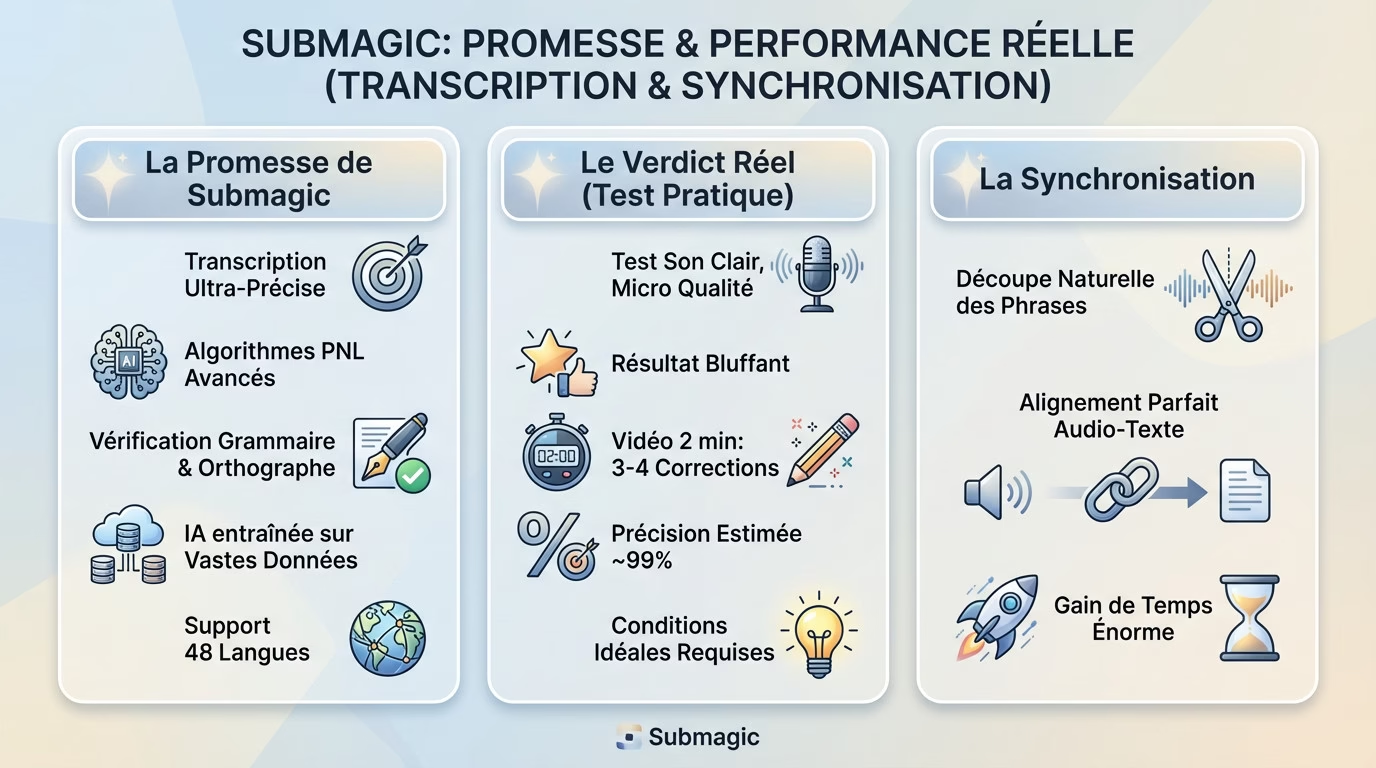
Submagic is certainly bold. The tool promises near-perfect subtitle quality thanks to advanced NLP algorithms. On paper, this means the end of tedious manual corrections.
How does it work? The AI absorbed tons of data to understand the context. It doesn’t just listen, it also checks grammar and spelling to deliver a clean text.
The icing on the cake is that this technology handles 48 languages, from Japanese to Italian. That’s a solid tool for reaching a global audience.
My real-world test: the verdict
I wanted to check it out for myself. I uploaded a face-to-camera video with clear sound, recorded with a microphone. Frankly, the result is amazing from the very first try.
In a two-minute sequence, I only noticed three or four minor typos. It really comes close to the 99% accuracy claimed by the marketing team.
However, this observation applies to pristine audio. With background noise or a strong accent, the AI may stumble a bit more.
More than just transcription: synchronization
Having the right text is great, but if it appears at the wrong time, it’s useless. Poor synchronization instantly ruins the viewer experience.
Submagic really shines here. The sentence segmentation follows the natural rhythm of speech. To see how it integrates into the overall workflow, take a look at a full review of the tool .
Beyond words: the visual quality that changes everything
But precision isn’t everything. What truly distinguishes Submagic is its style.
Attention-grabbing subtitles
In fast-paced formats like Reels or Shorts, plain text is no longer enough. The aesthetics of the subtitles are just as important as the message itself in capturing the audience’s attention.
Submagic has perfectly grasped this challenge by integrating animated models based on web stars. You can recreate Alex Hormozi’s style in a single click, without any technical effort. It’s incredibly effective.
Don’t think of this as just reading; it’s a true design tool. These dynamic animations keep the viewer glued to the screen until the very end. That’s where the quality of Submagic subtitles lies.
The engagement advantage: highlighted emojis and keywords
The other big surprise is the automatic addition of emojis. This feature transforms flat text into a rich visual experience.
AI scans the context of your sentences to insert the perfect illustration at the right moment. If you’re talking about money, a bag of cash 💰 appears instantly. It amplifies the emotion without you having to lift a finger. It’s seamless.
In addition, the software identifies impactful words and enlarges them or changes their color. This technique guides the eye and prevents the dreaded scroll. Your message gets through, and the audience stays engaged.
- Animated subtitle templates: For a dynamic look inspired by current trends.
- Automatic addition of emojis: To reinforce the emotion and visual message.
- Highlighting keywords: To guide the eye and emphasize important points.
A clear difference from conventional tools
Compare that to editing in Premiere Pro or the free version of CapCut. To achieve this result manually, you’d have to animate each keyword frame by frame. It would take hours. Here, it’s done instantly.
The tool’s true strength isn’t just accurate transcription. It’s the combination of robust speech recognition and a visual design optimized for social media. That’s why so many creators are choosing to take advantage of it now.
The limits of AI: when manual retouching becomes necessary
However, the promise of ‘zero effort’ has its limits. AI isn’t magic, and some situations present it with considerable challenges.
The challenge of accents, jargon and proper names
While Submagic’s subtitle quality is often impressive, the tool has its flaws. Technical jargon and proper nouns remain the bane of current algorithms. You will inevitably have to go back and correct these unavoidable errors.
Let’s take a concrete example from Drone and Cam. If I mention “Insta360 X4” or the “H.265” codec, the AI can sometimes make serious mistakes. It doesn’t necessarily know these niche terms by heart. So, it needs to be checked.
Also be aware that very strong regional accents can cause a drop in accuracy. The algorithm quickly loses track.
The decisive impact of audio quality
Let’s face it: “Garbage in, garbage out.” Poor audio quality will inevitably lead to a poor final transcript. Don’t ruin your work with a mediocre recording.
Background noise, wind, or excessively loud music will disrupt the AI. These extraneous elements generate far more errors than a studio recording. It’s simple math.
| Test condition | Estimated accuracy | Correction effort required |
|---|---|---|
| Clear audio (lavalier microphone, no noise) | 98-99% | Very weak (a few words need revising) |
| Average audio quality (smartphone in a quiet room) | 90-95% | Low (proofreading and minor corrections) |
| Audio with technical jargon (clear sound) | 85-90% | Medium (correction of specific terms) |
| Noisy audio (outdoors, wind, music) | 70-85% | High (numerous corrections needed) |
Getting perfect subtitles: my practical tips
How can we always be at the top of the rankings? With a few good habits, we can easily help the AI deliver the best possible result.
Prepare your video for optimal transcription
Many people think the magic happens only in the software. Wrong. The quality of Submagic subtitles depends primarily on your source: good preparation for filming does 80% of the work.
Here are my 4 golden rules for maximum accuracy:
- Improve your sound recording: Use an external microphone, it’s the most cost-effective investment.
- Speak clearly: Articulate well at a normal pace, without mumbling or rushing.
- Isolate your voice: Record in a quiet place. Lower the volume of background music when you speak.
- Avoid complex slang: If you must use it, be prepared to correct it manually.
The verification step: a reflex to adopt
Never publish blindly. Even if the tool is accurate, a ridiculous typo can destroy your credibility. You don’t want to lose your audience because of a careless mistake, do you? Take the time to proofread.
The editor is designed for this. You can correct text with a single click, adjust timing, or merge blocks for greater clarity. It’s simple, fast, and guarantees a professional result.
Customizing the dictionary: a much-anticipated feature
Here’s a detail that makes all the difference. If you use technical jargon or brand names, the AI might make mistakes. Provide it with your own glossary to avoid repetitive corrections.
Good news! You can add your own specific terms to the app’s dictionary. The AI learns these words and won’t make the same mistake in your future videos. A feature you should activate immediately to save time.
Verdict: Is the quality of Submagic subtitles worth it?
Overall, a very positive outcome for the creators.
Yes, without hesitation. If you’re looking to verify the quality of Submagic subtitles, know that the tool delivers on its promises of speed and efficiency.
In summary, here’s what I take away from Submagic’s quality:
- Strengths: Excellent accuracy with good audio, perfect synchronization, visual style and animations that boost engagement.
- Weak points: Difficulty with jargon and poor sound quality, need for systematic proofreading.
Facing the competition: where does Submagic stand?
Compared to CapCut, the transcription is similar, but the richness of animation styles is far superior in Submagic. Where others simply transcribe, this tool adds real, immediate visual value.
Compared to direct competitors like Zubtitle, Submagic wins out with its dynamic interface and automatic emoji insertion. If you’re still hesitating between these two giants, check out this Submagic vs. CapCut comparison to help you decide.
My final opinion: who is this really for?
This is clearly for content creators active on vertical platforms (TikTok, Reels, Shorts) who want to save time. If your goal is to produce quickly and effectively, you’ll love automation.
If you want subtitles that are not only accurate but also stylish without spending hours on it, this is the tool for you. Try Submagic here .
In conclusion, Submagic is an essential tool for your short content. While a quick proofread is still recommended for jargon, the visual quality and overall accuracy are impressive. You save valuable time while captivating your audience. Don’t hesitate to try the tool and boost your videos right now.





Leave a Reply