
🔎 What is Opus Clip?
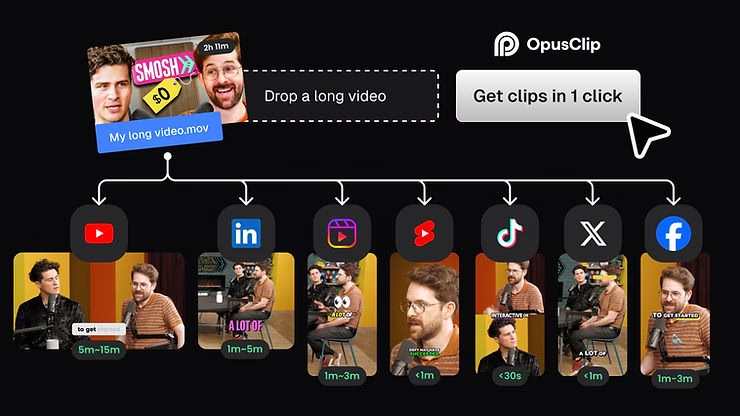
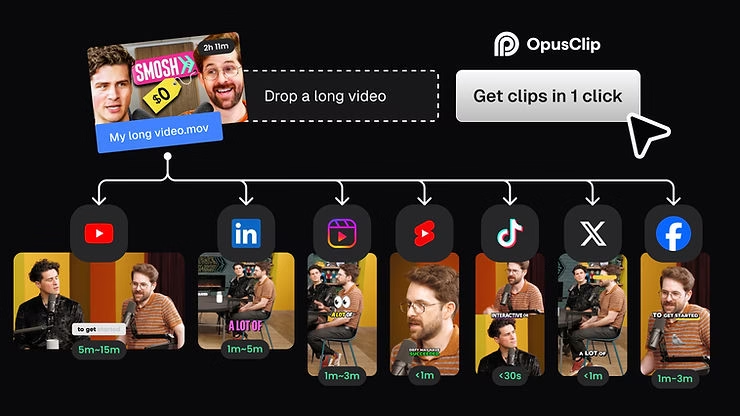
Opus Clip is the perfect tool for anyone who wants to automatically turn their long videos into impactful shorts. It uses cutting-edge artificial intelligence to analyze your content, identify the most interesting moments, and convert them into short clips optimized for YouTube Shorts, TikTok, or Reels.
It’s not just basic automated editing: Opus Clip detects who’s speaking, crops the video to the main speaker, adds stylish subtitles, generates relevant B-roll, and even gives you a virality score. Basically, you upload your video, let it roll, and get back clips ready to go viral.
🚀 Why is Opus Clip creating a buzz among creators?
If you spend any time on YouTube, TikTok, or Instagram, you’ve probably seen clips generated with Opus Clip without even knowing it. And it’s no coincidence that the tool has won over 10 million creators and businesses.
What makes all the difference is its AI curation engine . It identifies the most captivating moments in your video, the ones where something really happens: a punchline, a memorable anecdote, a strong reaction. Then, thanks to the Auto Reframe function , it automatically follows the main speaker, like a professional cameraman.
Add to that dynamic subtitles , contextual AI B-Roll (perfect for cutaways), and a virality score to help you choose the most promising clips… and you have a tool that clearly saves time while boosting your reach.
🎯 Who is Opus Clip for?
Opus Clip is designed for all content creators who want to save time and maximize their visibility. Whether you’re a YouTuber , podcaster , online trainer , or coach , it’s a tool that allows you to easily reuse your long content into several short and impactful clips.
It’s also ideal if you’re posting to TikTok , Instagram Reels , or YouTube Shorts , but don’t want to spend hours editing. Even if you don’t have any video editing skills, you can generate professional-quality clips in just a few clicks.
In short, Opus Clip is perfect for those who create video content regularly … but not necessarily for those who want to do everything manually . It’s a co-pilot, not a complex editing studio.
🧪 My honest opinion after several tests
After testing Opus Clip on several long videos (interviews, vlogs, and even tutorials), I was amazed by the speed and relevance of the results. In a few minutes, I had a selection of short, well-paced clips, with subtitles in place, good cropping, and sometimes even a fairly coherent B-roll without having to do anything.
Some clips were directly usable for social media. Others required a small adjustment (a mistranslated word or a cut that needed refining), but overall, I saved a huge amount of time compared to 100% manual editing.
I now use it in my own workflow for all my long-form content. It allows me to stay consistent with Shorts without sacrificing my time or creative energy.
✅ The (many) advantages of Opus Clip
What makes Opus Clip so powerful is that it combines powerful technology with ease of use . You don’t need to be an editor or video technician to use it: you upload your video, let the AI do the work… and you get clips ready to post.
Among the big advantages:
- 🎯 Monumental time savings . Where manual cutting takes 2 to 3 hours, Opus Clip does it in minutes.
- 🧠 Clip relevance : AI targets clips with the highest engagement potential.
- 📱 Formats optimized for Shorts, TikTok, Reels, with automatic subtitles and good framing.
- 🎬 Smart Reframe (Auto Reframe): ideal if you are filming in a wide shot or with two people.
- 💡 AI Copilot Feature : You can give it instructions to target certain topics or keywords in the video.
It’s a tool that boosts your productivity without sacrificing the quality of your content.
🤏 The limits… but frankly minor
Let’s be honest: no tool is perfect. But in the case of Opus Clip , the few limitations encountered are more than offset by the time and efficiency gains.
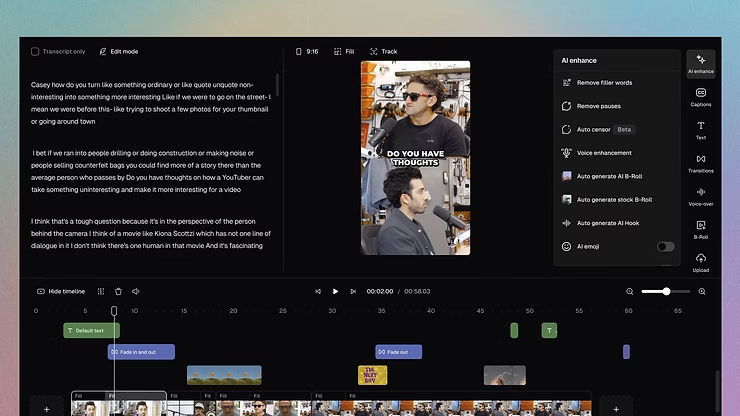
- 🎞️ A somewhat basic editor : if you want to add complex animations or time very precise effects, it’s better to export your clips to Premiere Pro or CapCut.
- 📝 Subtitles sometimes need adjusting : the AI does a very good job, but sometimes a few words are mistranscribed, especially with accents or background noise.
- 🎥 B-roll not always 100% relevant : This option is cool, but some shots are generic. Luckily, you can replace or disable them.
In short, these are details worth knowing, but nothing that prevents it from becoming a tremendously effective tool for everyday use. What’s more, the team regularly improves the platform.
💡 Tips to get the most out of Opus Clip
Using Opus Clip is simple. But to really maximize results, here are some best practices that I’ve tested and validated:
- 🎙️ Prepare your long video : structure your speech, avoid unnecessary digressions, and remember to insert strong sentences or punchlines. The AI feeds on this.
- 🧭 Use “AI Copilot” mode : you can tell it to target certain topics or types of sentences, and that changes everything in terms of the relevance of the extracts.
- ✂️ Don’t hesitate to sort through the generated clips : some will be perfect, others average. Keep the ones that match your style.
- 🖥️ Adjust the subtitles if necessary : a quick reread is often enough to correct one or two typos.
- 🎯 Test different formats (16:9, 9:16) depending on the platform you want to post on (YouTube, TikTok, Insta, etc.).
💰 How much does Opus Clip cost?
Good news: Opus Clip offers a free plan to help you get started. You can test the tool, generate a few watermarked clips, and see if it fits your creative style.
Then, if you want to go pro, the prices are really affordable:
- 🔓 Creator Plan : around $10-15/month , for 150 minutes of video to process (ideal for regular production).
- 🚀 Unlimited Pro Plan : Perfect for agencies, intensive creators, or those who work in teams. No minute limits or restricted features.
You can also take advantage of a monthly credit system if you prefer to use it occasionally. And given the time it saves, it’s clearly a good return on investment.
🏁 Final verdict: is it worth it?
Honestly? Yes, a thousand times yes. Opus Clip is a real game changer for all creators who want to intelligently recycle their content without wasting hours editing. AI does the heavy lifting, you retain creative control, and the result is clean, dynamic, and ready to perform on social media.
It’s the kind of tool that quickly becomes indispensable once you integrate it into your workflow. You film, upload your video to Opus Clip, and get shorts that can be a hit… in just a few clicks.
If you want to save time, publish more often, and boost your visibility, I highly recommend it. Try it here 👉 Opus Clip





Leave a Reply