
Do you find that AI sometimes lacks precision or that the subscription puts too much strain on your monthly budget? Don’t worry, we’ve identified the best Opus Clip alternatives to transform your long videos into viral shorts with surprising ease. We’ll guide you straight to more comprehensive and often less expensive tools to boost your productivity without sacrificing the quality of your content.
Opus Clip is good, but we want more
Why look elsewhere: minor frustrations with Opus Clip
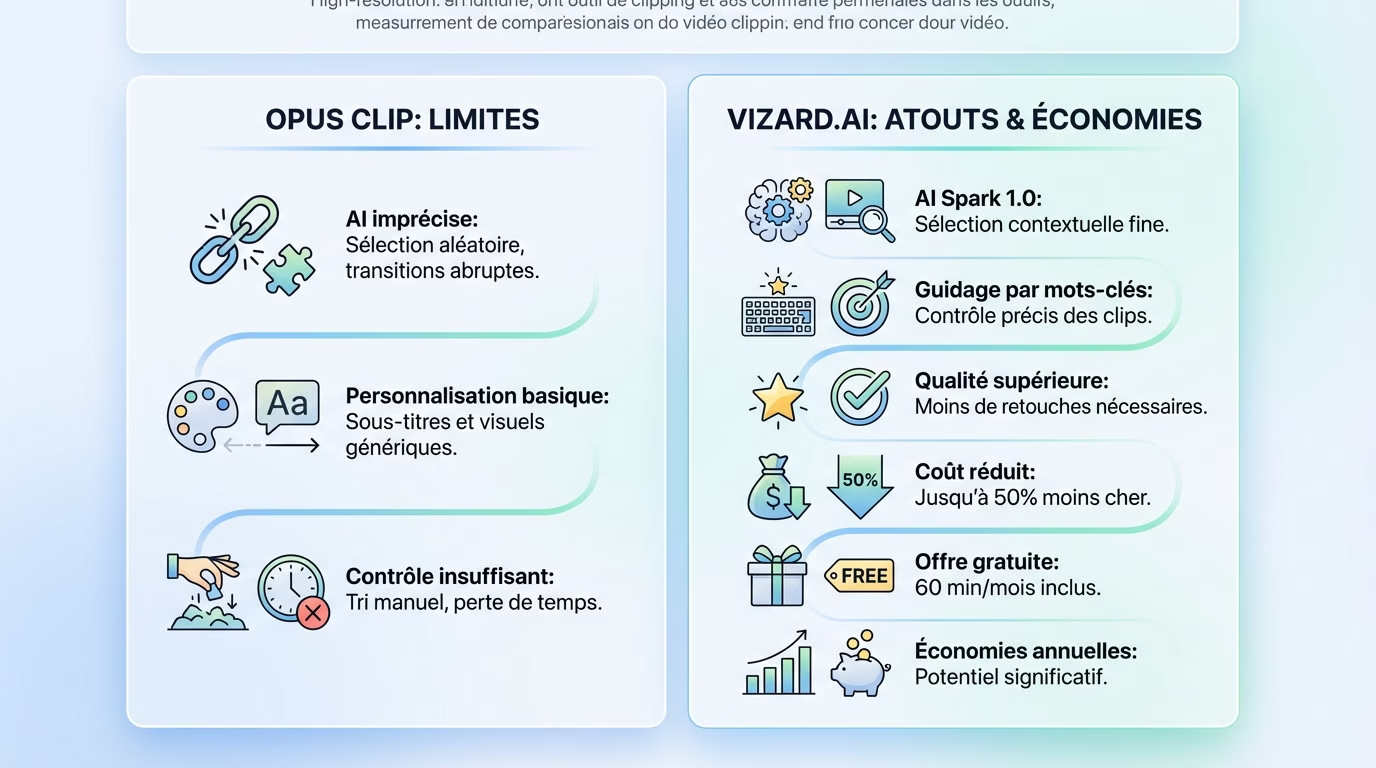
Opus Clip does a decent job of extracting clips, that’s undeniable. But its AI sometimes selects moments somewhat randomly, and the transitions often lack fluidity.
Customizing subtitles and visual appearance remains very basic. This is often a frustrating point of contention for creators who want to establish a strong brand identity.
The lack of precise control over clip selection, such as by keyword, often necessitates tedious manual sorting. This is a significant waste of time that many seek to avoid by exploring true clip-based alternatives.
Vizard.ai: the direct competitor that’s upping its game
Vizard.ai directly challenges Opus Clip with a more robust approach. Its AI, Spark 1.0, is more adept at selecting engaging moments by truly analyzing the overall context of the video.
You can guide the AI with specific keywords and prompts. This is a major advantage for creators who know exactly which segments of their video they want to highlight.
User feedback often highlights the improved overall quality of the generated clips. This drastically reduces the need for manual editing after generation.
The budget, an argument that carries weight in the balance
Let’s address the financial aspect without getting into a complex pricing structure. Vizard presents itself as a much more economical option, up to 50% cheaper per minute of video processed than its direct competitor.
Vizard also offers a generous free plan (60 minutes per month). This is an excellent way to test the tool in real-world conditions without having to use your credit card.
For creators who produce a lot of content, this cost difference is far from negligible. It represents substantial savings at the end of the year.
Beyond cutting: tools for a creative result
Finding alternative video clips isn’t enough if the final result is flat. A viral video isn’t just well-edited; it also needs to immediately grab attention and hold viewers’ interest.
Submagic and the art of attention-grabbing subtitles
Submagic clearly stands out thanks to its striking visual approach. Its strength lies in the generation of animated and stylized subtitles, which are far more engaging for the audience than simple static captions.
In terms of transcription, it’s solid, boasting an accuracy rate of 98.8%. This means you spend significantly less time manually correcting typos, which makes a real difference in your daily work.
With a vast gallery of available templates, you can finally perfectly align the captions with the visual identity of your channel or brand.
Automatic addition of b-roll and sound effects
B-roll, those extra shots added during editing, makes all the difference between amateur and professional video. Tools like Submagic can now automatically insert them to speed up the pace without you lifting a finger.
Never underestimate the impact of audio. Adding sound effects and suitable background music significantly increases audience retention on social media.
These features transform a simple raw clip into a complete mini-production, ready to be published instantly, without any additional editing effort.
Finer control over the final assembly
Text-based editing is an incredibly intuitive feature. To cut a section of the video, simply delete the corresponding word or phrase directly in the transcript; it’s quick and efficient.
The tool also cleans up the soundtrack by automatically removing awkward silences and speech tics like “uh.” The speech immediately becomes much more impactful.
This level of precision gives power back to the creator. We are no longer subject to the sometimes haphazard choices of AI; we refine them according to our needs.
Managing the entire process, from video to publication
Having a perfect video clip is one thing. Distributing it effectively without spending hours on it is another. Some tools have understood this well and integrate the entire production chain.
The integrated content calendar: Vizard’s strength
Vizard doesn’t just trim your videos; it’s a complete command center. You can schedule your posts directly within the interface, without having to juggle expensive third-party tools like Buffer. This provides an immediate boost to your workflow.
Where others block, Vizard ensures distribution everywhere. YouTube, TikTok, Instagram, of course, but also Twitter and LinkedIn. It’s rare to find such native coverage in this market.
We generate, schedule, and publish all in one place. It’s a work convenience that makes all the difference when you’re managing a large volume of content on a daily basis.
Flowjin, the assistant that also writes your descriptions
Flowjin takes assistance a step further among Opus Clip alternatives. Its real strength? It doesn’t leave you alone with the video. The tool automatically generates all the necessary text to accompany your images, which is often tedious.
It’s not just about cutting. The tool offers impactful titles and descriptions optimized specifically for each social network. Whether it’s LinkedIn or YouTube, the tone adapts perfectly.
This is the ultimate weapon if you lack inspiration for copywriting or if you simply want to cut your production time in half.
Teamwork and brand consistency
For agencies or teams, Vizard’s collaborative workspace is a major asset. No more sending large files by email; everything is easily managed online.
The “Brand Kit” feature is equally valuable. You save your logos, color palettes, and fonts once and for all. Then, a single click is all it takes to apply them uniformly to every design. Your image remains impeccable.
These functions may seem secondary, but they save a lot of time and guarantee a professional result, clip after clip, without extra effort.
CapCut, the alternative for those who like to keep their hands free
What if, instead of a 100% automatic tool, you were looking for a real video editor, but with a dose of artificial intelligence to help you?
More than just a clipper, a real pocket editing studio
CapCut is not in the same league as Opus Clip. It’s not a direct competitor, but a different philosophy: a complete editing software, available on mobile and computer, for those who want to create.
His approach is unique: instead of automating everything for you, he offers a massive toolbox for those who demand total control over their creation.
Do you see why it’s such a hit on TikTok? It lets you create complex edits, add effects, smooth transitions, and music very easily. It’s a complete production studio that fits in your pocket.
AI functions at the service of the publisher
To be clear, CapCut is integrating more and more AI features. It won’t cut a long video on its own, but it can automatically generate subtitles with remarkable accuracy thanks to voice recognition.
We also benefit from other valuable aids such as text-to-speech for voice, motion tracking or background removal, which are directly integrated into the editing interface.
AI acts here as a dedicated assistant, not as the director. It saves you a lot of time on repetitive tasks, but you remain the sole decision-maker.
For what type of creator is this the right choice?
This is the ideal tool for creators who love the editing process. Do you have a clear vision for your video and want total control over every detail? This is for you.
Compared to tools like Opus Clip or Vizard, it’s the choice of “doing it yourself” assisted by AI, rather than blindly “delegating” to an algorithm.
Therefore, it is not an alternative to save time at all costs, but rather the best solution to gain creative possibilities and freedom.
Specialized solutions for specific needs
Sometimes, you don’t need a Swiss Army knife. A tool that does one thing, but does it perfectly, is much more relevant.
2short.ai, the YouTube Shorts specialist
2short.ai doesn’t try to do everything, and that’s its greatest strength. It’s a niche tool, designed entirely to transform your long videos into impactful YouTube Shorts, without cluttering it with unnecessary features.
Its AI is specifically trained to identify the moments most likely to perform on this particular platform. It focuses on efficiency for a single, unique format, guaranteeing a level of relevance that general-purpose tools often struggle to achieve.
This makes it an excellent choice for YouTubers who want to repurpose their main content into shorter formats without spreading themselves too thin. You maximize your impact on YouTube without wasting time.
The advantage of languages: when your audience is international
Let’s return to the question of languages, an often underestimated but vital point of differentiation. It’s worth noting that Opus Clip supports around twenty languages, which is already quite good for a local audience.
However, Vizard sets itself apart by supporting over 30 languages for transcription and over 100 for translation. This is a decisive advantage for reaching a global audience instantly, without having to re-record your content.
For educational content creators, international companies, or travelers, multilingual capability is a significant deciding factor. Don’t let language limit your reach.
API access for customized integration
Let’s address a more technical but important aspect for those who love automation: API access. This allows you to integrate clipping technology directly into your own applications or workflows, offering complete flexibility.
Vizard offers self-service access to its API, which is a huge plus for developers who want to test and integrate quickly. You have an idea, you connect it, and it works.
In comparison, Opus Clip would require a more complex sales process, which could be a hindrance for more agile projects or rapid testing. Speed of execution is paramount here.
So, what do we choose? The practical guide to help you decide
With all these options on the table, the choice may seem complicated at first glance. In reality, it all depends on your number one priority and your way of working.
Priority #1: Budget and maximum time savings
If your goal is to produce a lot of decent music videos without breaking the bank, Vizard.ai stands out as one of the best alternatives to Opus Clip. Its cost-per-minute ratio crushes the competition, and its free plan is incredibly generous for getting started without any upfront costs.
Spark 1.0 AI intelligently sorts through the footage, and users report saving up to 80% of their editing time. It’s simple: you cut, you export, and you’re done.
This is clearly the tool needed by prolific creators who prioritize volume and raw efficiency above all else.
Priority #2: a flawless, post-ready visual presentation
If every detail counts and you want a visually stunning clip right out of the box, Submagic is an option to seriously consider. Its dynamic subtitles and intelligent B-roll insertion really make a difference in capturing attention.
It might need a little more tweaking to be perfect, but the final result doesn’t look “robotic.” The result is a clip that genuinely looks like it was edited by a human.
This is the perfect choice for perfectionists and those who have a very strong brand identity to maintain.
Priority #3: an all-in-one publishing workflow
Do you hate juggling ten different tabs? Then platforms offering a complete workflow are for you. Vizard, with its integrated publishing calendar, is an excellent candidate for managing everything in one place.
Flowjin is also a solid option if writing descriptions is a chore for you. The idea is to centralize as many tasks as possible to gain peace of mind.
This is the ideal solution for solopreneurs or small teams who want a well-oiled social content production machine.
Ultimately, the best tool depends on your needs. Choose Vizard.ai if you’re looking for efficiency at a low price, or CapCut if you want to maintain creative control. We recommend trying the free versions to see how they work for you. Get started and boost your visibility now!


Leave a Reply