
If you regularly create video content, you’ve probably already heard of Opus Clip . This tool is currently a huge hit thanks to its artificial intelligence that can transform any long video into impactful shorts, ready to go viral on TikTok, YouTube Shorts, or Reels. It’s simple: you upload your video, and the AI does the work for you.
But even though Opus Clip remains a benchmark, you might want to explore other options. Whether it’s for price, interface, slightly different features, or just out of curiosity, there are some very solid alternatives on the market. And since I test quite a few tools for my own videos, I thought it would be helpful to share the best alternatives I’ve found, along with a few bonus promo codes to help you save money in the process 😉
Spoiler alert: Klap.app is a little gem with a 30% discount thanks to my code CREATE30 , and Submagic remains a sure bet for awesome subtitles (code CREATE10 for 10% off).
Come on, shall we take a look around together?
🎬 What is Opus Clip and why is everyone talking about it?
Opus Clip is a bit like the Swiss Army knife of video editing in 2025. Its big strength? It uses artificial intelligence to automatically identify the highlights of your long videos (conferences, vlogs, interviews, podcasts…) and transform them into ultra-impactful short clips, ready to be posted in one click on TikTok, Reels or YouTube Shorts.
You hardly have to do anything: the tool detects who’s speaking, centers the frame on the person, adds stylish subtitles, transitions, relevant B-roll, and even a virality score to show you the potential of each clip. In short, it saves a ton of time while boosting the quality and impact of your videos.
That’s precisely why over 10 million creators have already adopted it. Personally, I often use it when I want to create multiple short videos from a single long piece of content without spending hours on it. And if you want to try it for yourself, it’s this way 👉 Opus Clip
🎥 Comparison: AI Video Editing Tools
🔍 Why would you want an alternative to Opus Clip ?
While Opus Clip is clearly one of the best tools available, it’s not necessarily perfect for everyone. Some creators are looking for an alternative for various reasons, and that’s perfectly legitimate.
The pricing might deter some, especially if you’re just starting out or simply want to test the AI edition without committing. Others might find the interface a bit cluttered or prefer tools with a more minimalist look. And then there are those who simply want more manual control , or conversely, even more automation .
There are also creators with specific needs: generating dynamic subtitles on the fly, creating multilingual shorts, or even integrating more advanced visual effects. In short, depending on your workflow and style, another solution might be a better fit.
This is where the alternatives to Opus Clip come in. And the good news is, there are a few that are really worth checking out – I’ll introduce them to you right after this 👇
🚀 The best alternatives to Opus Clip
Looking for another option to automatically edit your videos without sacrificing quality or hassle? Here’s a selection of tools I’ve tested that are definitely worth checking out:
✅ Klap.app – The simple and remarkably effective AI alternative
Klap.app is a real gem for creators who want to get straight to the point. You upload a long video, and the AI takes care of identifying the highlights, adding animated subtitles, and producing ultra-engaging short formats, perfect for TikTok or YouTube Shorts.
It’s fast, intuitive, and frankly amazing. Plus, with my code CREATE30 , you get 30% off ! What more could you ask for?
✨ Submagic – For subtitles that really pop (literally)
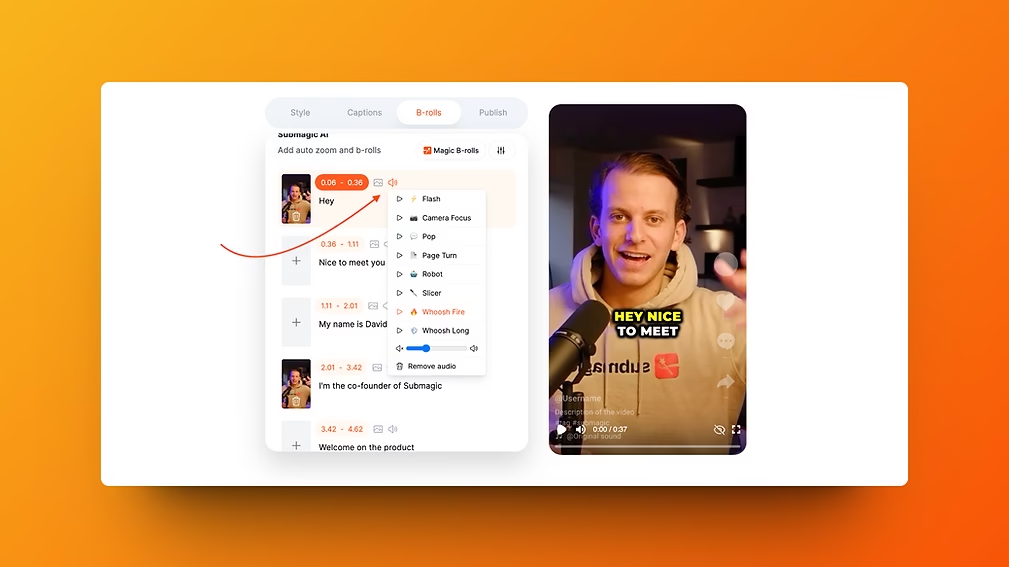
If your thing is making eye-catching videos with stylish subtitles , animated effects, emojis and rhythm, then Submagic is your best ally.
This is the tool I use to give my shorts and reels a professional look without spending hours in post-production. The result is clean, dynamic, and ready to go viral. And with the code CREATE10 , you save 10% on your subscription.
🎬 CapCut Pro – The Swiss Army knife for TikTok creators
You’re probably familiar with the free version of CapCut, but CapCut Pro is the ultimate upgrade for creators. More effects, more templates, more creative freedom, all with a super smooth interface.
It’s an excellent option if you want to combine automation and personalization, especially for highly visual or creative content. And given the price-to-performance ratio, it’s hard to beat.
💡 Which alternative to Opus Clip should you choose based on your creative style?
Each tool has its advantages, and it all depends on what you want to prioritize in your editing:
- 🔥 Want AI to do (almost) everything for you? → Klap.app is perfect for that. You upload, you click, and you instantly get a ready-to-post short. Simple, fast, efficient – with 30% off using the code CREATE30 .
- 🧠 Want a super professional visual experience with stylish animated subtitles? → Submagic is the king of style. In seconds, you’ll have a video that grabs attention and makes people want to click. -10% with code CREATE10 .
- 🎨 Looking for a comprehensive and ultra-flexible tool? → CapCut Pro offers an excellent balance between creativity and efficiency. If you want a semi-automated workflow with plenty of customization options, it’s a sure bet.
- 👑 Want everything in one click, without compromising on quality? → Opus Clip remains the absolute benchmark. Auto editing, intelligent reframing, virality score, B-roll… it’s all there.
🎁 Recap of current promotions
| Tool | Main advantage | Discount available |
| Opus Clip | Ultra-comprehensive AI editing | Free trial available |
| Klap.app | Generate shorts in 1 click | -30% with code CREATE30 |
| Submagic | Animated subtitles and visual effects | -10% with code CREATE10 |
| CapCut Pro | Creativity + editing power | Affordable price & pro version |
✨Opus Clip Alternative: Conclusion
Today, with all the AI-powered tools available, creating impactful videos has never been easier. Whether you’re a YouTuber, coach, podcaster, or simply passionate about content, there’s a solution tailored to your style.
Personally, I still use Opus Clip for its all-in-one power, but I also love trying out alternatives like Klap.app – especially with the 30% discount using the code CREATE30 , it’s definitely worth it. And when I want a more eye-catching result, Submagic remains unbeatable (don’t forget the code CREATE10 ). Finally, for creators who want a super comprehensive and creative tool, CapCut Pro ticks all the boxes.
In short, you now have all the tools you need to boost your content. If you try one of these services, let me know what you thought in the comments – or if you have another gem to share. 🎥🔥
And if you found this article helpful, feel free to share it with a creative friend or subscribe so you don’t miss any future tips ✌️



Leave a Reply