
Is editing your short videos taking up way too much of your time, and are you looking for a miracle solution? I used the Opus Clip platform for several weeks to give you an honest review and see if it lives up to its promises. You’ll finally know if this tool is a real productivity booster or if it’s too limited for your needs.
The promise of Opus Clip: what is it really worth?
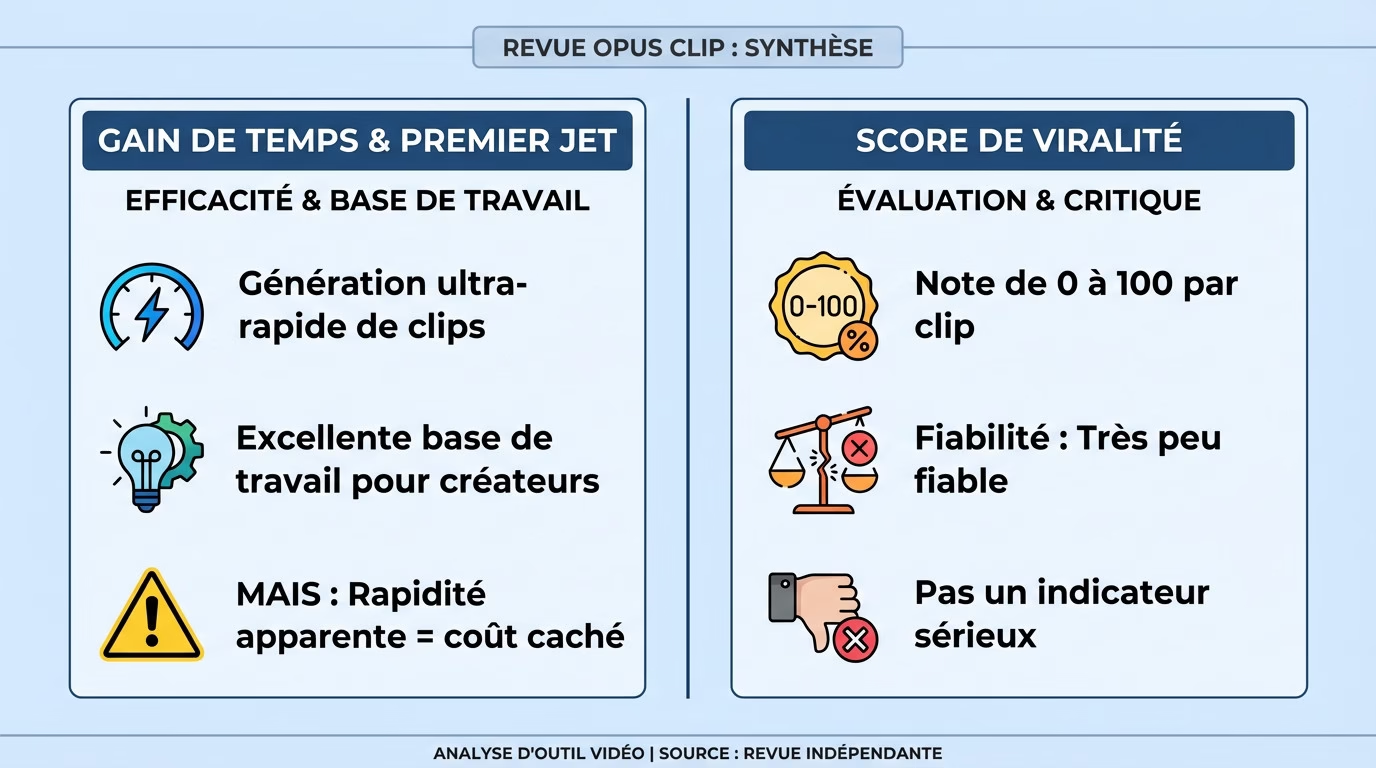
An immediate time saving for the first draft
You import a long video, and in a few minutes, the tool generates about ten ready-to-use clips. On this point, it lives up to its promise: it’s fast, efficient, and my first impression of Opus Clip is quite positive.
This is clearly its greatest strength. For a creator who needs raw material immediately, it’s an invaluable starting point. It allows them to get a rough draft and identify interesting angles without having to watch hours of footage.
But beware, this apparent speed hides an invisible cost that often only becomes apparent much later.
The famous “virality score”: a help or a gimmick?
Opus Clip assigns a score out of 100 to each generated clip. The idea is simple: AI analyzes the hook and flow to guide you directly to the clips most likely to perform.
After several weeks, my conclusion is clear: this score is unreliable. I’ve seen poorly rated clips become huge hits and “99” scores completely flop. Don’t base your editorial strategy on this fickle metric.
The real obstacles in everyday life
But the initial speed hides frustrations that quickly appear when you use the tool every day for real.
Customizing subtitles: a wall of frustration
If you’re looking for an honest Opus Clip review, know that customization is the major drawback. It remains far too limited for a creator who cares about their brand image.
You quickly find yourself limited by a small font selection and rigid color palettes. Animations are static and unchangeable. And those automatic emojis? Often poorly placed, they become a nightmare to remove manually in the editor.
This is a major drawback if you want a truly professional result that aligns with your brand identity.
Slow processing and rigid workflow
Let’s talk about the time. While the initial contact seems quick, generating a full video takes an incredibly long time. Sometimes it’s over 90 minutes of waiting. It’s a far cry from the instantaneity promised on paper.
The process also lacks flexibility in everyday use. It’s impossible to edit demo clips or make fine adjustments before final export. Ultimately, you’re more at the mercy of the tool than in control.
AI facing non-standard content
Everyone raves about this tool for simple videos. But to give a truly honest Opus Clip review, you have to test its limits. I stopped using basic “talking head” formats to give it a real challenge. It’s easy to shine with a steady monologue. It’s a different story when things are moving, when there’s shouting, when there’s overlapping. That’s when you see what the engine is truly capable of. Think the AI handles everything? Not so fast. Beyond the interface, I wanted to push the AI to its limits with videos more complex than a simple face-camera shot.
Automatic cropping with multiple people on screen
I uploaded a podcast-style interview with two dynamic guests. The idea? To see if the Auto Reframe function accurately tracks the speaker, as promised by the speaker detection technology. In theory, it should switch automatically.
The results are mixed. The AI often falters. Sometimes the framing jumps to a silent person or even cuts the speaker in half. It’s impossible to publish this without manually correcting it.
When AI loses track of the narrative context
The algorithm excels at spotting viral keywords or catchy “hooks.” It scans the audio and identifies peaks in intensity. This is its greatest technical strength.
But it often lacks human logic. You end up with a punchline without the beginning, or a sentence cut off abruptly before the crucial information. It forces you to check everything manually to make sense of the clip. It’s frustrating.
Verdict: Who is Opus Clip made for and at what price?
So, after these weeks of testing, do I really recommend Opus Clip?
The ideal user profile for this tool
This tool is clearly designed for creators who want to produce content in bulk without any hassle. If you’re looking for quick inspiration from your raw footage and extreme customization isn’t your priority, go for it. It’s the ideal weapon for flooding social media quickly.
However, this isn’t for you if you have a very strong brand identity. Perfectionists in editing and those who conduct a lot of interviews or podcasts may find the AI’s cuts too abrupt and the lack of control frustrating.
The pricing plans analyzed (and the watermark)
The pricing structure is quite simple to understand. A free trial is available, followed by several paid subscriptions. The main difference between the offers lies primarily in the number of video minutes you can watch each month.
But there’s one major drawback: the watermark. It remains embedded on videos in the free versions. To remove it and get enough credit, you have to upgrade to a higher plan. This really raises questions about its cost-effectiveness, especially considering the tool’s other shortcomings.
Despite the limitations mentioned, my opinion of Opus Clip remains that you should try it. Everyone’s workflow is different. The best way to form your own opinion is to test it yourself right now. Learn more about Opus Clip See pricing Try it for free
Opus Clip is an effective tool for saving time on the first draft of your videos. It’s a real help with mass production, despite its limitations in terms of customization. We recommend trying it for free to see if it fits well into your creative routine before committing.


Leave a Reply