
Are you worried your machine-gun-like speaking speed might be a technical hurdle, and wondering if the Submagic “fast-talking creators” formula really works for your videos? Let’s see together if this tool can truly keep up with your breakneck pace and generate accurate subtitles without requiring hours of tedious manual editing. Discover now how this technology will save you precious time every day by transforming your fastest-moving footage into viral, ready-to-publish content.
- Speaking fast, the nightmare of manual subtitling
- Submagic’s answer: an AI trained for sprinting
- More than just words: visual rhythm serving the flow
- Gain speed, from registration to publication
Speaking fast, the nightmare of manual subtitling
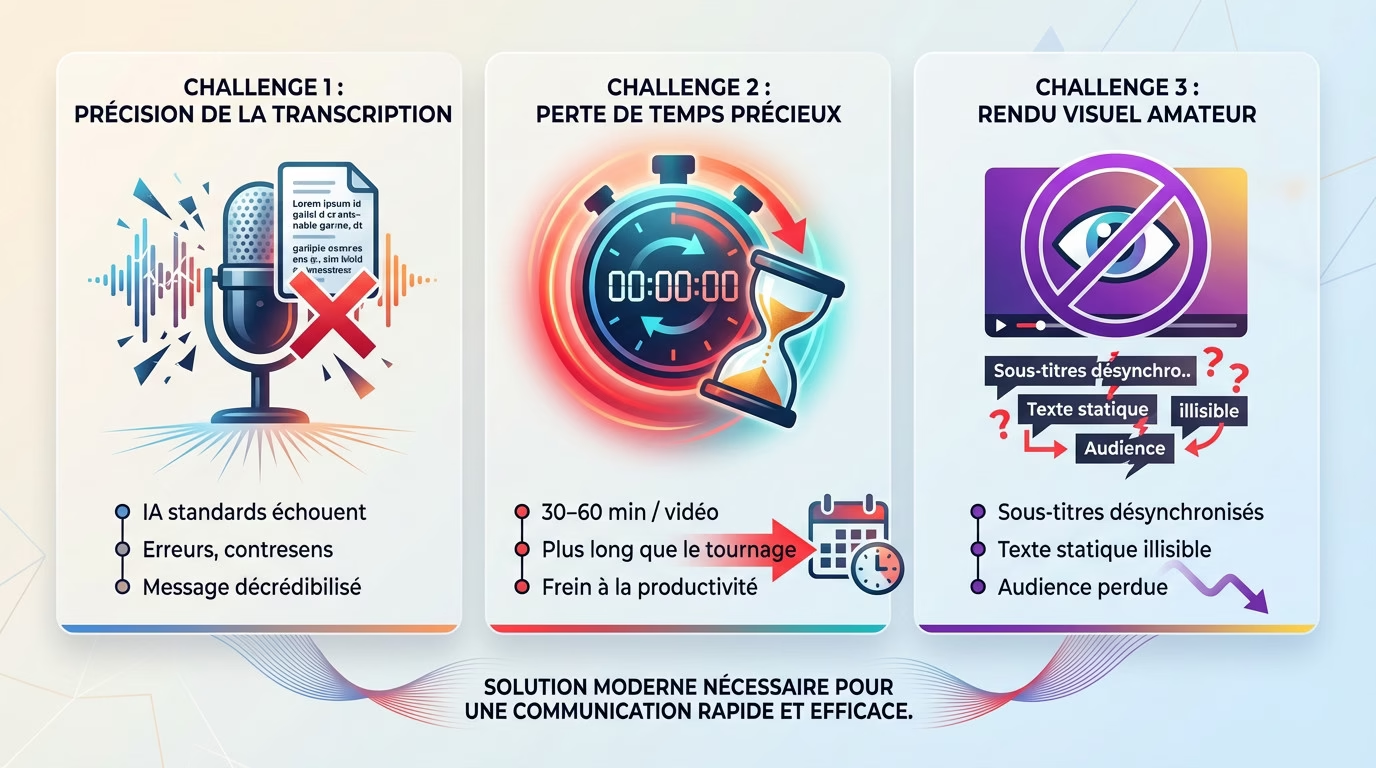
The challenge of perfect high-speed transcription
Are you one of those creative types who speaks quickly and energetically? Then you’re definitely familiar with this struggle. Traditional transcription software often fails, generating glaring errors, embarrassing mistranslations, or missing words. It’s just infuriating.
Speed and rapid articulation are often misinterpreted by standard AI on the market. This inevitably forces you into meticulous proofreading and tedious manual corrections, completely negating the time savings promised by automation.
However, the slightest error in the text can instantly discredit the serious message of your video.
When every second of editing is precious
For someone like you with a fast typing speed, time is a key resource. Let’s be clear: manual subtitling or correcting a bad transcription can take much longer than filming the video itself.
Look at the numbers: we easily lose 30 to 60 minutes per video correcting the script. Imagine what that represents over an entire month of intensive content creation. It’s huge.
This wasted time is a direct and brutal obstacle to your productivity and the regularity of your publications.
The risk of an amateurish rendering that detracts from the content
Let’s talk about the final product. Fast-paced speech requires perfectly synchronized subtitles to remain legible. Simply put: even a slight delay makes it impossible for the viewer to follow along while trying to read.
Subtitles that appear as large, static blocks of text are completely unsuitable for a fast-paced conversation. The viewer doesn’t have time to read them. The visual style must absolutely keep up with the rapid-fire pace of the speech.
In short, poorly managed subtitles give an unprofessional image and can drive away the audience.
Submagic’s answer: an AI trained for sprinting
A game-changing transcription precision
Submagic boasts 99% transcription accuracy. For fast-paced speech, this makes a significant difference. You no longer waste time manually correcting every sentence the software misinterprets.
Its AI has been trained on a massive amount of speech data to understand context. It captures rapid articulations and complex sequences far better than generic solutions. Where other tools falter, Submagic keeps pace.
This clarification is the first step towards recovering precious time.
Automatic cleaning: goodbye to “uhs” and silences
The tool offers a feature to remove filler words. This is a phenomenal time-saver for your daily workflow.
It automatically detects and cuts out “uh,” “well,” or “so” that clutter your speech, especially when you’re speaking quickly. Your message becomes direct and impactful without any manual effort on your part.
Here’s why Submagic is a formidable solution for fast-talking creators. See what this tool can do for you:
- Filler word detection: AI identifies and removes speech tics for clearer speech.
- Auto-cut silences: The tool tightens the edit by eliminating pauses, which energizes the video and maintains attention.
- High-fidelity transcription: The foundation of everything, with 99% accuracy even at a fast bitrate.
How AI adapts to your pace, not the other way around
Submagic’s text-based editor simplifies everything. Correcting a transcription error is as easy as editing a Word document. This approach is much faster than manipulating timelines.
The tool supports over 48 languages, demonstrating the robustness of its engine. This guarantees quality in handling the complexities of fast-paced speech using this AI video editing tool , regardless of the language.
More than just words: visual rhythm serving the flow
Dynamic subtitle styles to capture attention
A simple font isn’t enough. With a fast-paced delivery, you need movement to keep your audience engaged. Submagic doesn’t just display text; it instantly applies animated styles. With a single click, your words leap out to keep up with your pace. Take inspiration from stars like Alex Hormozi or MrBeast. Submagic replicates these dynamic styles to captivate your TikTok audience, even if you’re speaking at lightning speed.
Submagic vs. manual editing: a comparison for fast-paced creators
Are you still wasting a ton of time manually timing every word? Good news: there’s a better way. This chart demonstrates the dramatic productivity difference between Submagic’s AI and traditional editing for handling fast bitrates.
| Criteria | With Submagic | CapCut type manual assembly |
|---|---|---|
| Accuracy of the transcription | 99% automated | Variable (often 80-90%) |
| Error correction | Simple text editing | Timeline manipulation |
| Animated subtitles | 1 click (pre-designed styles) | Manual animation (keyframe by keyframe) |
| Added synchronized emojis | Automatic | Manual placement |
| Estimated total time (1 min video) | Less than 5 minutes | 30-60 minutes |
The importance of emojis and synchronized animations
When the pace quickens, text alone isn’t enough. Automatic zooming and highlighting create essential visual cues to make the message easier to digest. Furthermore, AI analyzes the context to insert the perfect emoji at the right moment. This detail effortlessly enhances your tone. Even compared to alternatives like Opus Clip , Submagic’s visual richness remains unbeatable for energizing a fast-paced speech.
Gain speed, from registration to publication
An optimized workflow for busy creators
Finished filming? Perfect. With Submagic, the process is seamless: upload, the AI does the work, tweak a little, and you’re done. No need to tear your hair out over complex edits; everything is designed for speed and professional results.
- Step 1: Drag and drop your video. No technical preparation is necessary.
- Step 2: The AI analyzes everything. It generates subtitles, emojis, cuts and zooms.
- Step 3: Check and customize. The text editor allows for quick edits.
- Step 4: Export. Your content is ready to be published in minutes.
Beyond subtitles: the extras that make all the difference
But be warned, Submagic doesn’t stop at words. The tool incorporates “Magic B-Rolls.” Essentially, the AI understands the context and automatically overlays relevant illustrative images. It’s visual, dynamic, and saves you hours of searching through image libraries.
Another huge time saver: automatic generation of descriptions and hashtags. AI writes SEO-optimized text for you. As a result, you can already start thinking about your next video without wasting a second on administrative tasks.
In short: the verdict for the microphone sprinters
If you have a machine-gun writing style, it’s a game-changer. Clearly, Submagic for fast-talking creators is much more than a handy tool; it’s a true productivity ally for everyday use.
It solves accuracy issues, boosts visual style, and saves precious time. It’s the ideal solution for keeping up the pace without ever compromising quality. Try Submagic here .
If you have a fast publishing rate, Submagic isn’t just convenient, it’s a true ally for your productivity. It solves your challenges of accuracy, style, and time to maintain your publishing pace. It’s time to take things to the next level and try Submagic here .







Leave a Reply