
Don’t know which tool to choose for quick and easy video editing? This InVideo Picture Capcut comparison analyzes the features of each software to save you time and money. Finally find the ideal solution for your specific needs and start creating viral content now.
- Quick comparison: who is each tool made for?
- Key features: the artificial intelligence showdown
- Ease of use and user experience: which is easier to master?
- The showdown: InVideo AI vs. CapCut , the unexpected duel
- Verdict: Which tool should you choose in 2025 for your video projects?
Quick comparison: who is each tool made for?
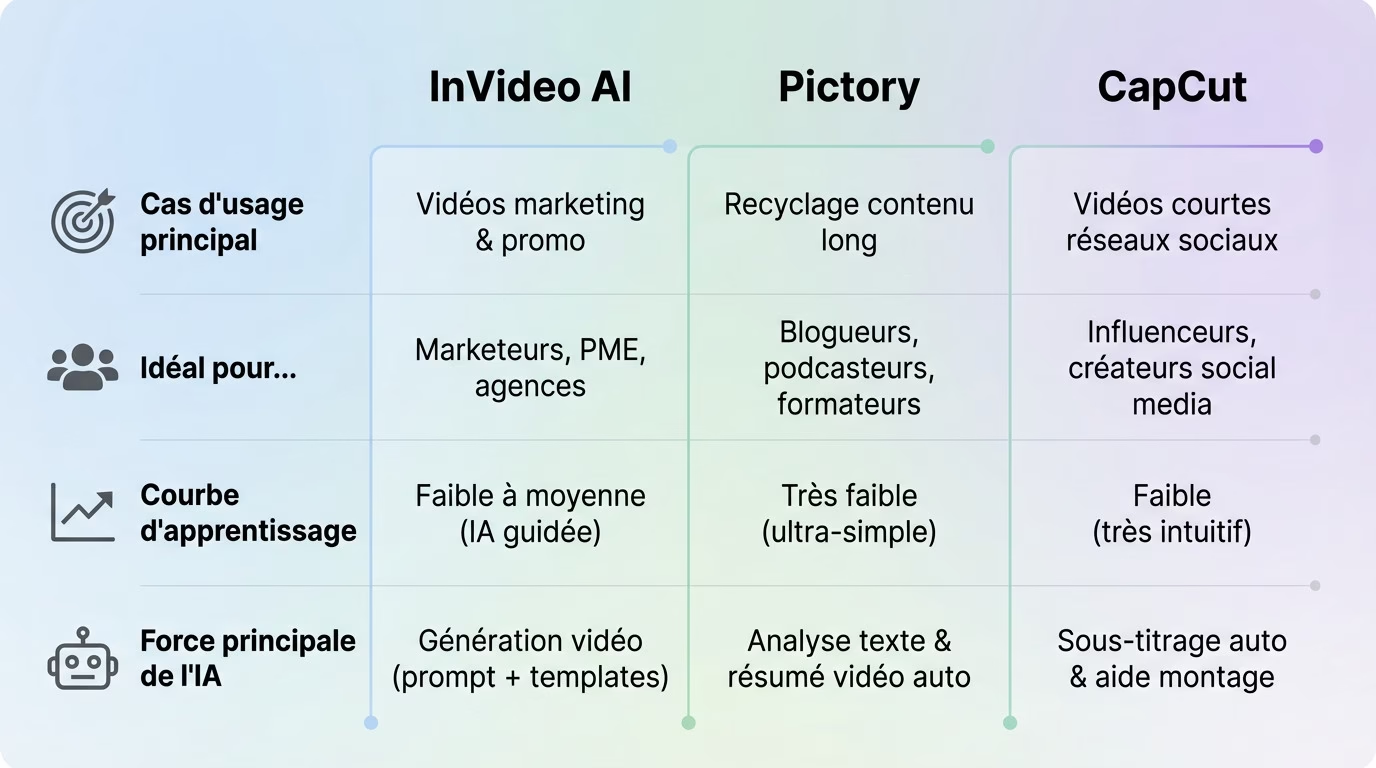
Still undecided? Here’s an InVideo, Pictory, and CapCut comparison to help you decide. InVideo AI is your automated production studio. Pictory acts as a smart recycler for long texts. CapCut remains the essential manual editing tool for your social media.
| Criteria | InVideo AI | Picture | CapCut |
|---|---|---|---|
| Main use case | Marketing and promotional videos | Recycling long-form content (articles, webinars) | Creating short videos for social media |
| Ideal for… | Marketers, SMEs, agencies | Bloggers, podcasters, trainers | Influencers, social media content creators |
| Learning curve | Low to medium (AI-guided) | Very weak (ultra-simple) | Low (very intuitive) |
| AI’s main strength | Video generation from a prompt + templates | Automatic text analysis and video summarization | Automatic subtitling and editing assistance (effects) |
InVideo AI: the Swiss Army knife of video marketing
InVideo AI is the all-purpose solution . With its customizable templates, a blank page is a thing of the past. It’s the ultimate weapon for marketers in a hurry to release an ad.
Type in your idea, and the AI assistant will generate a script and visuals . We’re aiming for raw efficiency to produce quickly. It’s the ideal tool for professional results without expertise.
Pictory: the content recycling expert
Pictory is the expert in transforming long-form content . Give it an article, and it will extract the essentials for a second life.
Its AI automation creates relevant scenes from your text. Perfect for effortlessly amplifying your presence. It’s the essential content recycling machine .
CapCut: the king of video for social media
CapCut reigns supreme in short and vertical formats . Linked to TikTok, it instantly incorporates viral trends.
Its library of trendy effects and sounds is vast. There’s no total automation here: you sculpt your viral video manually. For TikTok or Instagram Reels, it’s the choice of control .
Key features: the artificial intelligence showdown
Video generation from text
InVideo and Pictory stand out as the two undisputed champions of this category. Their promise is simple: to transform a script, an article URL, or a raw idea into a usable video .
Pictory analyzes the source text, identifies key phrases, and automatically assembles scenes to create a summary . InVideo, on the other hand, starts with a detailed prompt to generate a complete video with script, voice-over, and relevant visuals.
CapCut does not offer this function in the same way; it focuses primarily on editing and assembling already existing clips.
Assembly and customization: from automated to manual control
Pictory positions itself as the most automated of the bunch . The editing remains minimalist: the idea is to trust the AI and adjust quickly if necessary, without wasting time.
InVideo works like a clever hybrid . It automates the initial creation, but then offers a fairly comprehensive editor to modify everything: timeline, scenes, animations, etc. It’s a good compromise for maintaining control.
CapCut remains the most manual of the three. It’s a truly simplified editing software , with a timeline, layers, and complete control over each element. The AI assists, but doesn’t make all the decisions.
Voiceovers, subtitles, and media libraries
Let’s talk about media libraries. InVideo and Pictory integrate huge image and video libraries like Storyblocks or Shutterstock. CapCut focuses more on trending sounds and viral effects.
Automatic subtitles are present and effective on all three platforms, with CapCut having an advantage in creative stylization .
Let’s now compare the AI voiceovers , a critical point for any invideo pictory capcut comparison:
- InVideo AI: Offers a wide selection of realistic AI voices and the ability to clone your own voice. The quality is often astonishing.
- Pictory: Offers decent AI voices, but sometimes a bit robotic. Effective for quick informational content.
- CapCut: AI voices are more “social media” oriented (synthesized voices typical of TikTok), less corporate but very popular.
Ease of use and user experience: which is easier to master?
InVideo: guided but sometimes a bit dense
To begin this InVideo picture capture comparison, note that InVideo’s interface is very guided . The AI literally holds your hand to generate the first version of your video. This is incredibly reassuring if you’re a complete beginner in front of the screen.
However, the advanced editor can seem cumbersome once the video is generated. The numerous customization options might overwhelm someone who just wants to make a quick change without too much hassle.
In short, it’s an easy tool to start with, but it requires a little practice to master .
Picture: Simplicity as a credo
Pictory clearly stands out as the champion of simplicity in this trio. Its interface is clean, almost minimalist, which is easy on the eyes. There are few buttons, and the process remains linear, without any unnecessary distractions.
This simplicity is also its limitation, as the customization options remain quite basic . You can’t modify everything.
It’s the perfect tool for those who are allergic to complex software and want a clean result in just a few clicks .
CapCut: Mobile and desktop efficiency
CapCut’s DNA is decidedly mobile-first, and it shows immediately. The interface is designed for touchscreens, making it extremely intuitive and quick to learn , even for a novice.
Its computer version retains this formidable efficiency. For those who want more comfort, the large screen option is a real plus. If you want to learn more, we have a complete guide to CapCut PC that explains everything.
In short, it’s the most “fun” and straightforward tool to use , especially if you’re used to mobile apps.
The showdown: InVideo AI vs. CapCut , the unexpected duel
Pictory is often compared to its direct competitors, but the real battle is between InVideo and CapCut. One focuses on marketing automation, the other on viral creativity. It’s a clash of philosophies .
Marketing automation vs. social creativity
InVideo AI is designed to save businesses time; that’s its main promise. Its goal is to produce clean and efficient videos at scale , without spending hours on it.
In contrast, CapCut is primarily a tool for personal expression. It’s designed to capture a trend, add a unique touch, and engage an audience immediately. It’s less about automation and more about facilitating creativity .
It’s a bit like a match between a marketing assistant robot and a creator’s toolkit . In fact, this duel is somewhat reminiscent of the Submagic vs. CapCut debate on short video automation.
Quality of templates and effects
InVideo’s templates are professional, business-oriented, and results-driven . You’ll find perfect templates for ads, customer testimonials, or product presentations that inspire confidence.
Conversely, CapCut’s templates and effects are dictated by current viral trends. They are designed to be fun, impactful, and instantly recognizable .
If you’re looking for an InVideo Picture Capcut comparison , here’s the summary:
- InVideo AI – Pros: Massive time savings, professional output, ideal for corporate content. Cons: Less creative flexibility, can appear generic.
- CapCut – Pros: Total creative control, access to the latest trends, perfect for personal branding. Cons: More time-consuming, less AI automation.
Verdict: Which tool should you choose in 2025 for your video projects?
For the content creator who wants to recycle
After this comparison of InVideo, Pictory, and CapCut, the answer is simple: Pictory is your best ally . If your hard drive is full of unused content, it’s the tool you need to avoid wasting any of it.
It’s unbeatable for effortlessly transforming your written or long-form content into short formats for social media. It’s the fastest way to leverage what you’ve already produced.
In practical terms, here’s what it allows you to do in just a few clicks:
- Transform a blog post into a series of engaging Reels .
- Extracts the highlights from a webinar or video interview.
- Create an informative video from a simple text script.
For the marketer or small business
Here, InVideo AI clearly takes the lead over the competition. For creating ads, product demonstration videos, or consistent branded content, its template library and AI are formidable .
It’s the ideal solution for those who need to produce in large volumes without sacrificing professional quality. You can learn more about its capabilities by reading our full InVideo review .
This is an investment in your marketing workflow that will save you valuable time . If you’re interested, you can learn more about Invideo AI or view Invideo AI pricing directly.
For the social media pro (TikTok, Reels, Shorts)
Without a doubt, CapCut is the tool you need . It was born for this, it’s attuned to social media and perfectly understands current trends.
Its strength lies in its ability to give you the keys to viral creativity : the latest trending sounds, the most effective effects, the dynamic transitions. AI is there to help you, not to decide for you.
If your goal is to build an audience and engage them with trending content, look no further.
In the end, the The best tool depends on your goal.. Choose Pictory to effortlessly repurpose your long-form content . Opt for InVideo AI if you’re aiming for professional marketing efficiency . Finally, rely on CapCut to create viral videos for social media. Try them out to find your favorite.




Leave a Reply