
Are you still hesitating between InVideo and Canva, worried about wasting your budget or hours on a platform ill-suited to your video creation ambitions? This comparison breaks down the features, the power of artificial intelligence, and the user-friendliness of each interface to help you make the right technical choice . Together, we’ll identify the tool that will truly boost your daily productivity and help you avoid frustrating mistakes that hinder your progress.
- Clash of philosophies: video specialist versus creative jack-of-all-trades
- The AI duel: magical generation versus creative assistance
- On the editing bench: a closer look at video editing capabilities
- Media libraries and models: who has the most resources?
- Brand consistency: the brand kit put to the test by video
- Verdict: InVideo or Canva, which tool for which creator?
Clash of philosophies: video specialist versus creative jack-of-all-trades
InVideo: the obsession with video above all
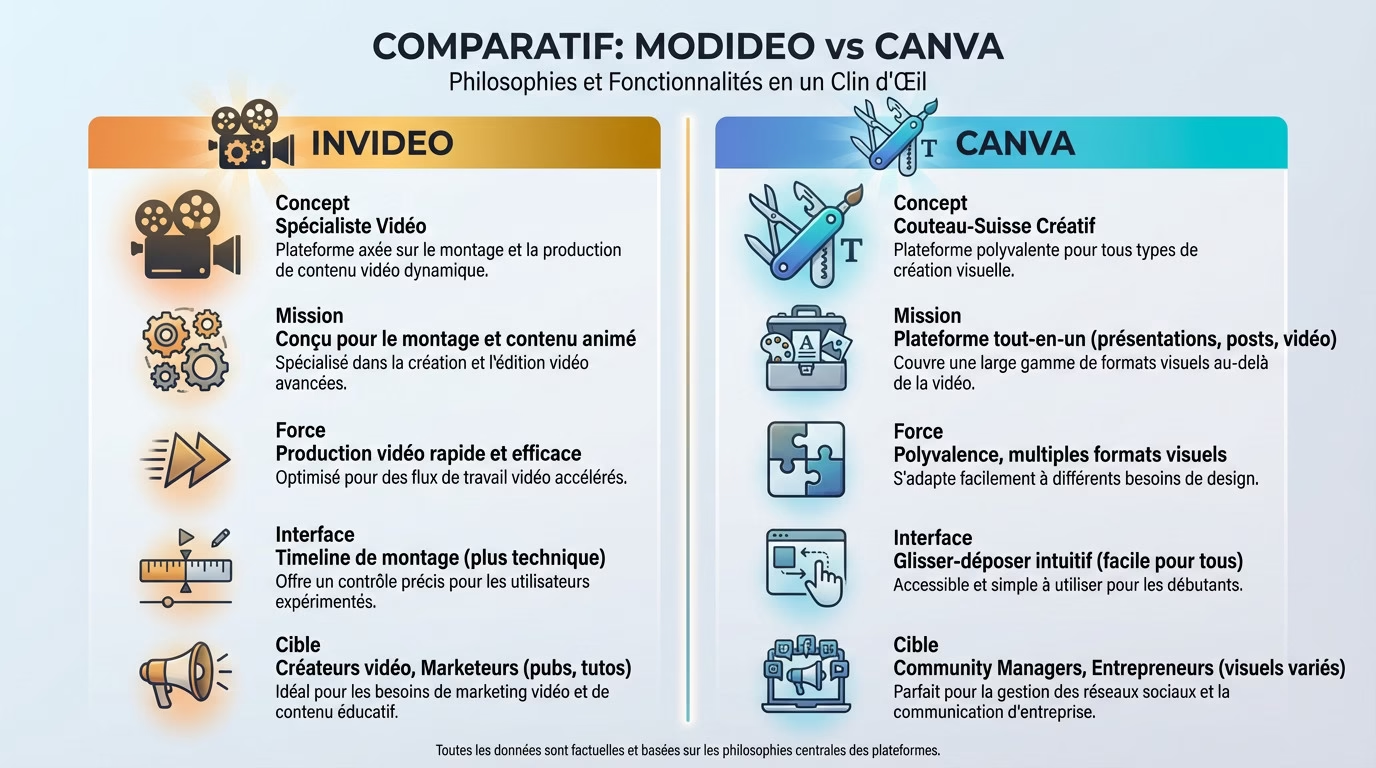
In the InVideo vs. Canva comparison, InVideo is a tool specifically designed for video . Its core focus is editing and generating animated content. Every function is designed for this single purpose. It’s not meant for making flyers.
Let’s focus on its specialization. That’s its greatest strength. It caters to those whose primary need is fast and efficient video production .
This approach makes him an expert in his field, but potentially limited for other creative needs . Do you see the difference?
Canva: the playground of universal design
Canva stands out as the all-in-one platform . You can create presentations, social media posts, resumes, and even videos. Feel free to explore it to do everything you need.
It’s important to note that video is just one feature among many. It’s a powerful addition to an already rich ecosystem, but not its core function . It’s a useful complement.
Keep in mind that its versatility is its greatest strength. It’s the perfect tool for someone who juggles multiple visual formats on a daily basis. It saves time .
Impact on ease of use and interface
InVideo’s interface is centered around an editing timeline. While this may seem familiar to experienced editors, the approach can be a bit more technical for complete beginners. It takes some time to adapt and master the tool . It’s a worthwhile investment.
Compare that to Canva’s interface, based on an ultra-simple and unified drag-and-drop system for all types of creation. The learning curve is practically nonexistent, even for video. You get a professional result immediately . It’s very intuitive.
For whom and for what purpose, in short?
Remember this: InVideo is for the video content creator, the marketer who needs to produce ads or tutorials in series. It’s for pure volume .
Canva is for community managers, entrepreneurs, or marketing teams who need to produce a variety of visuals, including short videos, without juggling ten different software programs. It’s the choice of simplicity and efficiency for everyone.
The AI duel: magical generation versus creative assistance
Now that we’ve seen the difference in philosophy, let’s see how artificial intelligence is integrated into each tool , because that’s where the game gets really interesting.
InVideo and its AI: the automatic director
Are you hesitating between InVideo and Canva? Let’s look at InVideo. Its main strength is generating videos from a simple prompt . AI writes the script, finds the media, adds the voice-over, and synchronizes the subtitles.
We’re using a complete “script-to-video” approach. You just provide a rough idea, and the AI delivers a nearly finished first draft of a video. It’s ideal for those who want immediate results.
Let’s not forget other features like voice cloning. This allows you to create personalized and consistent voice-overs for your projects.
InVideo’s specific AI advantages
- Script generation : AI writes the text for the video.
- Media selection : AI chooses relevant videos and images from the stock library.
- Voice-over creation : Generating an audio narration from the script.
- Automated assembly : AI assembles all elements in a coherent manner.
These tools are designed to automate the most time-consuming tasks of video editing. You no longer waste time on the technical aspects, freeing up space for your strategy .
My opinion? It’s amazingly fast. But be warned, the result often requires manual adjustments for a truly perfect finish.
Canva and its magical suite: the versatile assistant
Canva’s AI, grouped under the “Magic Studio” banner, functions as a collection of assistant tools . You use “Magic Write” to refine the text or “Magic Design” to get suggestions for visual templates.
Here, AI helps improve an existing design or generate elements , but it doesn’t create a complete video from a prompt like InVideo. It’s a one-off helper, not a director.
A fundamentally different approach
In short, InVideo’s AI creates for you, while Canva’s AI creates with you . The difference is huge depending on your workflow.
The choice depends on your needs: do you want a tool that does 80% of the work or an assistant to accelerate your own creative process ? This is the central question in the world of automated video editing .
On the editing bench: a closer look at video editing capabilities
The editing timeline: precision versus simplicity
With InVideo, you’ll find a familiar interface, much closer to that of traditional video editing software. You have complete control over overlays, transition timing, and audio synchronization . It’s the ideal tool if you want pinpoint accuracy without struggling with the interface.
Canva, on the other hand, offers a much simpler and more visual timeline. It’s perfect for assembling a few clips on the fly, but be warned: it quickly becomes a nightmare if you attempt complex edits with too many overlapping tracks.
Effects, transitions and animations
InVideo doesn’t mess around: its library of effects and transitions is specifically designed for video. You’ll find dynamic text effects and polished transitions that instantly give a professional “production” look .
Of course, Canva also offers some nice animations, but they remain fairly basic. They do the job for animating graphic elements or stickers, but don’t expect to achieve a cinematic look or advanced visual effects with them.
Audio and music management
Sound is often overlooked, yet InVideo offers more advanced audio mixing options. You can fine-tune the background music volume so it never drowns out your voice-over. It’s this detail that makes all the difference.
On Canva, you can add and remove music, that’s true. But the advanced audio management options remain very basic . It’s functional for a quick story, but clearly not suitable if you want precise and immersive sound design.
My opinion as a content creator
Let’s be honest: for quick video editing for social media, Canva does the job admirably. If your goal is to produce a polished video in five minutes without any hassle, go for it; it’s fast, simple, and incredibly effective .
But as soon as the project gets more complex—a scripted YouTube video or a tightly timed commercial— InVideo’s powerful editing features become indispensable . You’ll avoid a lot of frustration. To learn more, check out our full review of InVideo.io .
Media libraries and models: who has the most resources?
A good video edit needs good ingredients. Let’s now compare the media libraries and templates offered by the two platforms.
Templates: the starting point
InVideo doesn’t mess around: its templates are 100% video-oriented. You’ll find templates for Facebook ads, dynamic YouTube intros, and video listicles. They come pre-structured with logical scenes. It’s a huge time saver .
Canva ‘s strength lies in the quantity and diversity of its templates. You’ll find video templates, of course, but also everything for every other imaginable format. This ensures overall visual consistency for your brand across all media .
Stock image and video libraries
Good news: both platforms provide access to huge libraries of royalty-free media. They often rely on strong partnerships, for example with iStock or Storyblocks, to offer you professional-quality content without hidden costs .
Note a difference in this InVideo vs. Canva comparison. InVideo often features premium video clips . Its goal is to build a video. Canva, on the other hand, offers a more balanced mix of images, illustrations, and videos.
Graphic and audio elements
Here’s what differentiates the two libraries :
- Canva: A gigantic library of icons, illustrations, shapes, animated graphics.
- InVideo: More targeted video elements such as stickers, animated CTAs, and effect overlays.
It must be said, Canva demonstrates superiority in the variety of static graphic elements . This is its core historical business.
Regarding audio, both offer extensive libraries of royalty-free music . You have filters available by genre or mood to find the right sound.
The verdict on resources
Finally, Canva wins the point for the quantity and overall diversity of its creative assets . If you want volume, this is where you need to go.
However, be aware that InVideo excels in the relevance and specialization of its templates and elements for pure video production . Everything is designed for editing. The choice, once again, depends on the final project.
Brand consistency: the brand kit put to the test by video
Creating content is good. But creating content that respects your brand identity without spending hours on it is even better. Let’s see how InVideo and Canva handle this aspect.
Canva’s “brand kit”: the king of consistency
Canva’s Brand Kit is a major asset for designers. It allows you to easily centralize logos, precise color palettes, and typography. These elements then become accessible with a single click in any design. This saves a huge amount of time and helps maintain a clear brand identity .
This advantage naturally extends to video. You can apply your brand colors and fonts to a video template in seconds. This ensures perfect consistency with your other media , avoiding style errors that can be costly to your professional image.
Brand management in InVideo
InVideo also allows you to set up a strong brand identity . You can add your logo, colors, and default fonts in the settings. To do this, simply fill in the designated fields before starting the creation process.
It’s worth noting that this feature is more geared towards video. Its main purpose is to automatically apply the logo as a watermark or to ensure that text templates use the correct font. The approach is less comprehensive than Canva’s, but remains highly functional for quick production .
Team workflow
Canva is heavily focused on collaboration features. Multiple people can work on the same design, leave detailed comments, and shared folders make organization easy. This eliminates endless email back-and-forth to approve a simple change.
InVideo does offer sharing and teamwork options, that’s true. However, Canva’s ecosystem has historically been more robust for collaboration across a wide range of creative projects. It’s often the preferred choice for agile marketing teams that want to centralize everything.
The blind spot: moving from static to animated
This is the key point in this invideo vs. canva comparison: if your brand already uses Canva for static visuals, creating videos there is surprisingly seamless . No need to re-import logos or search for hexadecimal codes everywhere.
However, if your needs are solely for video, InVideo’s branding system is perfectly adequate and well integrated into its own production workflow. All that remains is to choose the tool that best suits your daily operations .
Verdict: InVideo or Canva, which tool for which creator?
To summarize this duel, nothing beats a summary table . Here are the key points to remember.
| Functionality | InVideo AI | Canva |
|---|---|---|
| Core business | AI-powered video creation and editing | Versatile graphic design (all-in-one) |
| AI Power | Complete script-to-video generation | Creative assistance (Magic Studio) |
| Learning curve | Easy, but with video editing logic | Extremely low profile, universal drag-and-drop |
| Brand management | Good, focused on video needs | Excellent, centralized brand kit for all formats |
| Ideal for… | High-volume video content producers, marketers | Community managers, entrepreneurs, multi-skilled teams |
Choose InVideo if…
Here is the typical profile for whom InVideo is the best choice .
- …you want to turn blog posts or ideas into videos in minutes.
- …your main production is video (ads, social media, tutorials) and you are looking to automate as much as possible .
- …you need advanced AI features like voice cloning and full script generation .
- …a slightly more technical editing timeline doesn’t scare you in order to have more control.
Choose Canva if…
Conversely, Canva will be your best ally if you recognize yourself in these situations. You’re not looking for a complex tool. Your main need is versatility and simplicity. It’s the sensible choice.
You manage all of a brand’s visual communication and want perfect consistency between your posts, stories, presentations, and short videos. You prefer a single tool to do everything, without juggling multiple subscriptions.
The final word: two tools, two missions
Ultimately, there’s no single “best” tool. The real question isn’t “InVideo or Canva?” but rather ” What is my primary need today? ” That’s where everything hinges.
InVideo is an AI-powered video specialist built for speed and pure automation. It transforms a script into a movie. Canva, on the other hand, remains an incredibly powerful generalist design tool that has added an excellent video capability to its repertoire. If video is your livelihood, InVideo wins. Otherwise, Canva is enough. It’s up to you to choose your side.
Now is the time to take action to boost your production . To explore the power of video AI, you can learn more about Invideo AI or view Invideo AI pricing directly.
In short, it all depends on your primary need . If you want to create videos in bulk using AI , InVideo is for you. However, if you’re looking for a single tool for all your visuals, Canva remains the gold standard . Feel free to try both to decide.





Leave a Reply