
Do you have a still photo and wonder how InVideo AI image video works to bring it to life? We’ll show you how this tool interprets your photos to create smooth, ultra-realistic animated sequences . Discover the simple method to transform your ideas into impactful videos and save tons of time on your editing.
- The mechanism behind image-to-video transformation
- Bringing a static image to life
- From animation to full video
The mechanism behind image-to-video transformation
InVideo doesn’t just stretch pixels. It interprets your intent to build a complete video sequence around the image.
From concept to storyboard: the role of the prompt
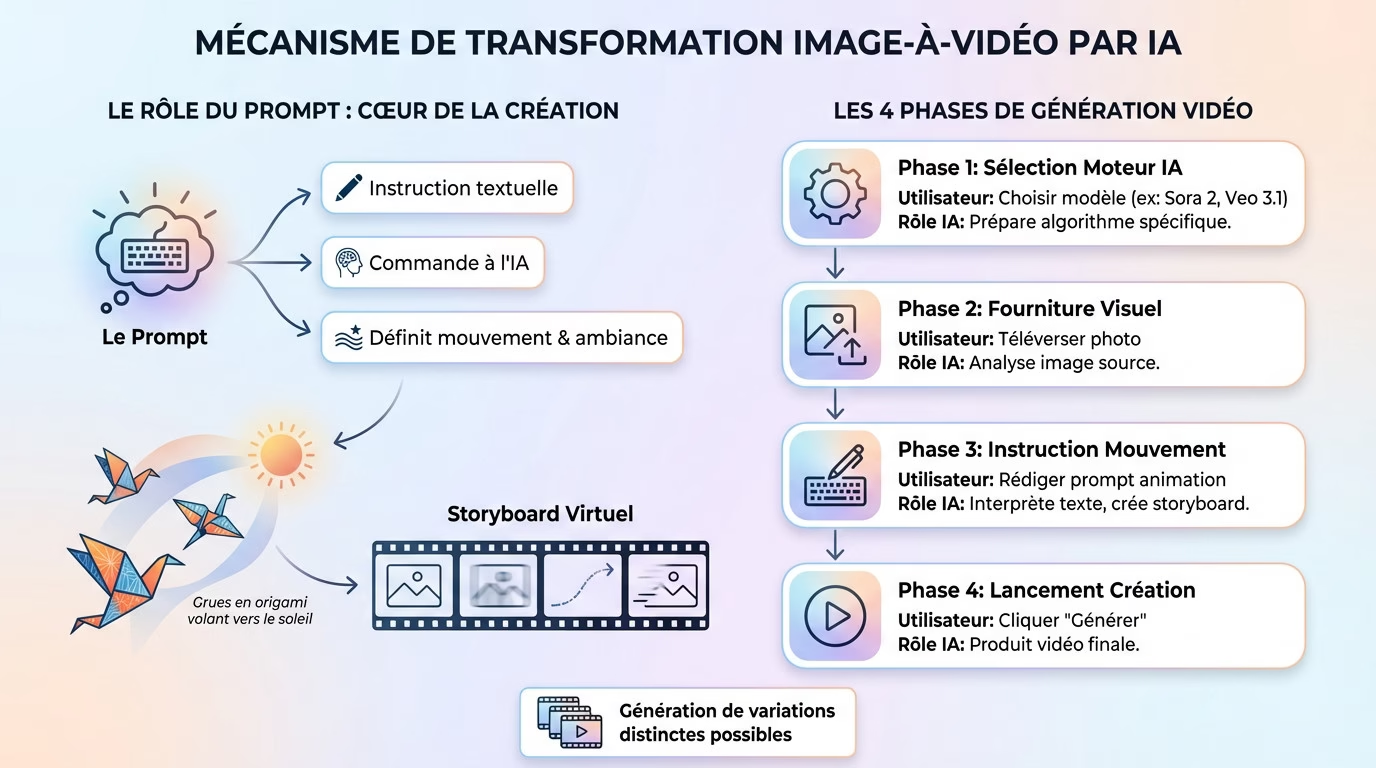
It all starts with the prompt. This command tells the AI `invideo ia image video operation` to define the movement. The algorithm translates the idea into a virtual storyboard .
Take the example of “origami cranes flying towards the sun”: this sentence becomes the guiding thread that the AI breaks down into logical scenes .
Key stages in video generation
The user process remains simple. The following table summarizes this flow, capable of generating several distinct variations quickly .
| Stage | User action | The Role of AI |
|---|---|---|
| 1. Engine Selection | Choose the model (e.g., Sora 2, Veo 3.1) | Prepare the animation algorithm |
| 2. Provision of the Visual | Upload your photo | Analyze the source image |
| 3. Movement Instruction | Write the animation prompt | Create a motion storyboard |
| 4. Launch | Click on “Generate” | Produced the final video |

Bringing a static image to life
Create movement and depth
AI isn’t limited to simple zoom or basic panning. It analyzes the image to inject real depth and fluid movement. This mechanism is precisely what creates the perfect illusion that the scene was filmed . That’s the core of how InVideo AI image video works.
Want more control? You can guide the AI with reference images for the beginning and end of the sequence. To learn more, check out our full InVideo review .
Ensure visual consistency
The real technical challenge is visual consistency. The AI must animate the image without generating strange artifacts or unpleasant flickering. This is where everything hinges on achieving a believable result.
The goal is to preserve the integrity of your original photo. Therefore, the AI strives to keep the fundamental elements intact :
- The original lighting of the scene.
- Colors and their calibration .
- The textures of objects and surfaces .
From animation to full video
Animating an image is good. But InVideo goes further by assembling an entire video . Let’s see how.
The clever scene-by-scene assembly
The tool doesn’t just create a single clip. It assembles a full-length video , ready for YouTube or TikTok, by linking several coherent scenes.
No photo? AI can first generate one from text, before animating it . The flexibility is total, from written concept to visual movement.
The finishing touch: sound and text adjustments
InVideo’s AI image-to-video functionality automatically includes audio. AI adds sound effects, music, or voiceover to enhance the video, saving valuable time.
Forget about complex timelines thanks to text-based editing . You request your changes in writing, as easily as with any other AI-powered video editing tool .
In short
InVideo doesn’t just animate a photo; it orchestrates a complete production (image, sound, editing) with simple commands. Don’t miss out on this technology that makes complex software obsolete.
Turning a photo into a video with InVideo is child’s play. You don’t need to be an expert: AI handles the animation, sound, and editing for you. It’s the perfect solution to quickly boost your social media presence. Don’t hesitate any longer, get started and animate your photos today!
In short
InVideo uses artificial intelligence to transform your simple photos into captivating videos . It’s the perfect tool for saving time.




Leave a Reply