
Do you find video editing too time-consuming and complex? Discover how to use invideo AI to transform a simple idea into a viral clip without any technical effort. This practical guide reveals the exact method to generate your first automated content in just a few minutes.
- Getting Started with InVideo AI: The Preparation
- Generate and personalize your video
- Finalize and export: the finishing touches
Getting Started with InVideo AI: The Preparation
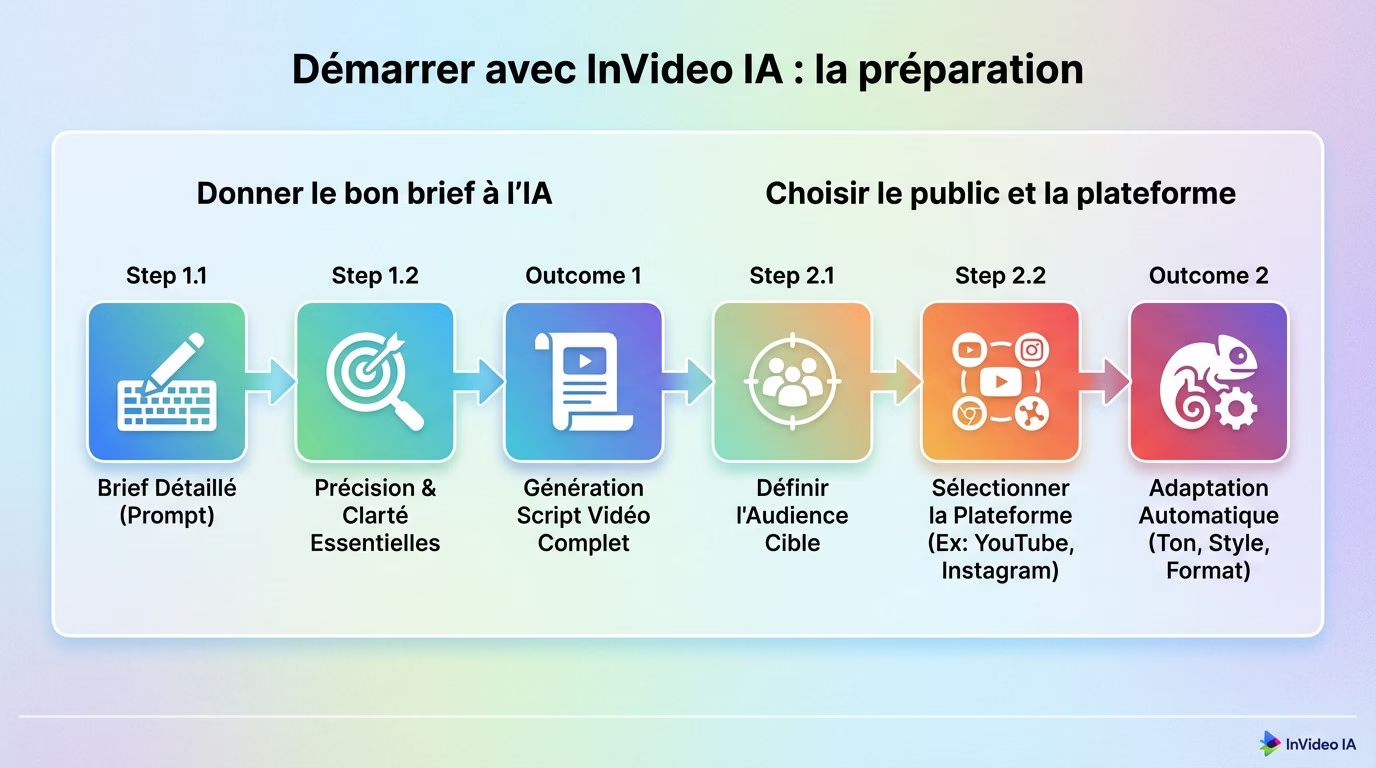
Giving the AI the right brief
To use InVideo AI, first write a simple text instruction. Be detailed and precise in your request to guide the AI effectively . For example, clearly state the subject and the exact mood.
From this single instruction, the AI will generate a complete script for the video. It transforms your words into a solid narrative structure.
Choose the audience and the platform
Define your target audience, such as “travelers” or “tech enthusiasts”. Select your destination platform , for example a YouTube Short or an Instagram Reel.
These choices allow artificial intelligence to automatically adapt the tone, style, and format of the video. The resulting video then perfectly matches the chosen medium .
Generate and personalize your video
Once the prompt is sent, the machine gets to work. But be warned, the magic happens mainly in the next step .
The first AI-generated version
The tool quickly produces a complete draft including script, scenes, stock media, and an AI voiceover. Consider this output an excellent raw working draft , but it is rarely the final, definitive version.
Refine the result with text commands
Locate the “magic box” below the video preview. This is where you will edit the video with simple phrases in natural language , without touching a complex timeline.
- Change the music to a more epic style .
- Remove the second scene , it’s irrelevant.
- Uses a female voice with a more dynamic tone .
That’s the whole point of using invideo ia: you maintain creative control without any editing skills . You simply order your changes, and the software executes them.
Finalize and export: the finishing touches
Text commands are great, but manual adjustment remains unbeatable for the finishing touch.
Changing the media and the voiceover
AI does the rough work, but your eye remains essential . Take control to refine every detail.
| Element | Possible action |
|---|---|
| Visual media | Draw from the library (16M+ media) or import your files. |
| Voiceover | Change the AI voice or record your own narration. |
These options transform a standard video into a unique creation . Your personal touch makes all the difference.
Export and use your creation
Click “Export” to retrieve the file. You can use invideo ia to monetize on YouTube using royalty-free media.
To delve deeper into the subject, read our full review of InVideo.io . It's the perfect tool for drone and cam creators.
Creating a high-quality video is child’s play . With InVideo AI, you can transform a simple idea into captivating content in minutes . Forget about hours of editing . The tool handles everything for you , from the script to the voiceover. All you have to do is get started and publish your first creation.




Leave a Reply