
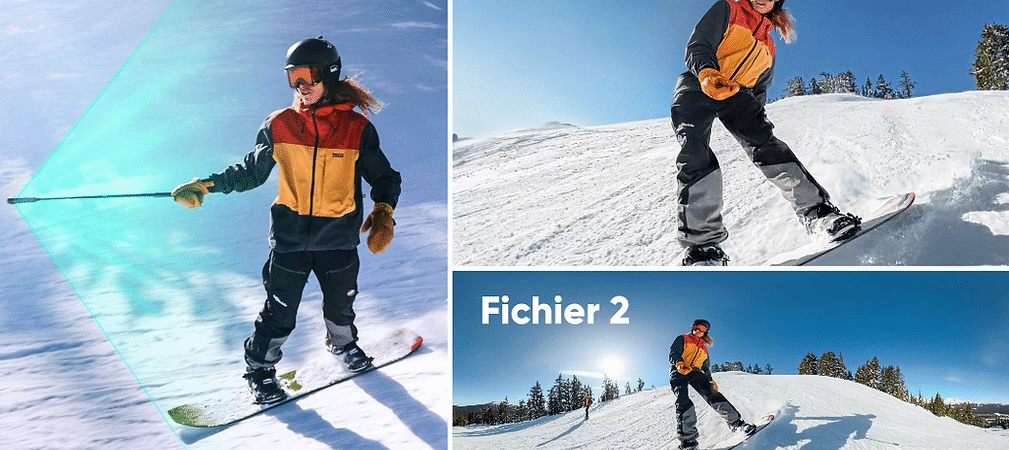
The 360° Me mode is one of the most impressive features of Insta360 cameras, especially the Insta360 X5 . It allows you to film dynamic videos with a third-person perspective, without needing a cameraman. Combined with the invisible selfie stick and smooth stabilization, this mode is ideal for vlogs, solo adventures, or simply capturing spontaneous moments.
Here’s how to use it effectively to get share-ready videos in a snap.

What exactly is 360° Me mode?
Me mode is an intelligent tracking mode that automatically keeps the subject (you) in the center of the image, thanks to AI-powered 360° framing. You film all around you, and the camera selects the most interesting angle.
The invisible boom mic effect gives the impression that a camera is floating beside you. This creates a unique, professional-quality shot without the boom mic ever being visible.
How to activate Me mode on the Insta360 X5
Activating Me mode is simple:
- Turn on your X5 and connect it to the Insta360 mobile app (or use the touchscreen).
- In the capture modes, choose “Me Mode” .
- Set the resolution to 4K 30fps or 60fps for smooth rendering.
- Make sure the invisible pole is fully extended and centered.
- Start recording and start moving!
The camera simultaneously records a 360° video and a flat MP4 file , ready to be shared without editing.
Take advantage of the best Insta360 offers
Tips for dynamic and natural shots
- Maintain a smooth pace : walk or run at a steady speed so that FlowState stabilization works best.
- Change direction : rotate around objects or make circles to create movement within the frame.
- Look at the camera from time to time to add a human touch to your video.
- Avoid hiding the camera with your arms or bag to keep the selfie stick effect invisible.

Quick editing thanks to Insta360 Studio or the mobile app
The Insta360 mobile app allows you to automatically crop 360° videos:
- Activate AI Tracking so the app follows your face or body.
- Choose the vertical, horizontal or square format depending on the target platform (Reels, TikTok, YouTube Shorts).
- Add music, text, and transitions directly from the app.
- Exports to MP4 ready to share on Instagram, Facebook, or YouTube.
Examples of Me mode usage
- 🌍 Travel vlog : show your experience with a cinematic angle.
- ⛺️ Hiking or walking : film yourself in nature without needing to frame the shot.
- 🏋️ Solo sports : running, skating, mountain biking… the camera follows you naturally.
- 📷 Product or location presentation : gives the impression of filming with a “flying camera”.
Conclusion
The 360° Me mode literally transforms the way you film solo. With the Insta360 X5 , you can capture ultra-stable, dynamic, and above all , share-ready footage effortlessly .
Whether you’re traveling, out for a walk, or preparing a vlog, this mode saves time and improves quality. So, ready to film yourself as if you had an invisible cameraman by your side?



Leave a Reply