

The Insta360 X4 is a revolutionary action camera that captures spectacular 360° images and videos. However, it is inevitable that over time or due to heavy use, your camera’s lens may become damaged. Fortunately, replacing the lens of the Insta360 X4 is possible, and thanks to the high-quality accessories available on the market, such as those from the LISILIFIT brand, your camera can return to its original image quality.
In this article, we will show you how to replace the lens of your Insta360 X4, what are the best options available, and some tips to ensure a successful replacement. This guide has been designed to make the process as simple as possible, even for those who don’t have a lot of experience repairing electronic devices.
 Buy on Amazon
Why Replace the Lens of Your Insta360 X4?
When the lens of your Insta360 X4 is damaged, whether by scratches, shocks or natural wear and tear, the quality of your shots is directly affected. A damaged lens can lead to blurry images, distracting reflections, or even unwanted shadows. These issues can make your videos less engaging and decrease the value of your content, especially if you’re a content creator or a photography and video enthusiast.
Replacing the lens allows you to enjoy new clarity and sharpness for your videos. This is an affordable and efficient option compared to buying a new camera. Not only does this save you money, but it also helps reduce electronic waste by extending the life of your current device. The replacement lens is a wise investment for anyone who wants to preserve the quality of their images without spending a fortune.
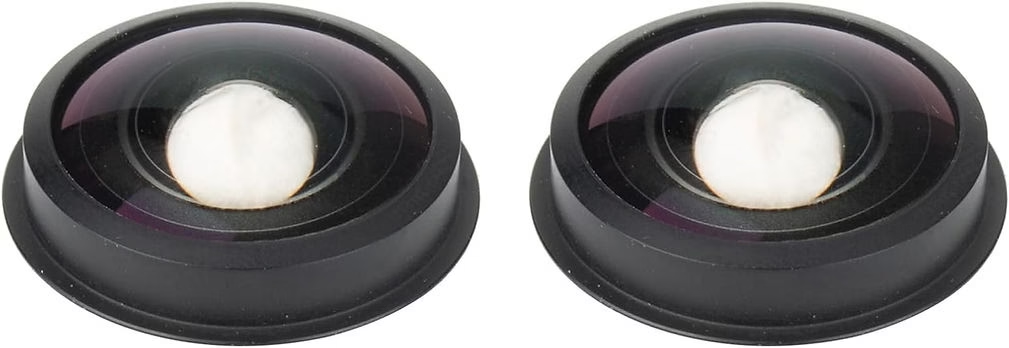
The Perfect Replacement Lens: LICHIFIT for Insta360 X4
To replace the lens of your Insta360 X4, we recommend the LICLIFIT Replacement Lens, designed specifically for this camera model. Here’s why this lens is a great choice:
- Perfect Compatibility : The LICHIFIT lens is perfectly compatible with the Insta360 X4. There are two types of lenses: those with a marked circle and those without. Be sure to check your camera’s original lens before ordering, and choose the same type for worry-free installation. The non-circle version is also compatible with the Insta360 X3, making it a versatile product if you own multiple models.
- Premium Quality : Made with high-quality materials, this lens ensures a long life and better performance. Replacing a damaged lens with a LICHIFIT lens ensures that your device will perform optimally. The quality of the materials is essential to prevent future damage and ensure that the camera performs as intended, even under heavy use conditions.
- High Light Transmission : This lens offers high light transmission, allowing you to capture high-resolution videos with outstanding visual effects. Whether for selfies, landscapes, or architectural photos, the LICHIFIT lens ensures impeccable results. You’ll get vivid colors, sharp details, and professional-quality images, whether you’re using the camera for outdoor adventures or indoor recordings.
- Lightweight : The lens is designed to be lightweight, which means it doesn’t add extra weight to the camera or affect the quality of shooting. This makes it a perfect choice for those who like to capture moments with ease, without weighing down the equipment. A lightweight lens is especially beneficial for long shoots or shooting sessions where comfort is crucial.
To purchase the LICHIFIT Replacement Lens, go here: LICHIFIT Replacement Lens for Insta360 X4.
Steps to Replace the Insta360 X4 Lens
Replacing the lens on your Insta360 X4 can seem daunting, but by following these simple steps, you can do it safely:
- Prepare your workspace : Make sure you work in a clean, well-lit area. This will help prevent dust or dirt from entering the camera during the replacement process. Having an organized space will allow you to keep all the tools close at hand and avoid losing small parts during installation.
- Remove the Damaged Lens : Using a small screwdriver and the appropriate tools, gently unscrew the damaged lens. Be very careful to avoid damaging the camera’s internals. If you don’t have experience in dismantling electronic equipment, it’s best to seek professional help. You can also watch online tutorials for visual tips on how to do this.
- Install the New Lens : Carefully place the LICHIFIT replacement lens, making sure to align the screws properly. Tighten the lens until it is secure, but do not overforce it to avoid causing damage. Proper installation is essential to ensure a perfect seal and prevent dust or moisture from getting inside the camera, which could affect the quality of the videos.
- Check the Image Quality : After installing the new lens, turn on your Insta360 X4 and do some shooting tests to make sure the lens is installed correctly. Check for any visible blurred areas or distortions. Also, make some recordings in different light conditions to make sure that the light transmission is optimal and that the camera is working as intended.

Important Tips
- Required Tools : It is important to use specific repair tools so that your camera is not damaged. If you don’t have these tools, consider replacing the lens at a local repair shop. Suitable repair kits can be purchased online and often come with instructions that make the process easier.
- Professional Installation : If you are not comfortable with replacing it yourself, it is highly recommended that you hire a professional. Improper installation can lead to further damage to your camera. In addition, a professional will be able to guarantee that the lens is perfectly installed, giving you peace of mind.
- Protect your new lens : After replacing the lens, it is advisable to use additional protection, such as a protective cap or shell, to prevent further damage. This will extend the life of the new lens and prevent you from having to make frequent replacements.
Buy on Amazon
Conclusion
Replacing the lens of your Insta360 X4 is an essential operation to keep the quality of your videos and images at their best level. With the LICHIFIT replacement lens, you have access to a quality product that allows you to bring your camera back to life at an affordable price. Whether you’re a content creator, an adventurer, or just a photography enthusiast, this solution will allow you to continue capturing unique moments without compromising on quality.
Don’t let a damaged lens stop you from capturing precious memories. Order your replacement lens now and enjoy the full power of your Insta360 X4! Click here to buy the LICIFIT lens.
With the right tools, a little patience, and the right lens, you’ll be able to restore your Insta360 X4 to full functionality and continue to capture your adventures in the best possible condition. Don’t underestimate the impact a quality lens can have on your videos — it’s a crucial part of achieving results you’ll be fully satisfied with.




Leave a Reply