
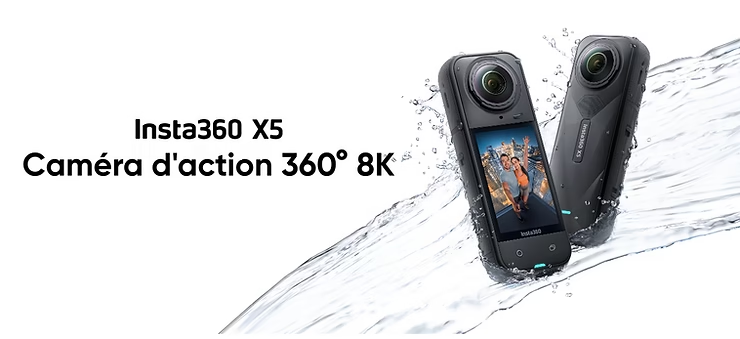
When the light goes down, many cameras show their limits. Digital noise, loss of detail, dull colors… Filming at night or indoors is never easy. With the Insta360 X5, the brand announces a major step forward thanks to its all-new PureVideo mode, boosted by a triple AI chip and 1/1.28″ sensors.
But what is this promise really worth on the ground? Does this mode hold up to a GoPro Hero 13 Black or the previous generation like the X4? In this article, we’ll dive into the technical and visual details to understand if the X5 deserves its status as queen of the night.
Insta360 X5: a new generation designed for the night?
The Insta360 X5 marks a major turning point in the world of 360° cameras, not least thanks to its new 1/1.28″ sensor, which is significantly larger than that of the X4 (1/2″). In photography and video, the size of the sensor plays a decisive role in low light: the larger it is, the more light it captures, thus reducing digital noise and improving the overall rendering.
Insta360 didn’t stop there: the X5 has three AI chips dedicated to optimizing image processing, in real time. Objective? To offer better management of contrasts, colors and details, even in dark environments. All this while maintaining the fluidity of the image, even in 5.7K at 60 fps or 8K at 30 fps.
Another advantage is the replaceable lenses, which ensure optimal optical quality even after months of intensive use. A real novelty that improves durability, but also sharpness at night.
a:hover { transform: scale(1.05); } a[href*=”amazon”]:hover { background-color: #e68a00; } a[href*=”insta360″]:hover { background-color: #222222; } a[href*=”lacameraembarquee”]:hover { background-color: #0052a3; }
What is PureVideo mode on the Insta360 X5?
The PureVideo mode is one of the flagship innovations of the Insta360 X5. Designed specifically for dark or dimly lit scenes, this mode combines the capabilities of 1/1.28″ sensors with a triple AI chip, capable of analyzing each image in real time to optimize brightness, sharpness and color balance.
Specifically, PureVideo applies intelligent noise reduction, avoiding the “dirty blur” effect often seen in night videos. The algorithm also processes saturation, exposure and stabilization, even when contrasts are extreme. This helps to retain detail in dark areas while preventing strong lights (headlights, street lights, signs) from burning the image.
The use cases are numerous: nocturnal city trips, subdued interiors, timelapse sunsets, or vlogs in a lit alley. PureVideo is automatically triggered as soon as the light becomes dim, but can also be activated manually via the Insta360 app.
Insta360 X5 vs X4 comparison in low light
At first glance, the Insta360 X5 and X4 may seem close. However, as soon as the light dims, the differences become obvious.
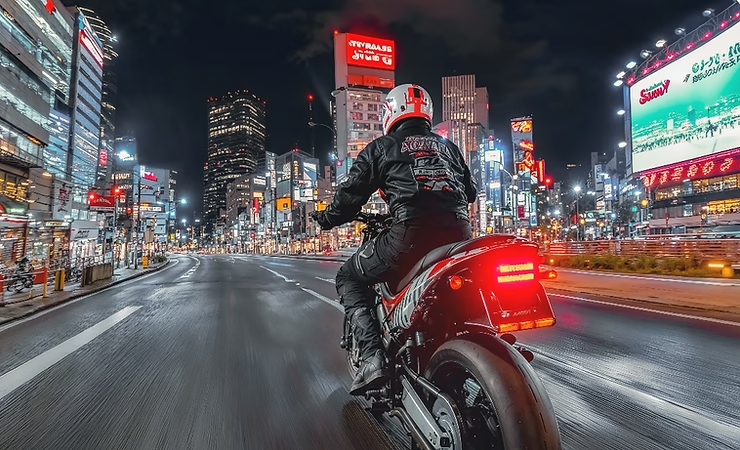
In a real-world test — city drive at night, car on a lit street, or ski down at sunset — the X5 clearly outperforms the X4 in several ways. First of all, in terms of digital noise : where the X4 generates artifacts in dark areas, the X5, thanks to the PureVideo mode, manages to smooth them out without degrading the image.
In terms of color rendering, the X4 tends to produce slightly cooler or slightly desaturated images in the dark. Conversely, the X5 handles white balance better and maintains a natural palette, even in mixed urban lighting.
Finally, the details in the shadows are much better preserved on the X5. On the same street plan, you can clearly see the textures of the ground, the foliage or the faces — where the X4 loses these elements in a uniform black. The X5’s Active HDR mode at 5.7K 60 fps also contributes to this richer and more dynamic rendering.
In summary, for those who often film at night, the Insta360 X5 brings a real break with the previous generation.
The current limits of PureVideo
Even though the Insta360 X5’s PureVideo mode impresses with its ability to enhance low-light shots, it’s not without its weaknesses.
First, the noise reduction algorithm can sometimes smooth the image too much. On some static shots, fine textures (cobblestones, dark foliage, clothing details) may appear slightly blurred. This is not a major flaw, but demanding designers will notice it.
Another point: in 8K recording, especially if the ambient temperature is high, the X5 can heat up faster than usual. This leads to early outages or the activation of the thermal protection mode. Nothing critical, but to be taken into account for long night sessions in 8K.
Finally, indoors with mixed lighting (cold LEDs + warm neon lights, for example), color management can sometimes seem unstable. You will then have to go through manual color correction in Insta360 Studio or the mobile app for a more natural look.
Conclusion: PureVideo is a major step forward, but it can still be improved for certain specific uses.
Tips for shooting with the Insta360 X5 in low light
To get the most out of the Insta360 X5 in low-light conditions, a few tweaks and tricks can make all the difference.
🎛 Let PureVideo mode manage exposure automatically : the algorithm is designed to adjust ISO, white balance, and noise reduction without manual intervention. Forcing the ISO in Pro mode can, on the contrary, degrade the quality.
🔦 Adds minimal illumination if possible : Even a small LED headlamp is enough to improve the readability of a moving subject. You can also take advantage of urban lights (street lamps, shop windows) as a room source.
📱 Use the Insta360 app for live monitoring : you can check the exposure, colorimetry and histogram in real time, even in the dark. This helps to avoid unpleasant surprises in publishing.
🧊 Take into account the temperature : if you film for a long time in 8K, avoid hot environments. You can also temporarily remove the battery between sockets to limit heating.
🎒 Think about the right accessories : an invisible pole allows you to keep a stable grip even when walking at night. And if you’re vlogging, an externally plugged lavalier microphone (with the USB-C module) can greatly improve the sound.
In short, the X5 can become your ultimate night weapon if you use it with the right reflexes.

And compared to a conventional camera like the GoPro Hero 13 Black ?
Comparing the Insta360 X5 to a more conventional camera like the GoPro Hero 13 Black gives you a better understanding of the strengths and trade-offs of the PureVideo mode.
In very low light, the GoPro Hero 13 Black holds its own well, thanks in particular to its 1/1.9″ sensor, its good HDR management and its HyperSmooth 6.0 stabilization. Its 5.3K format is optimized to produce a clean, ready-to-use image with little retouching. She particularly excels on still shots or well-lit scenes with little movement.
The Insta360 X5, on the other hand, captures much more information thanks to its 360° vision: it absorbs more global light on each scene. As a result, even on a dark street or forest at the end of the day, you can crop in the best-lit direction and get a sharp shot. PureVideo plays a central role here to compensate for the classic limitations of 360° in low light.
On the other hand, the GoPro remains more effective in fast handheld video without editing. With the X5, you’ll enjoy the maximum quality… as long as you go through a little post-production time to crop and optimize your rendering.
Should you shoot in PureVideo or classic HDR?
The Insta360 X5 offers several modes to adapt to different lighting conditions, and the question often comes up: is it better to activate PureVideo or stay in classic Active HDR mode?
🎬 PureVideo is your best option in the evening, in poorly lit interiors, or in scenes with a lot of dark areas. He excels in nocturnal urban shots, portraits in a subdued atmosphere, or concert videos. The image is softer, cleaner, with less apparent noise, and the colors are balanced without forcing contrasts.
🌄 Active HDR, on the other hand, works perfectly in backlight or changing light (for example, during a sunset or a quick transition from shade to sun in the mountains). It retains more textures and relief in highlights and shadows… provided that the light is still sufficient.
⚖️ In short:
- PureVideo → dark mood, night scene, low lighting, controlled motion.
- Active HDR → end of day, dynamic landscapes, natural light with contrast.
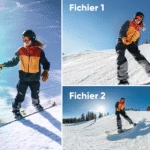
And if you’re hesitating? Make two plans! The Insta360 app allows you to quickly view it to choose the best way to edit it.
Will PureVideo mode revolutionize 360° night video?
The Insta360 X5’s PureVideo mode isn’t just a marketing add-on, it’s a real step forward for anyone who shoots in harsh conditions. Where 360° cameras have been limited by digital noise and lack of contrast in low light, the X5 offers a truly credible alternative — with a clean, immersive rendering that can be used right out of the app.
Of course, everything is not perfect yet: some smoothing can be too pronounced, and it will sometimes be necessary to correct the colorimetry in post-production. But the evolution compared to the X4 (or even a GoPro Hero 13 Black) is significant.
With time, and future software updates from Insta360, we can expect even more precision in the management of the night image. And when you combine PureVideo, FlowState stabilization, 8K and larger sensors… The result is probably the best consumer 360° night camera to date.
❓ FAQs: PureVideo Insta360 X5
What is PureVideo mode on the Insta360 X5?
It’s a dedicated low-light video mode, combining a 1/1.28″ sensor and three AI chips to reduce noise, balance colors, and smooth the image. It activates automatically or manually as soon as the light dims.
Is PureVideo mode better than regular HDR mode?
Yes, in dark conditions. PureVideo is most effective for night scenes, low-light interiors, or subdued environments. Active HDR is still preferable at sunset or in contrasting natural light.
Does the Insta360 X5 do better than the X4 in low light?
Yes. Thanks to its larger sensor and the PureVideo algorithm, the X5 significantly reduces noise, improves colorimetry, and retains more detail in shadows compared to the X4.
Is the GoPro Hero 13 Black as good as the X5 at night?
In a well-lit still shot, the GoPro defends itself well. But in a dark alley, the X5 outperforms the GoPro thanks to its cropping ability and PureVideo.
Are there any limitations to PureVideo mode?
Yes. It can smooth out some details a little too much, heat up to extended 8K or produce unstable colors in mixed lighting. But the overall result remains very clean.
What are the tips for filming in low light with the X5?
Leave PureVideo active, avoid hot environments, add light lighting, and use the Insta360 app to check exposure and colorimetry in real time.


Leave a Reply