
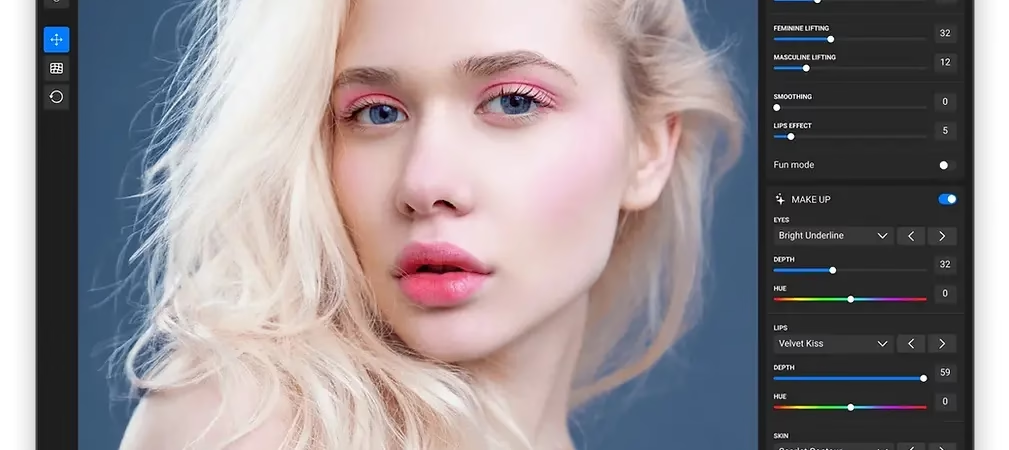
What is Face Make?
Face Make is an AI-powered portrait editing software that revolutionizes the way you modify faces in your photos. Using cutting-edge technology, this software deeply analyzes facial structure and offers a comprehensive range of tools to personalize features while maintaining a natural and realistic appearance. It’s not just a simple beauty filter like those found on social media; here, you have access to a palette of professional adjustments at your fingertips.
Whether it’s to refine symmetry, soften certain features, enhance expressions or subtly modify proportions, Face Make meets all your expectations, whether you are a professional photographer, graphic designer, influencer or enlightened amateur.
🏆 Winner of the TIPA World Award 2025 , Face Make was voted Best AI-Powered Portrait Editing Software . This prestigious award recognizes the product’s excellence and its ability to combine technical performance, innovation, and ease of use.
The main features of Face Make
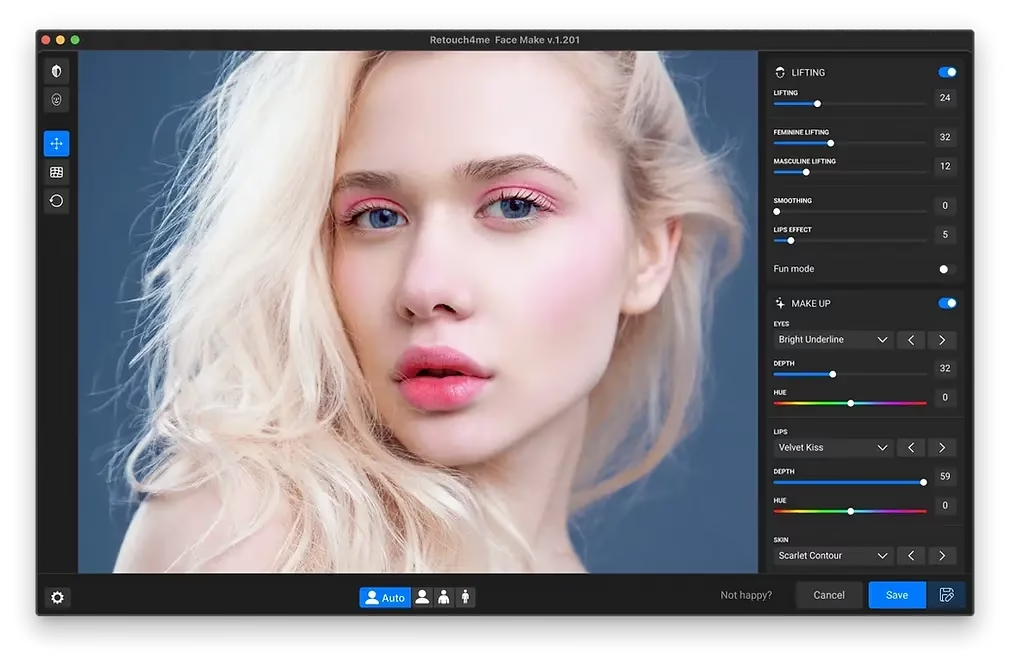
- Lifting : This function adjusts the overall proportions of the face for a more balanced and harmonious result. You have the option to accentuate or soften certain features for a more feminine, masculine, or completely neutral effect, depending on your needs.
- Makeup : Bring your portraits to life by applying a variety of makeup styles for the eyes, lips, and skin. You can also add freckles for a trendy or realistic effect. Whether you’re looking for a natural or artistic look, anything is possible.
- Movement : This feature allows you to modify the shape and size of specific elements such as the chin, forehead, nose, or cheekbones. Using precise sliders, you can fine-tune each element for a customized look.
- Before/after comparison : With one click, see the difference between your original image and the modified version. A perfect feature to validate your adjustments and see the impact of your work.
- Batch editing : Save valuable time by applying your adjustments to a whole series of portraits. Simply drag and drop your images into the software, and all the effects will be applied automatically.
- Custom mesh : If needed, you can manually refine the face mesh to avoid AI interpretation errors and achieve an even more accurate result. You can also reset the settings at any time.
Face Make is available as a plugin for Photoshop but also as a standalone version for Windows and MacOS, making it accessible regardless of your work environment.
How to use Face Make by Retouch4me?
- Visit the official Retouch4.me website
- Log in to your personal space via the “Account” tab.
- Click on “Photo retouching” in the left menu, then select Face Make .
- You can try the demo version for free, or opt for the full lifetime license, which entitles you to free updates and three activation keys for different devices.
- Download, install, and launch the software. Once your images are imported, follow the intuitive interface to begin the transformation.
🚀 Exclusive bonus: -20% discount with the code PHOTOBOOST
Don’t miss this opportunity to enhance your photo editing skills at a reduced price! By using the code PHOTOBOOST when placing your order, you’ll immediately receive a 20% discount on Face Make and all available plugins. It’s the perfect offer to test the full power of Retouch4me tools at a lower cost.
Face Make by Retouch4me is much more than just software: it’s a true extension of your creativity. With it, you can correct, enhance, and transform a face in just a few clicks while respecting the personality and identity of your models. Give your portraits a professional, studio-quality finish and let your imagination run wild.
🔗 Direct link to the plugin: https://retouch4.me/products/retouch-plugins?promocode=PHOTOBOOST




Leave a Reply