

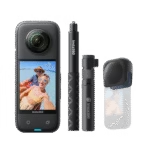
The call of the ocean is irresistible to adventurers and amateur filmmakers alike. Beneath the surface, a whole world opens up, brimming with color, life and mystery that only a camera lens can capture in all its splendor. Yet immortalizing these underwater wonders is not without its challenges. It requires technology that can withstand the pressure, handle the nuances of water-filtered light and deliver exceptional image clarity. In this quest to capture the perfect image beneath the waves, theInsta360 X3 and its Invisible Diving Case are unrivalled diving companions.
Discover theInsta360 X3 and the Invisible Diving Case
TheInsta360 X3 is no ordinary camera; it’s a revolution in the world of underwater videography. With its ability to capture 360-degree video at 5.7K, it offers a complete perspective of the underwater environment, leaving little room for blind spots and opening the door to limitless creativity. The 4K mode enables smooth slow motion, while the 3K mode at 100 fps delivers breathtakingly sharp detail, even in the fastest movements.
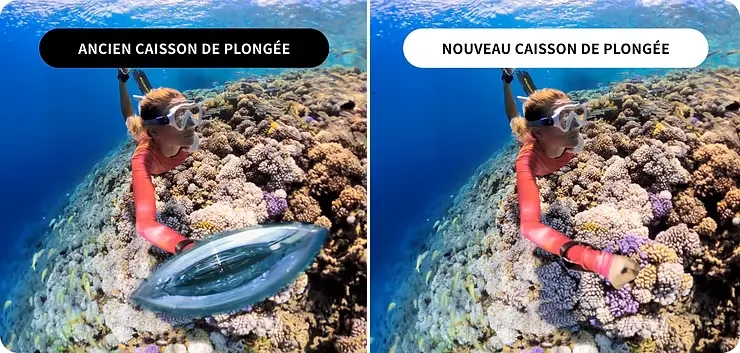
But what makes theInsta360 X3 truly suited to the underwater wonder is its Invisible Diving Housing. Designed to offer maximum protection without sacrificing image quality, this housing is the key to diving deeper without fear. Thanks to an advanced optical design, it eliminates light refraction problems, ensuring that your underwater images are as clear and vibrant as if they were taken in the open air.
The advantages of diving with this duo are clear. Not only do you get the ruggedness and waterproofing you need to explore the deep, but you also capture every moment with unrivalled clarity and beauty. For those looking to expand their underwater shooting possibilities even further, the Insta360 X3’s accessories offer a variety of options for every type of aquatic adventure.
By equipping theInsta360 X3 with its Invisible Dive Box, underwater videographers not only have access to cutting-edge technology, but also a passport to the exploration of the hidden mysteries of the oceans, with the guarantee of bringing to the surface images of previously unattainable quality.
Before diving – Preparation and settings
Preparation is the key to any successful adventure, especially when it comes to exploring the underwater depths. Before you plunge into the azure, a few essential steps must be followed to ensure that your Insta360 X3 is ready to capture every moment with precision and beauty. Here’s how to prepare your equipment for optimum compatibility and outstanding underwater performance.
1. Firmware update: Make sure your Insta360 X3 is running the latest firmware version. This step is crucial as it ensures that you benefit from the latest enhancements and features developed by Insta360, including specific optimizations for underwater capture. Updating is simple thanks to the Insta360 application, which will guide you through the process in just a few easy steps.
2. Correct installation of the camera in the housing: The Invisible Dive Housing is not just a shield against water; it’s also an extension of your camera, designed to preserve image quality without compromise. Before closing the housing, check that the seals and fastenings are free of debris or sand that could compromise the waterproof seal. Correct installation of your camera in its housing ensures that the record button and other controls remain accessible, allowing you to easily control your shot even when wearing diving gloves.
3. Recommended pre-dive settings : The underwater environment demands careful attention to your camera settings to capture the vividness and clarity of marine life. Here are a few recommendations to maximize the quality of your underwater videos:
- Video mode: Choose 5.7K video mode at 30fps for detailed capture while maintaining natural fluidity in water movement.
- White balance: Manually adjust the white balance to compensate for the bluish tendency of underwater shots. This will help restore the rich colors of corals, fish and the seascape.
- Stabilization: Activate FlowState stabilization to keep your videos smooth despite water movements or when you’re on the move.
- Resolution and frame rate: If you plan to slow down your videos to capture fast-moving events, such as a school of fish running away, use a higher setting such as 4K at 100fps.
By following these preparation steps and carefully adjusting the settings on your Insta360 X3, you’ll be ready to dive in and capture the wonders hidden beneath the waves. The sea is an ever-changing world, full of surprises and fleeting beauty, and thanks to your Insta360 X3, you can preserve these magical moments forever.
Underwater – Shooting tips
Once immersed in the dazzling dance of light and color of the underwater world, every detail counts in capturing the essence of this aquatic beauty with your Insta360 X3. Here’s how to ensure that every shot is a faithful reflection of this spectacle.
1. Importance of locking the touchscreen: Water exerts pressure on your camera’s touchscreen, which can lead to unintentional commands. Lock your Insta360 X3 ‘s touchscreen before diving to prevent accidental triggering and allow you to concentrate fully on your underwater experience.
2. Specific settings for underwater capture :
- White balance: Adjust white balance according to depth and light conditions. Water filters colors differently at different depths, starting with red. Manual adjustment can help correct these variations for natural colors.
- ISO: Keep ISO as low as possible to reduce image noise. Good underwater light conditions often allow you to opt for low ISO, especially in clear waters.
- Exposure: Use manual mode for precise exposure control, especially when shooting scenes with strong light contrasts.
3. Tips for optimum use of the housing: Make sure the housing is securely closed, and check that it is watertight before each dive. After installing your Insta360 X3 in its housing, clean the outer lens to avoid water drops that could spoil your shots. A small application of anti-fog product can also help maintain image clarity.
Section 4: After diving – Maintenance and care
Taking care of your equipment is essential to ensure its longevity and the quality of your future underwater adventures. Here’s how to care for your Insta360 X3 and its housing after every dive.
1. Cleaning and care of housing and camera: Always rinse the housing in fresh water immediately after each dive, especially if you have been diving in the sea. This prevents corrosion from salt and debris. Open the housing and remove your Insta360 X3 to clean it separately, taking care to clean the seals and contact areas.
2. Proper storage: After cleaning and drying, store your camera and its casing in a cool, dry place. Avoid locations exposed to direct sunlight or extreme temperatures. If possible, place silica gel sachets with your equipment to absorb any residual moisture.
By following these underwater shooting tips and post-dive maintenance practices, your Insta360 X3 will remain a reliable companion for all your underwater explorations, capturing the majesty of the aquatic world with exceptional clarity and precision.
Editing and Sharing Your Underwater Adventures
Once you’ve captured the brilliance of the underwater world with your Insta360 X3, the next step is to turn that raw footage into a compelling story. Here’s how you can make the most of your underwater videos and share them with the world.
1. Tips for editing underwater videos :
- Highlight selection: Review your footage and select the moments that best capture the beauty and mystery of the underwater world. Look for interactions with marine life, fascinating light effects, or action scenes.
- Color adjustment: Water can filter colors, especially at greater depths. Use the color correction tools to restore the natural vibrancy of your images. White balance, contrast and saturation can all be adjusted to reflect underwater colors more faithfully.
- Stabilization: Even with theInsta360 X3‘s FlowState stabilization, some shots may benefit from additional stabilization in post-production, especially if you’re capturing fast-action scenes.
2. Using AI editing features to enhance your shots :
- AI Editing: TheInsta360 X3 offers powerful AI editing tools that can automatically select highlights from your videos, creating captivating stories without the effort of manual editing.
- Special Effects: Experiment with the various effects and transitions available via AI to give your videos a creative touch. Effects such as timelapse, slow motion, or even animations can add an extra dimension to your underwater story.
3. Share your videos on social networking platforms :
- Optimization for platforms: Each social media platform has its own format and resolution recommendations. Be sure to adjust your videos accordingly to ensure optimal quality on Instagram, YouTube, Facebook, or TikTok.
- Instagram: Resolution: 1080×1350 Bitrate: 13-15Mbps Codec: H.264 File Type: mp4
- YouTube: Resolution: 4K Bitrate: 65-80Mbps Codec: H.264 or H.265 File Type: mp4
- TikTok: Resolution: 1080×1920 Bitrate: 13-15Mbps Codec: H.264 File Type: mp4
- Facebook: Resolution: 4K Bitrate: 65-80Mbps Codec: H.264 File Type: mp4
- Community engagement: Share your underwater adventures with captivating captions and relevant hashtags to reach a wider audience and drive engagement.
Conclusion:
Capturing the wonders hidden beneath the surface with theInsta360 X3 is an adventure in itself, but turning these moments into shareable stories is the essence of underwater exploration. Through each video, you have the opportunity not only to preserve these incredible memories, but also to inspire others to dive into their own aquatic explorations.
We encourage you to continue exploring, capturing and sharing the infinite beauty of the underwater world. Every dive is a chance to discover something new, and with theInsta360 X3, you’re perfectly equipped to document every magical moment. The underwater world is full of stories waiting to be told. So dive in and share your discoveries with the world.



Leave a Reply