
Do you dream of publishing viral content, but the idea of spending hours learning complex software discourages you before you even begin? To resolve this dilemma, this beginner-friendly Submagic vs. Capcut comparison examines which application offers the best compromise between professional results and ease of use for a novice. Together, we’ll determine whether you should prioritize artificial intelligence that does everything for you or a creative tool that gives you complete control, so you can boost your visibility without any hassle.
- Submagic or CapCut: the direct answer for the busy beginner
- The “zero editing” workflow: who wins the speed match?
- Beyond subtitles: Submagic’s automation arsenal
- So why choose CapCut? The cases where it remains king
- From editing to publication: the “zero writing” solution
- The crux of the matter: free versus subscription
Submagic or CapCut: the direct answer for the busy beginner
Submagic’s “zero effort” promise
You upload your raw video and the AI handles everything: subtitles, emojis, and zooms. It’s the perfect tool for those who refuse to deal with a complex timeline. The approach is radical.
Everything happens in the browser, without installation. You load the file and the work begins. It’s a huge time saver for creating without any technical friction.
If the word “editing” scares you, Submagic is your savior. It’s the ultimate in ease.
CapCut, the creative editor that asks for a little more
CapCut remains a true editing software. It provides the scissors, but it’s up to you to cut the sequences. You retain complete control. It’s rewarding but more demanding.
Her designs are perfect for a curious beginner who wants to learn. You can go far in your creative process if you’re willing to invest the time.
Want to get your hands dirty for a unique result? Then CapCut is the tool you need.
The verdict in a nutshell
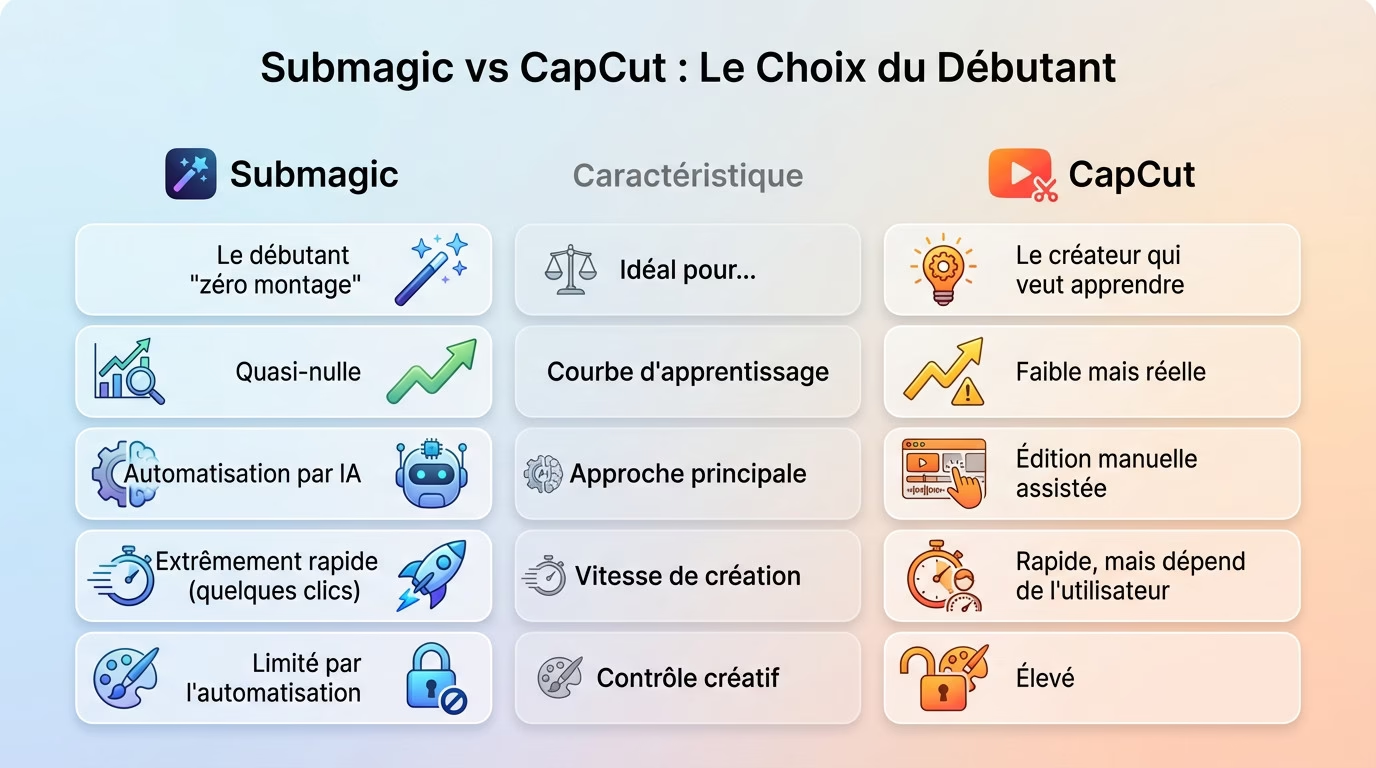
Here’s a visual summary to help you decide immediately. Look at this chart to see where you stand.
This table summarizes the key points, but consult a broader comparison for more in-depth information. In the Submagic vs. Capcut beginner comparison, everything depends on your desire to learn quickly or to produce quickly.
| Characteristic | Submagic | CapCut |
|---|---|---|
| Ideal for… | The “zero editing” beginner | The creator who wants to learn |
| Learning curve | Virtually zero | Weak but real |
| Main approach | AI-powered automation | Assisted manual editing |
| Speed of creation | Extremely fast (just a few clicks) | Fast, but user-dependent |
| Creative Control | Limited by automation | Pupil |
| To test the automated approach: Try Submagic here | ||
The “zero editing” workflow: who wins the speed match?
Now that we have laid the foundations of their philosophies, let’s look at how it actually works to create a video.
Create a subtitled video with Submagic
We start by uploading the video directly to the platform. The AI immediately takes over: it generates subtitles, integrates relevant emojis, and even adds dynamic zooms at key moments. Everything happens automatically, without us having to do anything.
Next, we take a quick look to confirm the proposed result. Need to correct a typo or change a style? It’s possible with a single click. Once satisfied, all that’s left is to export the final file.
The bulk of the work is done in seconds, without any complex manual intervention.
The same exercise on CapCut
For CapCut, the process is different: you first import the clip into the application. Then you have to navigate through the menus to find the “Automatic Captions” function and launch it manually to obtain a basic transcription.
This is where the real work begins for you. You have to adjust the text style, fine-tune the timing, and add animations or zooms yourself to make the image more dynamic.
The result can be excellent, but it requires significantly more action on your part.
The stopwatch doesn’t lie: automation makes the difference
If the goal is to produce a video ready for publication, the Submagic vs. Capcut comparison is quickly over. Submagic is objectively faster thanks to its AI, which manages the entire process. The time saved on editing is simply enormous.
The choice is simple for you: do you prefer near-total time savings with Submagic or precise manual control with CapCut? The difference lies in the effort required.
For a novice who wants to produce quickly, the choice of tool is obvious.
Beyond subtitles: Submagic’s automation arsenal
“Magic Clips”: AI that finds the gems for you
Video editing is often thought of as a technical chore. With Magic Clips, you simply give a long video to the AI and it does the work itself. It scans the file to extract impactful moments and generate clips ready to post.
For a novice, spotting the right “hook” is often a challenge. Here, the algorithm detects what will grab the audience’s attention for you. You no longer risk missing a powerful segment due to inexperience.
It’s like having a professional editor review the footage for you. The time saved is astounding.
Zooms, B-rolls and music in one click
A static video bores everyone, so Submagic automatically injects life into it. The tool manages the visual pacing for you.
- Auto Zooms: AI zooms in on important words to maintain viewer attention.
- Automatic B-Rolls: The tool adds relevant illustrative videos to enhance the content.
- Music and sound effects: AI suggests and synchronizes background music and sound effects.
In a beginner’s comparison of Submagic vs. Capcut, performing these actions manually would take hours. You have to manage keyframes and audio tracks yourself. Here, artificial intelligence synchronizes everything without human intervention.
Everything is done with one click. Your content becomes dynamic and professional instantly.
A personal editing assistant
Don’t think of Submagic as just a piece of software; it’s an assistant that works for you. It transforms raw material into a finished product, applying the techniques of viral videos. You go from beginner to effective creator without any technical skills.
This is where the true potential of this AI tool becomes apparent for those who want to move quickly. It doesn’t just cut, it optimizes for engagement.
It eliminates the fatigue associated with decision-making. The process finally becomes seamless.
So why choose CapCut? The cases where it remains king
However, CapCut shouldn’t be written off too quickly. It has some serious advantages, especially if your goal isn’t just to save time.
Total creative control
With CapCut, every technical detail is manually adjustable. You can fine-tune the exact timing of a cut, the precise animation of text, or the layering of multiple video tracks. It’s the raw freedom that automation can’t provide.
This is the ideal solution for someone with a clear artistic vision in mind. A specific vision that AI simply can’t guess for you. You remain the sole pilot in the cockpit.
Submagic’s automation can quickly become a gilded cage. Here, the bars are coming loose.
Trendy patterns and effects
CapCut highlights its vast library of free templates. It’s constantly updated with the latest TikTok and Reels trends that are currently trending. You have direct access to what’s working best right now.
Simply replacing a model’s videos is enough to ride a trend. It’s a massive creative time saver, eliminating the need to start from scratch. You benefit from the work of other creators.
This is a major advantage for being responsive on social media. Speed is key.
When CapCut is the best choice for you
Here are specific scenarios where CapCut is a better choice for a beginner. See if you recognize yourself in these situations:
- If you want to learn the basics of video editing.
- If you have a very specific creative idea that you want to bring to life.
- If your goal is to replicate a trend using an existing model.
- If your budget is zero (the free version is already very complete).
In short, it’s the best tool for anyone who sees video editing as a skill to be acquired. It’s not just a chore to be avoided at all costs. You’re investing in your own expertise.
From editing to publication: the “zero writing” solution
Once the video is exported, the job isn’t finished. We often find ourselves stuck staring at our phone screen. What should we write in the caption? Which hashtags should we choose to get noticed? It’s frustrating to get stuck so close to the finish line.
This step is often as paralyzing for a novice as the editing itself. It’s the fear of making a mistake, choosing the wrong keywords, and going unnoticed.
However, a great video with a bad description unfortunately risks being a total flop.
How Submagic also handles your texts
Good news: Submagic’s AI doesn’t stop at the image. It analyzes your content to automatically generate a compelling description suggestion and a list of relevant hashtags. No more racking your brains.
This truly fulfills the promise of “zero effort”. We start with a raw video and in just a few moments, we have 100% ready-to-post content.
It’s a phenomenal time saver and an immediate boost of confidence.
CapCut leaves you to figure it out yourself.
Here, the comparison between Submagic and Capcut for beginners is clear. Capcut’s function ends abruptly with file export. It’s a pure and simple video editor, period. It doesn’t handle any marketing aspects whatsoever.
Once the video is recorded on your phone, you’re on your own. It’s up to you to find the right words and viral hashtags without any help.
For a beginner, this is clearly one more technical barrier to overcome.
The crux of the matter: free versus subscription
Of course, all these features come at a price. That’s often the final deciding factor.
CapCut’s generosity… with limits
CapCut offers a surprisingly comprehensive free version. Its biggest advantage is that you can edit and export videos without paying a cent. It’s ideal for getting started risk-free.
However, the best effects, the most advanced AI tools, and cloud storage are reserved for the “Pro” subscription. Excellence often comes at a price.
The watermark on certain exports can also be an annoying obstacle.
Submagic: an investment to save time
Submagic is clearly a paid subscription service. There may be a trial, but its real value lies in the paid plans. That’s the price of automation.
Don’t view this cost as an expense for “software,” but as an investment to save hours of work each month. Time is money.
The price is directly related to the volume of videos produced.
Comparing offers: what are you really paying for?
To clarify this beginner submagic vs capcut duel, here is a direct comparison of what you get with each option.
- CapCut Free: Basic editing, simple auto-subtitles, numerous free effects, export sometimes with watermark.
- CapCut Pro (Subscription): Access to all effects, advanced AI tools, cloud storage, no watermark.
- Submagic (Subscription): All-in-one solution. AI subtitles, Magic Clips, B-Rolls, zooms, descriptions, hashtags. Price depends on the number of videos.
The choice is therefore: a free tool with paid bonuses (CapCut) versus a paid all-in-one service that does all the work (Submagic).
The final choice therefore depends on your priorities. If you want viral videos ready in seconds without any technical effort, go for Submagic. It’s pure automation. On the other hand, if you want to learn editing and control every creative detail, CapCut remains the best free learning tool.







Leave a Reply