
If you want the quick answer, Opus Clip does offer a free plan, but it comes with usage limits, a watermark and a monthly credit cap that can become restrictive fast. This guide helps you see whether the free plan is enough for your workflow or if a paid subscription makes more sense.
Is Opus Clip really free? What you get without paying
The free offer: 60 monthly credits to get started
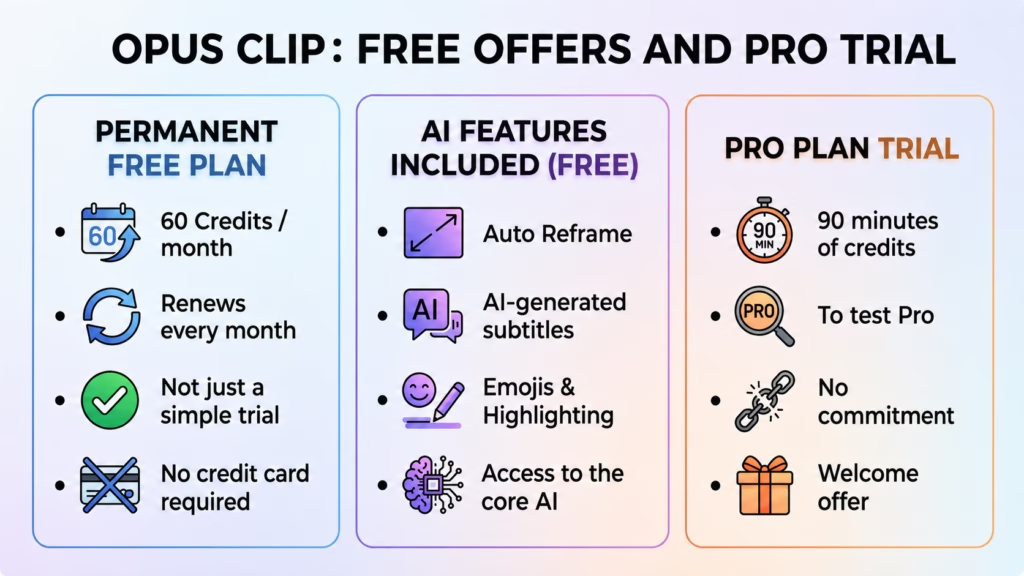
Yes, Opus Clip does offer a 100% free version. It’s not just a limited-time trial, but a permanent offer. Your credits will therefore renew automatically each month.
In practical terms, you get 60 free credits every month. This represents about an hour of source video, which is more than enough to get started. However, this amount will likely be insufficient for intensive production.
This is the perfect way to try out a free music video without ever taking out your credit card.
AI features included from the start
Even without paying, you get immediate access to the core technology. The tool includes automatic cropping, essential for adapting your videos to vertical formats. Furthermore, subtitles are generated instantly by AI to save you time.
These captions can include dynamic emojis and precise keyword highlighting. This is a real strength because it keeps the core of the service fully accessible.
Free trial of the Pro plan: 90 minutes to test everything
In addition to the permanent free plan, every new user receives a welcome bonus. You’re entitled to a free trial of the Pro plan to get started.
You then receive a total of 90 minutes of credits to use freely. This is the perfect opportunity to test the paid features without any commitment. You’ll then be able to see if the tool truly meets your needs.
Remember that this is a one-time welcome offer, completely separate from the monthly renewal.
The real limitations of the free version
The watermark: the inevitable compromise
If you choose the free version of Opus Clip, be aware that each video will display the brand’s logo. It’s visible and impossible to remove without paying. For a professional creator, this somewhat damages their brand image. This is the major drawback.
Consider this the only price you pay to use this powerful tool without having to use your credit card. This is how the platform is funded. It’s a two-way street for access to the service.
The Pro trial is a game changer. It allows you to export your clips completely blank.
Quality and lifespan of your clips
Let’s talk about resolution: the free version limits exports to a maximum of 1080p. That’s sufficient for TikTok or Reels, don’t worry. But if you’re aiming for 4K, you’ll have to pay. Subscriptions unlock this high quality.
Warning: You risk losing your work if you wait too long after generation. Your clips are only exportable for exactly 3 days. After this critical period, the file expires and becomes inaccessible. Therefore, it is essential to download the output immediately.
The lack of advanced editing tools
The free plan relies entirely on automation. You won’t have access to manual editing features like the full AI editor. Forget about precise cropping or removing silences. It’s a hands-free experience.
This means you have to trust the algorithm blindly. You can’t refine the result if the AI makes a mistake. It’s the raw result or nothing.
Upgrade to paid subscriptions: starter and pro plans
Now that the limitations of free services are clear, let’s look at what the first paid offers actually bring to the table. The idea is to show when the investment becomes worthwhile.
The Starter Plan: The first step for regular creators
If the limitations of the free Opus Clip plan are holding you back, the Starter plan is the perfect solution. It costs $15 USD per month. It’s the entry ticket to start working seriously.
The biggest advantage is the immediate removal of the annoying watermark. You also get 150 credits per month and finally access the full AI editor. This is the offer you need for truly clean visuals.
This plan is only available with monthly payments. You therefore retain complete flexibility to cancel whenever you want.
The Pro Plan: When Content Creation Gets Serious
The Pro plan is the next step up for very active creators. It’s priced at $29 per month. Paying annually brings the price down to the equivalent of $14.50 per month, which is much more economical.
Here, the credit allowance skyrockets to 3,600 units per year, available all at once. You also get access to advanced features like team seats for easy collaboration. Finally, the publishing scheduler simplifies your daily social media management.
Credit calculation: how does it work?
The credit system is often misunderstood by beginners. You don’t pay per short created, but per minute of video analyzed. Remember that one credit equals one minute of video uploaded to the platform.
For example, a 10-minute video will consume 10 credits, regardless of the number of clips subsequently generated. This detail makes all the difference when estimating your actual needs.
For teams and businesses: an overview of superior offers
For those whose needs exceed those of a solo creator, Opus Clip has designed more robust solutions. Let’s take a quick look at what they offer.
The Pro plan in detail: professional collaboration and exports
The Pro plan is a game-changer for collaboration. It includes a team workspace with two seats, perfect for creative duos. You’re no longer managing projects alone. It’s ideal for small businesses that want to move quickly.
But the real advantage is the XML export to Adobe Premiere Pro and DaVinci Resolve. This feature lets you retrieve your edits and then refine them in professional software. No more workarounds.
This transforms Opus Clip into a true production tool. It’s no longer just a social media gadget, but an essential link in your chain.
The Business Plan: The Tailor-Made Solution
The Business plan represents the platform’s ultimate offering. Pricing is customized based on a quote, so you’ll need to contact the sales team directly to discuss it. This is where things get serious.
This solution is designed for demanding agencies and large enterprises. You benefit from priority project processing and enhanced enterprise-grade security. API access facilitates custom integrations, while a dedicated Slack channel ensures ultra-fast support should any issues arise.
My opinion: who are these subscriptions really aimed at?
Let’s be clear: testing the free version of Opus Clip is a good starting point for getting started. The Starter version is sufficient for solo creators, but the Pro version is aimed at those who integrate video into a serious workflow. It’s the logical choice for a small team.
As for the Business version, it’s clearly on a different scale. It addresses the needs of massive volume, strict security, and advanced integration. Unnecessary for most, but essential for major players.
Opus Clip is an excellent option for testing viral clip creation at no cost. If you want professional results without a watermark, upgrading to the Starter plan quickly becomes essential. We recommend starting with the free version to properly assess your actual needs before subscribing.





Leave a Reply