
Here’s what matters most first, with the essential points, useful context, and practical takeaways made easy to scan.
Are you getting a little lost in InVideo’s pricing structure with all the talk about credits, minutes, and subscription plans? This practical guide breaks down each offer in detail to help you select the plan that perfectly matches your video creation volume . We’ll see together how to avoid hidden fees and optimize your budget to generate your content without any unpleasant surprises at the end of the month.
- InVideo AI’s free offer: a real test or just a preview?
- Paid plans for creators: details of the Plus and Max offers
- Comparison of InVideo AI subscriptions: Plus, Max and Generative
- Beyond standard plans: Team and Enterprise solutions
- The crux of the matter: understanding video minutes and AI credits
- Managing your budget: what happens if you exceed your quota?
- InVideo AI or InVideo Studio: be careful not to confuse the prices
- Monthly or annual billing: which is the best option for your budget?
- Which InVideo AI subscription is right for you?
InVideo AI’s free offer: a real test or just a preview?
What you can actually do with the free plan
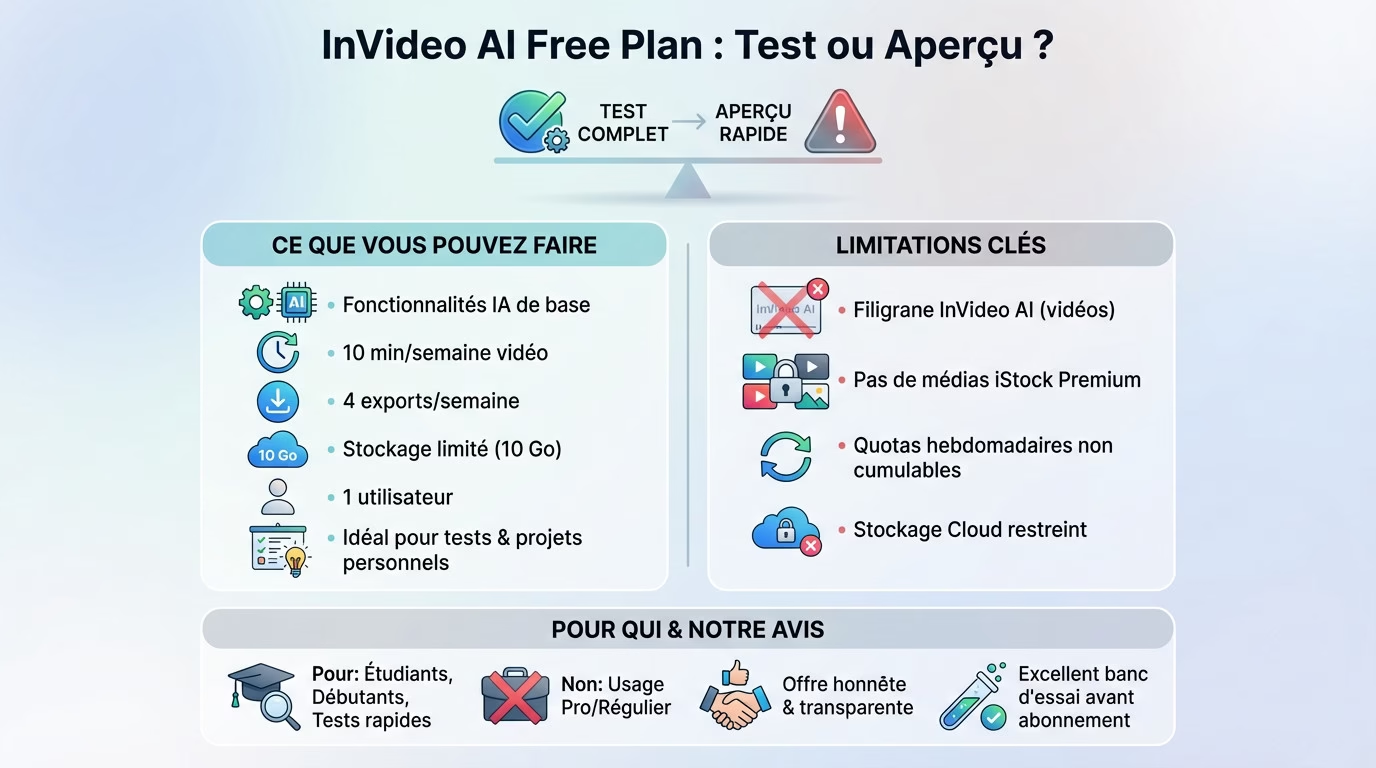
Looking to understand InVideo AI pricing without paying? This free plan is the perfect entry point. It lets you test the basic AI features without ever reaching for your credit card. It’s ideal for getting a first concrete idea.
In terms of resources, you’re allowed 2 minutes of video generation per week and 4 weekly exports. Storage is also limited for your projects. It’s not much, but it’s enough .
Please note that this account is limited to a single user . It’s clearly designed for solo use. It’s suitable for exploration or small personal projects, but not for team collaboration.
Limitations to be aware of before you start
The most noticeable issue is the InVideo AI watermark . It will be present on absolutely all your videos exported using this plan. It’s the unavoidable “price” to pay for using the tool for free.
Access to the media library is also restricted. You won’t be able to use the premium iStock media included in the paid plans. Your choice of images and clips will therefore logically be more limited for your creations .
Also note that your quotas for minutes and exports reset every week. They do not accumulate from one week to the next .
Here is a summary of the main obstacles :
- Watermark imposed on all videos.
- No access to the iStock premium media library.
- Limited generation and export quotas per week.
- Limited cloud storage for your files.
For whom is the free plan really worthwhile?
Are you a student, a beginner creator, or do you just want to quickly test the tool? Then this plan is for you . It’s ideal for a one-off project that isn’t intended for commercial use.
However, for any professional or regular use, the free plan quickly reveals its limitations. The watermark is a major drawback for a serious brand image. You can’t distribute that to a wide audience.
So it’s an excellent technical demo, but not a viable long-term solution . See it as an invitation to upgrade if the tool convinces you.
My opinion on the free InVideo offer
I think InVideo’s free offer is quite fair. It doesn’t hide its limitations and lets you get a real sense of the AI’s power. You know exactly what you’re buying next .
Many alternatives are either more restrictive or don’t offer a free plan at all. InVideo takes a transparent approach here . You can use the interface without paying, which is a good thing.
If you want to delve deeper into the subject, take a look at our full review of InVideo . You’ll find more details there.
My advice? Use this plan as a testbed. Create one or two videos to see if the workflow suits you before considering a paid subscription . That’s its real purpose.
Paid plans for creators: details of the Plus and Max offers
Ready to take your creations to the next level? The Plus plan is the first step to stop tinkering with the limitations of the free plan. Most importantly, this plan removes the annoying watermark from your final videos .
Let’s talk concrete numbers for your workflow. You have 50 minutes of video generation per month and a comfortable pool of 80 AI credits. That’s more than enough to fuel an active YouTube channel or a TikTok account .
Visual quality also takes an immediate leap forward . Your storage space increases to 100 GB to keep your files secure. You also get access to approximately 120 iStock media images per month to illustrate your points with a professional touch.
This plan is clearly designed for a lone wolf. It’s limited to a single user, which makes sense for a freelancer. However, exports are unlimited , so you can redo your edits indefinitely.
The Max subscription: for those who want to take things to the next level
Do you need to produce significantly more content? The Max plan is the natural next step for ambitious creators. It’s designed for those who generate video content intensively and regularly across multiple platforms.
Here, the limits are drastically pushed for professionals. The video generation volume explodes to 200 minutes per month , accompanied by 320 AI credits. This is a whole different ball game; it’s designed for high volume.
Resources naturally follow this increase in power. Storage is quadrupled to reach 400 GB of available data . Access to iStock media becomes very convenient with approximately 480 monthly downloads for your projects.
It also often marks the end of working alone. The Max plan allows you to add multiple users to your account , often two included by default. It’s ideal for a small agency or a creative duo collaborating.
Plus or Max: how to choose according to your needs?
Don’t automatically choose the most expensive plan; it’s pointless. The Plus plan is more than enough if you only create a few videos a week for your social media or blog. It’s the sensible choice for a freelancer.
Aim for the Max plan if video is your main source of income. When you’re managing multiple clients simultaneously, the high production volume of the Max plan quickly becomes an absolute necessity.
Ultimately, just look at your current actual consumption. Ask yourself: “How many minutes of video do I need to generate each month?” This single answer will determine your subscription .
The value for money of these two options
Let’s look at InVideo’s pricing from a purely cost-effective perspective. The Plus plan is very affordable for removing the watermark and accessing professional stock footage. It’s a minimal investment to instantly boost your brand’s credibility .
The Max plan may seem more expensive at first glance. However, the cost per minute generated is mathematically lower. For large volumes, it undeniably offers a better return on investment over time .
We also need to see what the competition is offering today. It’s interesting to see how this pricing compares to other AI video tools on the market. Each tool has its own credit model.
My verdict is quite simple to help you. The Plus plan is the smart buy to get started risk-free. The Max plan is the production tool to scale your business.
Comparison of InVideo AI subscriptions: Plus, Max and Generative
Now that we’ve seen the basic offers, it’s time to put the main subscriptions side by side to clearly visualize what separates them, including the new “Generative” offer.
The comparison chart lets you see everything at a glance
To choose the right plan, nothing beats a direct comparison of technical specifications. Rather than getting lost in lengthy descriptions, this table summarizes everything you need to know about InVideo IA pricing and associated quotas .
| Characteristic | Plan Plus | Plan Max | Generative Plan |
|---|---|---|---|
| Monthly price | approximately $20-25 | approximately $45-50 | approximately $190-200 |
| AI Generation Minutes | 50 min/month | 200 min/month | 800 min/month |
| AI Credits | 80/month | 320/month | 1280/month |
| Users included | 1 | 2 | 5 |
| Cloud storage | 100 GB | 400 GB | 1.6 TB |
| iStock Media | 120/month | 480/month | 1920/month |
| Video exports | Unlimited | Unlimited | Unlimited |
| Watermark | None | None | None |
| Ideal for… | Solo Creators / Freelancers | Small teams / Agencies | Large teams / Intensive production |
The “Generative” plan: for teams and mass production
The “Generative” plan is clearly InVideo’s heavyweight solution . It was designed specifically for content agencies, large companies, or creators who industrialize their video production without wanting to be held back by technology.
What’s striking here is the massive quotas available. With 800 minutes of generation and 1280 AI credits, you reach a volume that means you practically don’t have to worry about monthly limits , even with heavy use.
The other major advantage is the collaborative aspect of the offering. With 5 users included and a massive 1.6 TB of storage, it’s a platform designed for seamless teamwork , where everyone can access projects without overloading the system.
Analysis of key differences: where does the real choice lie?
The fundamental difference between the plans lies primarily in the volume of content generation (minutes and credits). This is the first decision filter: how many videos do you actually need to release each month to make the tool profitable?
The number of users is the second crucial factor that shouldn’t be overlooked. If you work in a team, even a small one, the Plus and Free plans are immediately out of the question because they are limited to a single person.
Ultimately, the choice is quite simple: it depends almost entirely on your production volume and the size of your team . No need to look any further, that’s where the tipping point lies.
Beyond standard plans: Team and Enterprise solutions
The “Team” offer: when collaboration becomes central
The “Team” plan doesn’t just pile up resources. It’s a real solution designed to streamline daily collaborative workflows . It goes far beyond the scope of a simple “Generative” plan. Do you see the difference?
The strength of this offer lies in its complete flexibility . You can easily add seats (users) on demand, beyond the 5 included in the basic package. No more juggling accounts.
Managing a team requires discipline and the right tools. This plan therefore includes team management options to control who has access to what . Security remains the top priority.
The “Enterprise” plan: the tailor-made solution for large organizations
Here, we’re completely moving away from the usual public pricing structures. The Enterprise plan is a customized offer that is negotiated directly with the InVideo team. Everything depends on your specific needs.
The advantages are significant, ensuring video production never stalls. These include unlimited or very high quotas, priority support, and a dedicated manager. Security is also enhanced through SSO.
Your company likely already uses a well-established and reliable software ecosystem. This plan allows you to integrate custom features or connect AI to your existing tools . The interface can even display your branding.
This high-end solution targets a very specific audience : multinational corporations, large media agencies, and institutions with stringent security requirements. Production volumes are often on an industrial scale.
How can I contact InVideo for a personalized quote?
Want to learn more about InVideo AI’s specific pricing? To configure “Team” or “Enterprise” plans, you must use the InVideo sales contact form . This is the only required step.
Don’t contact the team empty-handed; prepare your file . Come prepared with a clear idea: number of users, estimated volume, and security constraints. This greatly speeds up the process.
Please note that this is not an instant purchase by credit card. The process involves discussions with a dedicated sales representative to create the offer. Therefore, you should expect some delay .
Are these advanced plans worth the cost?
Let’s look at the numbers for your organization. For a company with dozens of employees creating video, the cost of an Enterprise plan is often marginal compared to the productivity gains. It’s a worthwhile investment .
It’s not just the final bill that matters. Dedicated support and robust security guarantees are non-negotiable for large corporations. The price paid reflects this peace of mind .
Ultimately, the financial aspect becomes almost secondary. The real question is: “Does it meet our security and volume requirements?” The answer is very often yes .
The crux of the matter: understanding video minutes and AI credits
We’ve talked about minutes and credits, but what does that actually mean? This is the most important point to understand to avoid any unpleasant surprises on your bill .
“AI generation minutes”: the main currency
To fully understand InVideo AI pricing, you need to grasp this basic concept. Every time the AI generates a complete video from a prompt, the duration of that video is directly deducted from your monthly quota .
Let’s take a concrete example to make it clear. If you have a 50-minute plan and you generate a 2-minute video, you have 48 minutes left. It’s as simple as that. That’s the main resource you’re using .
But be aware, there’s a nuance to understand. Modifying an existing video, such as changing a clip or editing the text, generally doesn’t use up any additional minutes. Only the initial generation from a script or prompt is counted .
What are “AI credits” used for: the secondary resource?
AI credits work a little differently than video minutes. They’re used to pay for specific AI actions that aren’t part of generating the entire video. Think of them as an essential supplementary currency .
You will spend them on very specific tasks. For example, generating a script, creating an AI voice-over, or using advanced editing commands can consume credits .
Now that you understand the principle, here’s what draws from this reserve :
- AI-powered script generation .
- Creation of synthetic voice-overs .
- Complex editing commands (e.g., “change the mood of this scene”).
- Adding special effects via a text command .
How to track your consumption in real time?
Don’t panic, you don’t need to keep track manually. InVideo provides a very clear dashboard where you can see your exact usage of minutes and credits to avoid any unpleasant surprises.
Finding this information is quite simple. Generally, it’s visible directly in the account settings (on the “Usage” page) or displayed on the main user interface page.
A little friendly advice for the road. You should make it a habit to check this counter regularly, especially if you have a large production volume, to anticipate a possible overrun .
Optimizing your quotas: best practices to adopt
The first thing to do is refine your prompts before launching the project. A precise prompt from the start prevents you from having to regenerate a video multiple times unnecessarily . This directly saves valuable minutes on your data plan.
Next, learn how to use the manual editor. For small edits like changing music or cutting a clip, it’s better to use the classic editor rather than asking the AI to redo everything each time.
Another key point: carefully consider the final project length. Don’t ask the AI for a 5-minute video if you only need 2. Being precise about the desired length is a simple but effective tip.
Quota management is ultimately a balancing act . AI should be used for what it does best: initial generation and major modifications, while the details should be handled manually.
Managing your budget: what happens if you exceed your quota?
Knowing what you consume is good. But knowing what happens when you consume too much is even better. That’s often where unexpected costs are hidden.
Exceeding the quota: a common situation
An unexpected surge in activity can happen to any creator, even the most organized. An urgent project comes in, a client adds a last-minute request… And just like that, the counter explodes .
In practice, once you reach your quota of minutes or credits, the AI generation features simply stop working . Don’t worry, your projects won’t disappear and nothing will be deleted.
Fortunately, InVideo doesn’t leave the user stuck. The platform offers immediate options to continue working, but be aware that these logically come at a cost that must be anticipated .
The option to upgrade to the higher plan
Need more space? The most common solution is to upgrade your subscription. If you’re feeling cramped on the Plus plan, you can switch to the Max plan at any time from your account.
This is where it gets interesting: InVideo only charges the price difference for the remainder of the current billing cycle. It’s a fair and transparent system that prevents you from paying twice in the same month.
Let’s take a concrete example. If you decide to upgrade right in the middle of the month, you’ll only pay 50% of the difference between the two plans. Your new quotas will then be available immediately so you can resume creating content.
Purchasing add-ons or additional credit packs
For a one-off need, it’s not always necessary to radically change your plan. InVideo sometimes offers additional resource packs for purchase via the “Add-ons” menu in the top right corner of the screen.
It’s simple: you can buy a pack of generation minutes or a pack of AI credits on demand. It’s a flexible solution for managing a surge in activity without committing to a more expensive plan.
The two approaches must be clearly distinguished. Upgrading is cost-effective if your need is recurring monthly. Buying add-ons is a smart strategy for a one-time, exceptional need that won’t happen again.
My advice to avoid unpleasant surprises
Here’s a practical tip for your cash flow: it’s better to choose a plan slightly above your estimated needs . This is safer than having to upgrade in a panic or buy emergency packs.
Analyzing InVideo AI’s pricing, we see that the cost per minute is often more advantageous in the higher-tier plans. Anticipating growth therefore allows for substantial savings .
- To honestly assess one’s production volume .
- Choose the plan that offers a 20-30% safety margin .
- Use the upgrade if needs increase sustainably.
- Reserve add-ons for one-off emergencies.
InVideo AI or InVideo Studio: be careful not to confuse the prices
Two products, two philosophies, two pricing structures
You type some text, and voilà, a video magically appears. That’s the principle behind InVideo AI, the tool that generates all the content from a simple prompt . You speak to it, and it instantly creates the visuals and the script. It’s pure automation.
Conversely, InVideo Studio remains a more traditional online video editor. Here, you start with templates that you must customize yourself element by element. It’s classic manual editing .
Please note that these are two separate products from the same publisher. A subscription to one does not grant access to the other. Their pricing operates independently, without any direct link.
InVideo Studio’s pricing structure: a classic model
Studio subscriptions, often called Business or Unlimited, are easy to understand. There’s also a free version, but it includes an annoying watermark . This is standard practice for this type of software. You know exactly what you’re buying.
The main factor influencing the price is the number of HD exports per month. Access to the premium image library also varies drastically depending on the chosen plan. The same applies to the quota of available iStock media. The more you pay, the more resources you have .
Here, there are no complex calculations with intricate AI “credits.” The system relies on clearly defined limits on functionality and content from the outset. You don’t pay based on processor usage. It’s an older model, but a reassuring one .
In short, it’s the typical pricing of an online video editor like you see everywhere. If you’ve already used Canva or a similar tool, you won’t be lost.
Why are InVideo AI prices different?
The difference lies in the demanding technology under the hood. AI-powered video generation requires enormous computing power to create images and audio. Every minute produced costs InVideo real money in server costs. They need to recoup the investment in those machines .
That’s why the minutes and credits system exists in invideo ia’s pricing. It directly reflects this variable and intensive processing cost. It’s a “pay-as-you-use” model disguised as a monthly subscription.
InVideo Studio, on the other hand, simply provides access to existing editing tools. The marginal cost per user is much lower for the company. That’s the real reason for this difference.
Which to choose: AI or Studio?
Choose InVideo AI if your goal is to produce videos in rapid succession . It’s ideal for effortlessly transforming ideas, blog posts, or scripts into visual content. You don’t want to waste time on technical editing.
Conversely, choose InVideo Studio if you’re a perfectionist. It’s the right choice for maintaining complete control over every cut and starting with highly structured templates. You manage every detail yourself.
The real question is simple: do you want to delegate the creation to an AI or do you want a tool to help you edit it yourself? Your workflow will dictate your budget .
Monthly or annual billing: which is the best option for your budget?
The plan has been chosen. One last decision remains, but it’s a crucial one: should we commit to a one-year plan or keep the flexibility of monthly payments ?
The economic advantage of the annual subscription
The moment of truth has arrived. If you’re looking to optimize your Invideo AI pricing, be aware that the platform rewards loyalty. Like many SaaS software programs, committing to a twelve-month contract unlocks an immediate discount on your overall bill .
Let’s talk concrete figures for your budget. This discount can reach up to 50% of the total price, depending on current offers. It’s simple math: you’re literally getting several months of free use every year.
Why such a gift? It’s simple. InVideo is looking to secure stable revenue and retain its users. In exchange for your long-term trust, they’re slashing prices .
The flexibility of monthly payments: why pay more?
However, paying more per month makes sense. It’s the price of freedom and absolute peace of mind. You retain total control : a single click is all it takes to stop the charges if the tool no longer suits you.
This option targets two specific profiles. First, those working on a one-off project. Second, creators with tight cash flow. No need to spend a large sum all at once; you spread the cost out without breaking the bank .
It’s also insurance against the unexpected. If your video production needs fluctuate or you doubt you’ll be using InVideo in six months, the monthly payment prevents you from paying for a service that’s gathering dust .
My recommended strategy: combine the best of both worlds
Here’s what I advise my clients. Don’t rush into it. Start with a monthly subscription, just for a month or two. Think of it as a full-scale trial period , without the constraints of a long-term commitment.
Take stock after a few weeks. If AI integrates seamlessly into your workflow and you’re producing a lot, then reconsider your approach. Switch to an annual subscription to lock in the advantageous rate for the long term.
This is the most rational method. You limit the risks at the start while leaving yourself the door open to make massive savings once you are certain that the tool is essential to your business.
What happens if you cancel your subscription?
Worried about getting stuck? Don’t panic. If you cancel everything, premium access will continue until the end of your current billing period (monthly or annual). There’s no need to complain; there are no pro-rata refunds for the remaining days .
Once that fateful date has passed, it’s back to square one . Your account is automatically downgraded to the free plan. You lose your AI credits and premium exports.
Good news, your work won’t disappear. Your projects will remain accessible in your library. However, you will be subject to the limitations of the free plan , such as that infamous watermark that cannot be removed from new exports.
Which InVideo AI subscription is right for you?
Are you a little lost in InVideo’s pricing and worried about paying for unnecessary options? That’s normal. 90% of users choose their plan randomly and end up wasting money or getting stuck mid-month. Let’s avoid that. Let’s look together at which plan perfectly matches your production pace so you only spend what you need.
The profile of the solo or freelance creator
Do you manage everything yourself, from the initial idea to the final edit? This profile is perfect for a YouTuber, blogger, or freelance community manager. You produce content for your own networks or for a handful of loyal clients. Here, the goal is to have enough resources without breaking the budget .
For you, the Plus plan is almost always the smartest choice . It offers more than enough content creation to ensure a regular online presence. It’s the perfect balance: neither too limited nor too much for one person.
Why this choice? First, the absence of a watermark is non-negotiable to maintain a professional image. Second, the 50 minutes of monthly video generation allow you to release several clips each week. This is exactly the pace needed to satisfy current algorithms .
The profile of the small agency or SME
Are you a small marketing or communications team of 2 to 5 people? Do you need to manage the company’s social media presence or handle multiple client accounts simultaneously? Collaboration and production volume quickly become major challenges .
In this case, the Max plan is the logical starting point for your business. It’s designed to handle a heavier workload than a solo freelancer. It’s the necessary step to avoid running out of resources by the 15th of the month.
With 200 minutes of generation time and 400 GB of storage, you can manage multiple projects in parallel without feeling constrained. Production bottlenecks are avoided. Team workflow is streamlined because you have the flexibility to iterate and make corrections.
The profile of the “content factory” or the large company
We’re talking about a media agency, a major brand, or a team dedicated to high-volume production . The required volume is enormous, and efficiency must be absolute to meet deadlines. Every minute saved counts, and the technical requirements are specific.
The Generative plan is the bare minimum to get started at this level of demand. But let’s be realistic, it’s very likely that this profile will quickly need to transition to a Team or Enterprise plan . Standard offerings quickly show their limitations when faced with such high demand.
The needs in terms of volume, number of seats for employees, and security exceed those of standard packages. Personalized support and tailored solutions become an absolute necessity. At this scale, it’s no longer a matter of improvisation; it’s about industrializing the process .
And what about occasional users?
Do you just need a video for a birthday or a one-off presentation? Or maybe you simply want to test the tool for fun over a weekend. Your usage is very sporadic , and you don’t intend to become a regular creator.
The simplest advice: the free plan is more than enough to get started. If the watermark is a problem for this one video, get a monthly Plus subscription and cancel it right after exporting . It’s a common trick to get quality without the commitment.
Paying an annual subscription makes no sense for this type of use; you’d just be wasting money. Flexibility is key here. You should only pay when you actually need it and revert to the free version the rest of the time.
Your InVideo AI subscription choice depends solely on your production volume . Start by testing the free version to familiarize yourself with the tool. If you want to remove the watermark, upgrade to the monthly Plus plan . You can always switch to an annual or higher plan as your needs evolve.








Leave a Reply