
Are you wondering if you can really generate high-quality videos without using your credit card? Let’s take a look at what the free invideo AI offer can actually do today. Discover the hidden limitations and tips to avoid wasting your precious credits.
- Free InVideo AI: the direct and straightforward answer
- In practical terms, what can be created with the free offer?
- The main obstacles: watermarking and quota management
- Getting Started with InVideo AI in French: The Practical Guide
- Is the free plan sufficient for your projects?
Free InVideo AI: the direct and straightforward answer
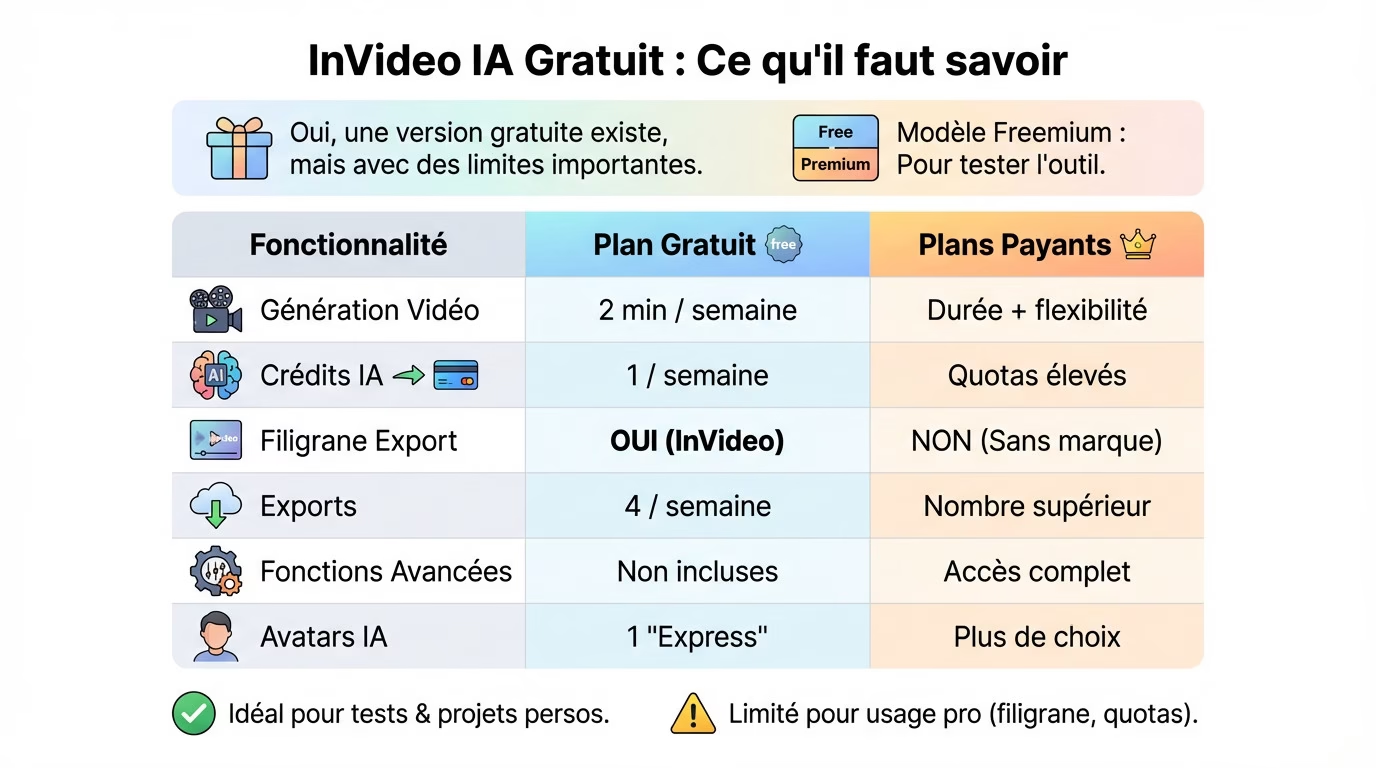
Yes, a free version exists, but…
Looking for a miracle solution for €0? Good news, there is indeed a free plan for InVideo AI. But be warned, don’t dream of total freedom without spending a penny, because the restrictions are very real .
It’s classic “freemium”. The goal is simple: to let you test the machine to understand the concept, not to offer you the complete tool indefinitely .
Here’s the real catch for discerning users. Your videos exported with this plan will display a huge InVideo watermark . That’s the non-negotiable rule of the game: your content will serve as a billboard for the platform.
The “freemium” model analyzed
Why this limitation? The idea is to give you a taste of AI’s capabilities. But advanced generative features and professional rendering remain behind a paywall. That’s the norm in software today.
Don’t get things mixed up. InVideo AI and InVideo Studio are two different things . The free version here specifically targets the AI-powered generation tool and its automated features.
In short, this plan remains perfect for judging the engine’s power. You’ll quickly know if the tool is worth your investment before you reach for your credit card.
Comparison: what the free plan gives you (and what it hides)
Don’t want to read the fine print? This table bluntly summarizes the differences between what you get for free and what is reserved for paying subscribers.
| Functionality | Free InVideo AI Plan | Paid plans (generally) |
|---|---|---|
| Video generation | 2 minutes / week | Longer duration, increased flexibility |
| AI Credits | 1 per week | Significantly higher monthly quotas |
| Watermark for export | Yes, InVideo watermark imposed | No, unbranded videos |
| Number of exports | 4 per week | Higher number of exports |
| Advanced features | Not included | Full access to generative tools |
| AI Avatars | 1 avatar “Express” | More choice and customization |
The verdict depends on your ambition. For tinkering or working on a personal project on the weekend, the free plan might be enough . It’s sufficient for having a little fun without spending any money.
But for serious purposes? Forget it. On YouTube or for a brand, the watermark and ridiculous quotas make the free option unusable . You’ll lose all credibility with a logo forced onto the image.
In practical terms, what can be created with the free offer?
Now that we’ve laid the groundwork, let’s see what these limits mean in practice for a content creator.
Your weekly quotas: AI credits and video minutes
Having one AI credit per week is very little. In practical terms, it means you can only generate one complete video from a prompt. Think carefully about your concept before launching the program so you don’t waste this single credit.
In terms of length, you’re limited to a maximum of 2 minutes per video . That’s the maximum length allowed for your final creation. It’s perfect for an Instagram Short or Reel, but far too short for a standard YouTube video.
In short, this quota is designed for very short formats and quick tests. Don’t expect to launch a serial content production .
The “express” avatar: a limited preview
If you try the free version of InVideo AI, be aware that you only have access to one “Express” avatar. It’s an impressive feature, but you won’t be able to use it excessively here.
This means you have no choice regarding the character, their voice, or their style. It’s a raw technical demonstration, but without the customization that makes the tool truly useful for building a strong visual identity.
The goal is clear: to show you what is technically possible , and then encourage you to explore the options of the paid plans.
The number of exports: a constraint to anticipate
Now let’s talk about the strict limit of 4 exports per week . Keep in mind that each time you finalize and download a video, the counter runs and counts down one export.
This is where things get tricky for perfectionists. You can’t afford to make multiple versions or minor corrections. You have to get it right the first time , otherwise the weekly quota is reached very quickly.
This constraint, combined with the single AI credit, forces you to be extremely efficient . You simply cannot afford to make mistakes in your requests to the AI.
The main obstacles: watermarking and quota management
The InVideo watermark: the permanent guest of your videos
This is the unavoidable trade-off for the free invideo AI offer. A brand logo is superimposed on every video exported with the free plan. You absolutely cannot remove it; it’s the price to pay for free access.
For personal use, it’s still acceptable. But if you want to build a brand image, it’s a real problem. This visual markup directly undermines the professionalism of your final edit and distracts the viewer.
My opinion is clear: for a professional result, this option is not viable . The platform’s branding overshadows your content.
The limits that must not be crossed: what you need to know
Before rushing in headfirst, there are strict rules to know to avoid frustration. Here’s what you can expect in practice:
- The watermark is mandatory : All your videos will bear the InVideo brand.
- Strict weekly quotas : 1 AI generation, 2 minutes of video, 4 exports. That’s all.
- No access to advanced features : The most powerful AI tools are locked.
- A single basic avatar: Forget about customizing your virtual presenter.
These barriers are calibrated to be just annoying enough. The idea is to entice you to make a purchase if you use the tool seriously. It’s the classic freemium mechanism to encourage you to buy .
Please note that canceling a paid subscription will downgrade you to the free plan. Only videos exported during the paid period will remain free of any logo . New creations will once again be subject to the restrictions.
Quotas exhausted? No carryover to the next month.
Here’s a classic trap that wastes resources: quotas are non-returnable . If you don’t use your AI credits or exports in a given week, they’re permanently lost. You lose what you don’t use.
Please note that the counters are automatically reset every week (or every month for paid plans), precisely on the anniversary date of your registration.
It’s a strict “all or nothing” policy. This forces regular use, but completely prevents “storing” credits for a large future project.
Getting Started with InVideo AI in French: The Practical Guide
Create your account and familiarize yourself with the interface
No need to get your credit card out right away. A simple email address is all you need to sign up and get immediate access to the free plan . It’s quick, seamless, and perfect for testing the tool without any commitment.
Worried about the language barrier? Good news, the interface adapts . InVideo AI perfectly understands instructions written in French. So you can describe your project in your own words, without needing a translator.
This is a major advantage that makes video creation accessible to everyone , even if English is not your strong suit.
From idea to video: the steps in the free version
Forget complex editing suites. Here, everything starts with a simple text box where you describe the video you want to create. Just type in your idea to get the ball rolling .
- Describe your video: Write a detailed prompt in French.
- Choose the audience and platform : (e.g., “Young adults”, “YouTube Short”).
- Generate the video: Launch the AI and wait for the first draft .
- Make changes as needed: Use the editor to change scenes, text, or music .
- Export your creation: Finalize the video (which will use one of your 4 exports).
Be precise from the start. The more detailed your initial prompt, the closer the result will be to your expectations , saving you tedious manual revisions.
The tool is powerful, but to master all its intricacies, take a look at our full InVideo review . We explore its features in depth to help you go further.
Exporting your first video (with watermark)
Are you happy with your video? Simply click the “Export” button. The rendering process will then start automatically to compile all the visual and audio elements.
This is where the conditions of the free InVideo AI mode apply. The video will output in standard quality and the InVideo watermark will be overlaid on the image, marking the limit of the free offer.
Once the file is ready, download it to your computer. You can use it freely , as long as the visible logo doesn’t interfere with your audience or your project.
Is the free plan sufficient for your projects?
For whom is the free offer really worthwhile?
If you type “free InVideo AI” into your search bar, be aware that this option is primarily aimed at students and those who are simply curious. It’s the perfect solution for those with a very specific need, such as creating a short, personal, non-commercial video at no cost .
It’s also an excellent way for a content creator or marketer to test the workflow and quality of the AI before considering a subscription. You validate the tool without pressure .
In short, it’s a risk-free entry point to discover the technology and see if it meets your expectations.
When limits become a real obstacle
However, as soon as you have more serious ambitions, the restrictions of the free mode eventually become a problem .
- Need for professionalism: The watermark imposed on the image quickly becomes unacceptable .
- Regular production : With 1 video per week, you won’t get very far.
- Longer videos : The 2-minute limit is a barrier for elaborate formats.
- Brand identity: The lack of avatar personalization is a real obstacle.
For anyone managing a YouTube channel, corporate social media accounts, or creating marketing content, the limitations of the free plan quickly become a major obstacle to productivity and the perceived quality of your work.
Sometimes it is better to turn to more specialized tools, for example for the creation of subtitles, where AI tools like Submagic can be more efficient and less restrictive on this specific point.
The next step: explore the options
If your test is successful but these limitations frustrate you, the logical next step is to explore paid plans. While we won’t go into specific pricing, know that they exist precisely to remove these barriers that stifle your creativity.
These plans remove all the restrictions mentioned: no annoying watermark, more credits, more duration and full access to features .
For those ready to see what this tool is truly capable of, it’s time to delve deeper. To form your own opinion, the best approach is to examine the details. Learn more about Invideo AI or view Invideo AI pricing directly.
In summary, InVideo AI’s free version is ideal for discovering the tool and testing its capabilities at no cost. However, the watermark and limited quotas quickly hinder more serious projects . It’s best to create an account to form your own opinion before considering a paid subscription.






Leave a Reply