
Looking to dive into the world of action cameras without breaking the bank? The GoPro Lit Hero is a great option for beginners. This blog will guide you step-by-step to mastering your camera and capturing stunning footage. We’ll cover how to get started, essential accessories, and some tips for successful videos.
Why is the GoPro Lit Hero a good choice for beginners?
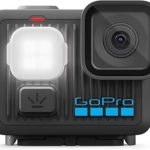
The GoPro Lit Hero , often called the “little sister” of the GoPro line, is an affordable action camera that offers excellent value for money. It’s perfect for those starting out in the world of action video without wanting to invest a large sum of money. Here’s why it’s ideal for beginners:
- Affordable price: Unlike high-end models, the Lit Hero is more financially accessible.
- Ease of use: Its interface is intuitive and easy to learn.
- Durability: Like all GoPros, it is designed to withstand shocks and harsh conditions.
- Decent image quality: Although it doesn’t compete with the latest models, the image quality is sufficient for quality videos on social media or for personal memories.
Getting started with your GoPro Lit Hero: the basics
Getting started with your GoPro Lit Hero is relatively simple. Here are the essential steps to begin:
- Battery charging: Make sure to fully charge the battery before your first use.
- Inserting the microSD card: Insert a Class 10 or UHS-I microSD card. This is where your videos and photos will be stored.
- Powering on and off: Use the power button to turn the camera on and off.
- Menu navigation: Use the buttons to navigate through the menus and settings options.
- Mode selection: Select video, photo or timelapse mode depending on what you want to capture.
- Setting parameters: Explore parameters such as resolution, frame rate, field of view (FOV) and exposure.
- Starting recording: Press the record button to start and stop recording.
Essential settings to get started
Although the GoPro Lit Hero offers automatic settings, it’s helpful to know a few key parameters to optimize your videos:
- Resolution: Choose the resolution according to your needs. 1080p (Full HD) is a good starting point for a good balance between quality and file size. If storage space is limited, opt for 2.7K for more detail.
- Frame rate (FPS): The higher the frame rate, the smoother your slow-motion footage will be. 30fps is sufficient for most situations, but 60fps or more will allow you to create superb slow-motion sequences.
- Field of view (FOV): The field of view defines the width of the viewing angle. “Wide” is ideal for capturing as many elements as possible, while “Medium” or “Linear” provides a more natural rendering.
- Stabilization (if available): Enable stabilization to reduce shaking.
Essential accessories for your GoPro Lit Hero
To get the most out of your GoPro Lit Hero, certain accessories are essential:
- A microSD card: Choose a card with high capacity and good speed for smooth recording.
- An extra battery: Action camera batteries have limited capacity. An extra battery is a must so you never miss a moment.
- A waterproof case: Although the Lit Hero is already waterproof, a case can protect the camera from shocks and deeper immersions.
- A selfie stick (telescopic pole): Ideal for first-person shots and selfies.
- A chest or head harness: For stable shots while moving.
- A tripod: Useful for still shots and timelapses.
Tips for successful GoPro Lit Hero videos
Here are some tips to improve the quality of your videos:
- Framing well: Think about the composition of your shots. Use the rule of thirds for a more aesthetically pleasing framing.
- Prioritize natural light: The quality of light is essential. Avoid filming against the light or in overly dark places.
- Stability: Hold your camera firmly or use an accessory to avoid shaking.
- Experiment with angles: Vary the viewpoints for more dynamic videos.
- Avoid sudden movements: Slow and fluid movements are more pleasant to watch.
- Editing your videos: Editing is essential to give your videos rhythm and remove unnecessary sections. Use free or paid editing software to cut, assemble, and add effects.
- Clean the lens: Regularly wipe the lens with a soft cloth to avoid smudges and fingerprints.
Video editing: the final step
Editing is a crucial step in transforming your footage into an engaging video. Numerous editing software programs are available, ranging from the simplest to the most professional. To get started, you can use free software like GoPro Quik (on mobile and computer) or DaVinci Resolve . These programs allow you to:
- Cut and assemble your sequences.
- Add music and sound effects.
- Adjust the brightness and contrast.
- Add titles and transitions.
Take the time to learn the basics of video editing to give your videos a professional touch.
Examples of situations where you can use your GoPro Lit Hero
The GoPro Lit Hero is ideal for capturing a wide range of activities. Here are a few examples:
- Sports: mountain biking, skiing, snowboarding, surfing, etc.
- Travel: Landscapes, monuments, encounters.
- Outdoor activities: Hiking, camping, etc.
- Family and friends videos: Birthdays, parties, events.
Conclusion
The GoPro Lit Hero is an excellent action camera for beginners. By following these tips and exploring the different features of your camera, you’ll be able to capture high-quality videos and immortalize your favorite moments. Don’t hesitate to experiment, try different settings, and let your creativity flow! The most important thing is to have fun and share your adventures.




Leave a Reply