
Hello world! If you’re here, it’s probably because, like me, you’re a little fed up with videos that make you seasick. You know, that famous “trembling syndrome” that transforms a great vacation memory or a hyper-creative story into an action movie shot during an earthquake.
Fortunately, there’s a solution: smartphone stabilizers. And in this area, one brand has really made a name for itself in recent years: Insta360 with its Flow range.
The thing is, with the arrival of the new models, the Flow 2 and the Flow 2 Pro, the choice has become more complex. So, which one is right for you? The efficient classic? The improved successor? Or the racing beast for pros? We’re going to break it all down together, simply, without fuss. Let’s go!

🎥 The Insta360 Flow: the foundation, but a solid foundation!
Let’s start with the essentials: the first Insta360 Flow . When it was released, it definitely made waves. Ultra-compact, well-designed, and ready to use in seconds—it’s a stabilizer designed for those who want to film without the hassle.
Its biggest selling point? Its all-in-one concept : 3-axis stabilizer, selfie stick , and integrated tripod . No need to screw or lug around accessories, everything is already there, discreet and efficient. In terms of features, it includes Deep Track 3.0 intelligent tracking , which automatically follows a moving subject, even in conditions that are not always easy.
🎯 Who is it for? Beginners, casual travelers, or content creators on TikTok and Instagram who want a simple, stable, and easy-to-take tool.
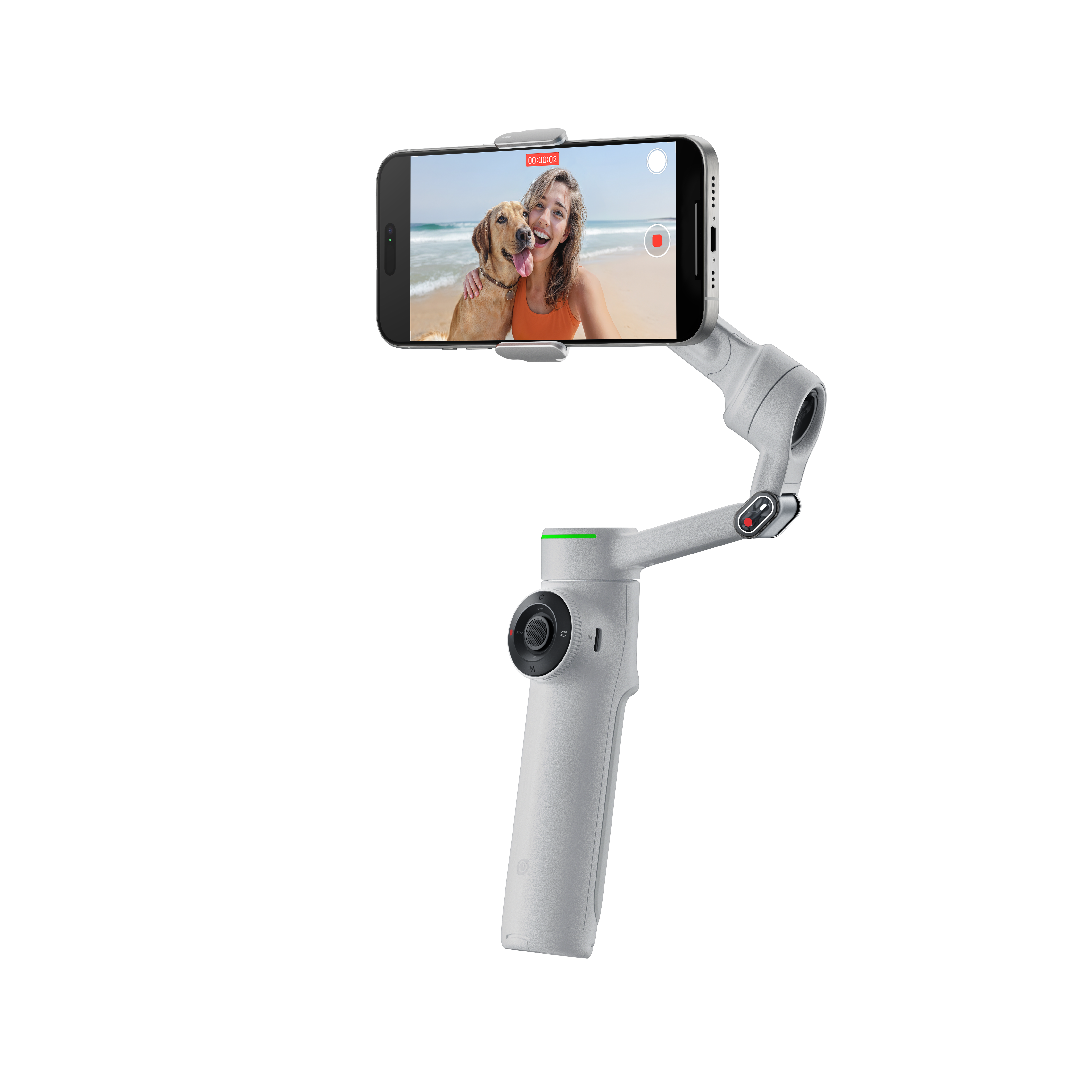
🚀 The Insta360 Flow 2: a well-thought-out upgrade
The Flow 2 is the improved version of the original model. No revolution, but a smart evolution that ticks all the right boxes.
On the program:
- Reinforced motors to support heavier and larger smartphones,
- Even more powerful Deep Track 4.0 tracking : it can follow multiple people on screen or stay attached to a subject even if it briefly passes behind an obstacle,
- A design that is still as compact as ever with integrated pole and tripod ,
- And some user-friendliness optimizations (better battery life, faster launch, improved compatibility with Android).
🎯 Who’s it for? Regular creators who want a stabilizer that’s more robust, smarter, and can keep up without overloading their setup.
🎬 The Insta360 Flow 2 Pro: the ultimate version, without compromise
With the Flow 2 Pro , we’re clearly entering the “pro” category. Everything has been designed for those who want to push their smartphone to its creative limits.
Among the new features:
- A physical wheel for ultra-precise control of zoom or focus – a real plus for dynamic shots or cinematic effects,
- Deep Track 4.0 AI tracking in its fastest version yet,
- Free tilt mode for even more creative movements,
- A built-in tracking light , super practical in low-light environments,
- A partially transparent design that adds a premium aesthetic touch.
🎯 Who is it for? For demanding creators, professional videographers, or enthusiasts who want the best of Insta360 technology, without compromising on quality, precision, or freedom of movement.
Comparison Chart: Key Features at a Glance
To get a clearer picture, there’s nothing like a good old-fashioned painting. Here’s what really sets the three models apart.
| Characteristic | Insta360 Flow 2 | Insta360 Flow 2 Pro | Insta360 Flow Pro |
| Positioning | Entry level | Lighthouse (high-end) | Mid-range |
| 3-axis stabilization | ✅ | ✅ | ✅ |
| Active Zoom Tracking | ✅ | ✅ | ❌ |
| Tracking multiple people | ✅ | ✅ | ❌ (not indicated) |
| 360° panoramic tracking | ❌ | ✅ | ✅ |
| Deep Track AI Tracking | Deep Track 4.0 | Deep Track 4.0 (faster) | Deep Track 3.0 |
| Free tilt mode | ❌ | ✅ | ❌ (not indicated) |
| Selfie mirror | ❌ | ✅ | ❌ |
| Tracking light | ❌ | ✅ | ✅ |
| One-touch connection | ✅ | ✅ | ✅ |
| Transparent engine design | ❌ | ✅ | ❌ |
| Remote control via smartphone | ✅ | ✅ | ❌ (not indicated) |
| Quick Start (Android) | ✅ | ✅ | ❌ (not indicated) |
| SmartWheel (touch) | ✅ (with button control) | ✅(physical zoom/focus wheel) | ❌ |
| Integrated selfie stick & tripod | ✅ | ✅ | ✅ |
| AI Mobile Editing Suite | ✅ | ✅ | ✅ |
So, which one is right for you? My verdict
The choice really depends on your usage and budget.
– Get the Insta360 Flow if you want flawless results for your memories and social media, without breaking the bank. It’s the best value for money for 90% of people.
– Opt for the Insta360 Flow 2 if you create content regularly, have a recent and heavy smartphone, and want a little more comfort and performance, especially on tracking.
– Go for the Insta360 Flow 2 Pro if audio quality is as important to you as image quality, and if you need precise manual controls. It’s an investment, but one that can truly professionalize your productions.

Frequently Asked Questions (FAQs)
Is my phone compatible with these stabilizers?
In general, Insta360 ensures broad compatibility with most iPhone and Android models. The most important thing to check is the weight and dimensions of your phone. For the iPhone 2 and iPhone 2 Pro, compatibility with heavier phones is improved. A quick visit to the official Insta360 website before purchasing is always a good idea!
Can I use the Mic Air with the Flow or Flow 2/Flow 2 Pro?
Yes, it is possible, but the Mic Air does not connect directly to the stabilizer . To use it, you will need to connect the Mic Air receiver to your smartphone , then attach the transmitter to you (using the clip, magnet or pendant).
🎤 The sound is picked up by the Mic Air and transmitted wirelessly to the receiver, which records via the phone’s microphone.
👉 It works, but requires some setup, and the whole thing may be less balanced when using the stabilizer.

Is the Insta360 app required to use the gimbal?
You can use the stabilizer for its basic function (stabilizing) without the app. But to access all the magical features like AI tracking, creative shooting modes (Dolly Zoom, Time-lapse…), the app is essential. And honestly, that’s 50% of the product’s appeal!
What is the real autonomy?
Insta360 generally advertises very comfortable battery life, around 10-12 hours. In practice, this depends on the intensity of your use (movement, phone weight, etc.). But even with intensive use, you should be able to get through a good day of filming without any problems.
I hope this comparison has helped you see things more clearly! Whatever your choice, you are entering a world where shaky videos no longer exist. So, ready to stabilize your creations? Don’t hesitate to ask your questions in the comments if you have any others
Publications similaires :
 Insta360 Flow 2 Pro vs DJI Osmo Mobile 6: Which is the best smartphone stabilizer for you?
 Meet the Insta360 Flow 2 Pro AI tracker: optimized tracking for Android and all your content
 Which Insta360 camera should you choose? GO 3S, Ace Pro 2, X4, or Flow 2 Pro?
 Insta360 Spring Offers: Up to €180 off 360 and action cameras!


Leave a Reply