
If you regularly create videos for TikTok, Instagram Reels or YouTube Shorts, you know how time-consuming editing can be… That’s where Submagic comes in. This AI-powered video editing tool has become a must-have for over 500,000 creators worldwide. Thanks to its automated features (dynamic subtitles, visual effects, intelligent cuts…), you can transform raw video into impactful content in just a few clicks.
And the good news? Submagic now offers ultra-advantageous annual rates , with up to 41% discount depending on the chosen plan. Whether you are a beginner or an experienced creator, there is a plan to suit your workflow.
👉 Try Submagic now and simplify your video editing! 🎁 Enjoy an extra 10% off all subscriptions with my promo code CREATE10 🔗 https://submagic.co/?via=guillaume25
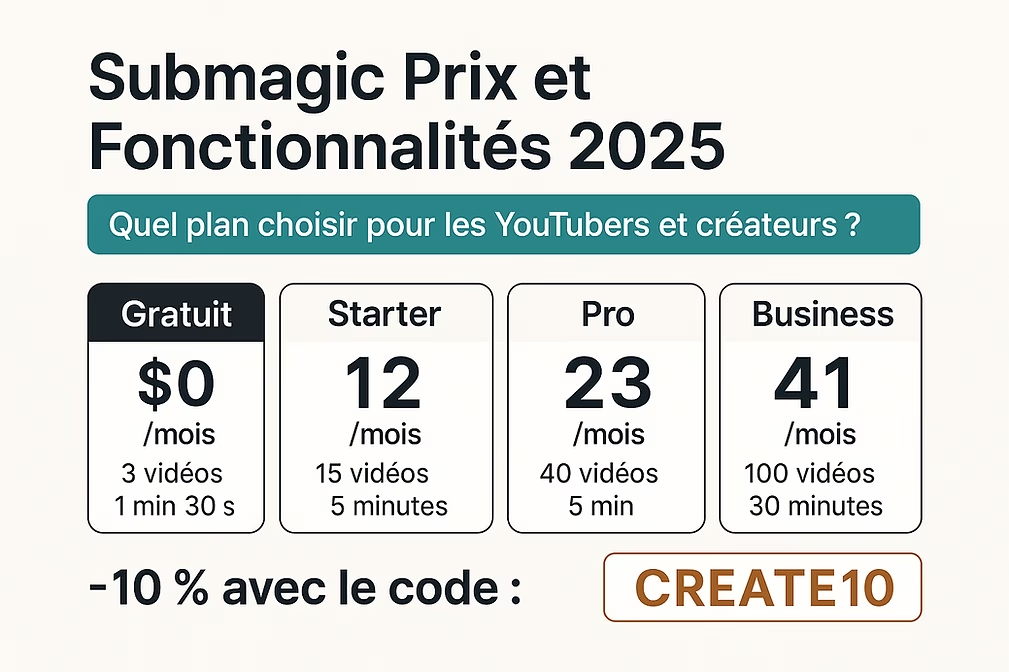
🆓 Submagic Free Trial: Try it out with no commitment
Before committing to a subscription, Submagic offers a free version that’s ideal for discovering the tool without using your credit card. It allows you to create up to 3 videos per month , with a maximum duration of 1 minute 30 seconds and a file size of 200 MB .
Despite this limitation, the essential elements are there:
- Automatically generated subtitles (98.8% accuracy)
- Text-based segmentation with whitespace removal
- Adding images, GIFs, and sound effects
- Export in 1080p (with watermark)
This is a good starting point to test the interface, edit your first clips and evaluate the impact of stylized videos on your networks. But to create regular and unconstrained content, it is better to switch to a paid offer.
💼 Submagic price comparison (billed yearly)
Submagic offers 4 main plans (excluding the free version), all with annual billing at a reduced price. Here is a clear table to help you see things more clearly:
| 🧾 Plan | 💸 Price/month | 🎞️ Videos/month | ⏱️ Maximum duration | 📽️ Quality | 👥 Team | ✂️ Magic Clips |
| Free | $0 | 3 | 1 min 30 sec | 1080p (with watermark) | 1 user | No |
| Choke | $12 | 15 | 2 min | 1080p / 30 FPS | 1 user | +$12 |
| Pro | $23 | 40 | 5 min | 1080p / 30 FPS | up to 3 | +$12 |
| Business | $41 | 100 | 30 min | 4K / 60 FPS | up to 5 | +$12 |
| Business | Price upon request | Unlimited | Unlimited | 4K+ / priority support | Unlimited | Custom made |
👉 All shots are watermark-free, with AI subtitles, text editing, b-rolls, GIFs, royalty-free music, etc.
🧪 Starter – $12/month: Ideal for solo creators
The Starter plan is the perfect entry point for creators who want to publish regularly without blowing their budget. For just $12 per month (billed annually), you get access to watermark-free editing , with a comfortable quota of 15 videos/month with a maximum duration of 2 minutes .
Here’s what you get:
- Export in 1080p at 30 FPS
- Automatic subtitles with manual editing option
- Intelligent video segmentation based on text
- Adding royalty-free GIFs, images and music
- Dynamic zoom effects for a professional look in one click
💡 Bonus : You can add the Magic Clips add-on for +$12/month, which allows you to automatically create viral shorts from long videos. Perfect if you’re filming interviews, podcasts or live streams and want to effortlessly extract the best moments.
🎁 Don’t forget to use promo code CREATE10 to get an extra 10% off your Starter subscription. 🔗 https://submagic.co/?via=guillaume25
🚀 Submagic Price: Pro – $23/month: The preferred plan for YouTube & TikTok creators
With 82% of users choosing it, the Pro plan is clearly Submagic’s best-seller. At $23/month per user (billed annually), it offers excellent value for money for ambitious content creators.
You get all the features of the Starter plan, plus powerful advanced tools to enhance your videos:
- Up to 40 videos per month , with a maximum duration of 5 minutes each.
- Up to 3 members per team
- Trendy animated subtitles , customizable with your colors, fonts and style
- Automatic removal of silences and failed sequences
- AI-generated impactful “hooks” (catchy headlines that grab attention from the very first second)
- Audio improvement : clean sound, without background noise
- Access to the Storyblocks premium library (videos and music)
And of course, you can add the Magic Clips add-on for an extra $12 per month: from a long video, Submagic automatically generates several short, stylized clips optimized for TikTok, Shorts or Reels.
💡 If you publish several times a week and want to increase efficiency, this is clearly the plan to choose .
🎁 Remember to use the code CREATE10 to enjoy a 10% discount on the Pro plan.
🔗 https://submagic.co/?via=guillaume25
🏢 Submagic Business Pricing – $41/month: For teams that produce on a high-volume basis
Submagic’s Business plan is aimed at agencies , startups , or creative teams that publish a large amount of content. At $41/month per user (billed yearly), you take things to the next level with a collaborative tool designed for mass production and maximum quality.
Here’s everything this plan offers you:
- 100 videos per member per month , up to 30 minutes each
- Export in 4K at 60 FPS for a professional look, even on a large screen
- Up to 5 members in your workspace
- Priority support and accelerated turnaround time
- Creation of 5 custom templates to harmonize your graphic charter
- Integrating brand logos into your videos
- Customizable word dictionary to improve the reliability of subtitles (brands, first names, professional jargon)
As with other plans, you can add the Magic Clips add-on (+$12/month) to generate dozens of shorts from a single webinar or long video with one click. Extremely practical for marketing teams!
🎁 Don’t forget that you also benefit from a 10% discount with the promo code CREATE10 on this Business plan.
🔗 https://submagic.co/?via=guillaume25
🧑💼 Submagic Enterprise Pricing – Tailored for demanding organizations
If you work in a large company , a video production agency or a media group , Submagic’s Enterprise plan is for you. Here, everything is customizable : number of users, video length, production volume, support, and more.
With this plan, you benefit from all the features of the previous offers , but with the following additions:
- Unlimited number of videos per month
- Customizable duration (beyond 30 minutes)
- Custom number of users
- Unlimited subtitle styles
- Customizable Magic Clip boundaries
- Dedicated support with Customer Success Manager
- Payment by invoice
The goal? To offer a professional, tailor-made solution for organizations that produce content at high frequency, across multiple channels, with high quality requirements.
👉 To find out more or book a demo, simply contact the Submagic team via their website.
🔗 https://submagic.co/?via=guillaume25
✂️ Should I get the Magic Clips add-on?
This is Submagic’s star feature , the one that can literally change your workflow if you work from long videos such as interviews, podcasts, training sessions, or live streams.
Magic Clips is an optional add-on at $12/month , compatible with Starter, Pro and Business plans. It allows AI to:
- Automatically detect the best moments in your long videos
- Generate multiple short clips optimized for TikTok, Reels, and Shorts
- Automatically apply vertical cropping
- Add animated subtitles , dynamic effects, transitions, and tagline text
💡 Result: in one click, you get 5, 10 or even 20 perfectly edited excerpts, ready to be published. This will multiply your visibility by 10 , as promised by the Submagic team.
This module is particularly powerful for regular content creators or those who want to recycle their existing content on vertical platforms.
🎁 Quick reminder: the promo code CREATE10 also works for Magic Clips if you add it to your subscription!
🔗 https://submagic.co/?via=guillaume25
🧐 Our opinion – Which Submagic plan should you choose?
Faced with the various offers and options like Magic Clips, you are probably wondering which is the best plan for you . Here is our recommendation based on your profile:
| 🎯 Objective | 💡 Recommended plan |
| Try the platform without obligation | Free – 3 videos to try |
| Get started on TikTok, Reels or Shorts | Starter – Affordable, effective |
| Publish several times a week | Pro + Magic Clips – Winning Combo |
| Working in a team or agency | Business – Collaboration & 4K |
| High-volume organization or production | Business – 100% customized |
👉 If you are a regular creator, the Pro plan with the Magic Clips option is by far the most interesting. It allows you to quickly create tons of stylish and optimized content for social networks, with a very professional look.
🎁 And don’t forget: whatever your plan, the promo code CREATE10 gives you an immediate 10% discount !
🔗 https://submagic.co/?via=guillaume25
✅ Conclusion
Submagic is much more than just a subtitling tool: it’s a true AI-assisted video production powerhouse , designed for modern creators. Whether you’re just starting out or managing a production team, there’s a Submagic plan to suit your pace, needs, and budget .
And with the annual discount of up to 41% + an extra 10% with the code CREATE10 , it’s clearly the right time to get started.
🎬 Ready to try Submagic? Click here to start with a free trial or activate your preferred plan.
👉 https://submagic.co/?via=guillaume25
❓ FAQ – Submagic Pricing and Features
💸 Is Submagic free?
Yes ! The free version allows you to test the tool with 3 videos/month (1 min 30 max), in 1080p with watermark.
📈 What is the difference between Starter and Pro?
The Pro plan offers more videos/month, stylized subtitles, AI-generated hooks, pro audio, and a premium library.
🎞️ What is Magic Clips used for?
It’s an add-on that allows you to automatically generate several short clips from a long video. Ideal for effortlessly creating viral content.
📆 Can I change or cancel my subscription?
Yes, the subscriptions are commitment-free and you can change your plan at any time.
🎁 Does the promo code work on all plans?
Yes ! The code CREATE10 gives you a 10% discount on all Submagic subscriptions, including Magic Clips.








Leave a Reply